Beam Drive Car Crash Test

Played 53 times.
5.0 (1 Reviews)
Developer: GameVoda
Published on: April 2026
Updated on: April 2026
Game technology: html5
Game rating: 5.0
Platforms: Desktop, Mobile, Tablet

Introduction to Beam Drive Car Crash Test

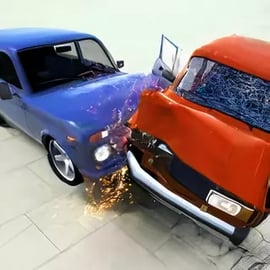
Beam Drive Car Crash Test is a high-impact, browser-based driving game that lets you unleash total metal mayhem in a safe, virtual environment. It blends a realistic car crash simulator with a free-roam playground, so you can send vehicles off mega ramps, slam into obstacles, and watch the bodywork crumple in glorious detail.

Inspired by soft-body physics titles like BeamNG.drive, this soft body car physics game focuses less on lap times and more on spectacular wrecks. Every collision bends frames, shatters glass, and rips off doors based on how and where you hit. It's a full vehicle destruction sandbox that runs right inside your browser—no downloads, no sign-ups, just click and crash.

Because it's designed as a browser driving crash game, Beam Drive Car Crash Test is great for short sessions or long experimentation marathons. Kids, teens, and adults can all enjoy its exaggerated crashes and cartoony chaos without any graphic gore. If you love tinkering with physics, trying ridiculous stunts, or simply watching slow-motion pileups, this online crash test simulator is built for you.

Beam Drive Car Crash Test Control Guide

Beam Drive Car Crash Test keeps controls simple so you can focus on driving, crashing, and experimenting with the physics instead of learning complex keybinds. Exact controls can vary slightly depending on the site you're playing on, but these are the most common layouts.

PC Keyboard Controls

  • W / Up Arrow – Accelerate and move forward.
  • S / Down Arrow – Brake or reverse.
  • A / Left Arrow – Steer left.
  • D / Right Arrow – Steer right.
  • Spacebar – Handbrake for sharp slides and spins.
  • C – Switch camera views (chase cam, cockpit-style, distant view).
  • Right Mouse Button + Move – Rotate the camera freely around your car.
  • R (where available) – Reset or respawn your car after a big crash.

These responsive inputs make it easy to line up jumps, drift into barriers, or thread your car through tight obstacles before inevitably smashing it to pieces.

Mobile & Tablet Touch Controls

On touch devices, Beam Drive Car Crash Test typically offers an on-screen interface:

  • Virtual steering buttons or a steering wheel on the left or right side.
  • Gas and brake pedals as large touch buttons, often at the bottom corners of the screen.
  • A dedicated handbrake button for quick spins and drift entries.
  • Tap icons to change camera or reset your car.

The UI is designed so you can play this realistic car crash simulator with just your thumbs, making it ideal for quick sessions on your phone or tablet.

Beam Drive Car Crash Test Features

What makes Beam Drive Car Crash Test stand out among driving and simulation titles is how it combines soft-body physics, open-ended play, and accessibility. Here are the key features that define the experience.

Realistic Soft-Body Damage System

  • Deformable car bodies that bend, twist, and crumple based on impact angle and speed.
  • Breakable parts such as bumpers, doors, hoods, and wheels that can detach during big hits.
  • Visual feedback that helps you see where your vehicle is weakest after each crash.

This soft-body system is the heart of the realistic car crash simulator experience. It encourages you to keep experimenting with bigger jumps and crazier collisions to see what happens.

Vehicle Destruction Sandbox Gameplay

  • Open environments packed with ramps, loops, obstacles, and barriers.
  • Freedom to drive, crash, and reset at your own pace—no strict missions required.
  • Plenty of room for user-created challenges, like "how far can I launch this truck?" or "what happens if I hit the train at full speed?"

If you enjoy free-form play, Beam Drive Car Crash Test is more of a vehicle destruction sandbox than a traditional racing game. You set the objectives, and the physics deliver the entertainment.

Diverse Vehicle Selection

While the roster can vary from platform to platform, you can usually expect:

  • Everyday sedans and hatchbacks that crumple easily but handle predictably.
  • Sports cars and supercars that reach higher speeds for more dramatic wrecks.
  • Pickup trucks and SUVs that feel heavier and survive certain impacts longer.
  • Occasional futuristic or parody vehicles, like cyber-style trucks or boxy retro rides.

Each vehicle responds differently in this soft body car physics game, so half the fun is finding out which car gives you the most satisfying destruction.

Instant Browser Play

  • No downloads or installations—play directly in your web browser.
  • Compatible with modern browsers like Chrome, Edge, Firefox, and Safari.
  • Runs on a wide range of hardware, from gaming PCs to entry-level laptops and mobile devices.

Because it's an online crash test simulator, you can jump in for a few quick crashes during a break or spend an entire evening perfecting your dream stunt line.

Experience Realistic Soft-Body Car Crash Physics Online

The main attraction of Beam Drive Car Crash Test is how convincingly cars deform when pushed beyond their limits. Unlike basic arcade titles where vehicles bounce off walls unharmed, this game uses a physics-driven damage model.

When you collide with an obstacle, the impact forces are distributed across the frame. Hit a barrier head-on at full speed, and you'll see the front crush inward while the windshield fractures. Clip a concrete block at an angle, and the car might spin, roll, or shear off a wheel. Every run feels a little different because every impact is simulated in real time.

This level of detail gives the game a realistic car crash simulator feel without being overly technical or intimidating. You don't need to understand engineering to appreciate the spectacle—just press the gas pedal, aim at something solid, and watch what happens.

For players curious about how crashes behave at different speeds or angles, this soft body car physics game also doubles as a fun, visual learning tool. You can:

  • Compare low-speed bumps with high-speed collisions.
  • See how rollovers differ from frontal impacts.
  • Experiment with side hits, jumps, and multi-vehicle pileups.

All of this unfolds in a bloodless, cartoon-style environment that keeps the focus on the cars, not the passengers, making it suitable for a wide age range.

Tips for Performing Extreme Stunts and Epic Vehicle Wrecks

Once you're comfortable with the controls, you'll want to maximize the chaos. Here are practical tips to create bigger, more satisfying crashes in this browser driving crash game.

Use Ramps for Maximum Air Time

  • Approach large ramps in a straight line to avoid spinning off the side.
  • Build up as much speed as your car can handle, then hit the ramp dead center.
  • Try different takeoff angles to produce front flips, backflips, or barrel rolls.

Longer air time usually means more dramatic landings and more surfaces of the car getting damaged.

Play With Speed and Angle

  • Lower-speed crashes often bend bumpers and dent doors.
  • High-speed collisions can fold an entire car in half or send it tumbling.
  • Hitting obstacles at an angle can lead to spin-outs and rollovers, spreading damage across multiple panels.

Don't always aim straight at a wall; experiment with glancing hits and side impacts for more variety.

Use the Handbrake for Style

  • Tap the handbrake just before a corner to initiate a drift.
  • Spin the car 180 or 360 degrees and collide backwards or sideways for different damage patterns.
  • Combine handbrake drifts with ramps to create wild, twisting jumps.

Reset Often and Compare Results

Because this is a true vehicle destruction sandbox, there's no penalty for crashing. Use the reset function frequently to:

  • Run the same stunt multiple times with slight tweaks.
  • Swap vehicles mid-session and see how each one handles the same obstacle.
  • Challenge friends or siblings to create the most impressive wreck on a given ramp or track.

Best Cars and Tracks for Maximum Destruction Fun

Not all combinations of cars and environments break in the same way. To get the most enjoyment out of this online crash test simulator, it helps to match the right vehicle to the right scenario.

Ideal Cars for Huge Crashes

  • Lightweight sports cars – They reach high speeds quickly and tend to crumple dramatically on impact, making them perfect for long jumps and hard landings.
  • Heavy trucks and SUVs – These vehicles feel more durable, so they're great for plowing through multiple obstacles or testing how much abuse a frame can take.
  • Retro compacts and sedans – Their boxy shapes often lead to funny-looking deformations and unexpected flips.

As you experiment, pay attention to how each vehicle reacts. Some might understeer into barriers more easily, while others spin out at the slightest nudge—both can be useful when your goal is pure chaos.

Tracks and Zones That Deliver Big Wrecks

Beam Drive Car Crash Test usually includes multiple arenas or zones designed for different types of play:

  • Mega ramp areas for long-distance jumps and high-speed nose-dives.
  • Urban or industrial zones filled with poles, walls, containers, and traffic-style obstacles.
  • Off-road sections with bumps, dips, and uneven ground that can trigger rollovers at lower speeds.
  • Rail or moving hazard sections (where available) that let you time collisions with trains or other moving objects.

For maximum destruction, choose a fast car, head to a ramp-heavy area, and experiment with different paths that chain multiple obstacles together.

How to Play Beam Drive Car Crash Test on Mobile and PC

Because this is a browser-based experience, getting started is quick and painless on both desktop and mobile.

Playing on PC or Laptop

  1. Open a modern web browser such as Chrome, Edge, Firefox, or Safari.
  2. Navigate to your favorite browser gaming platform that hosts Beam Drive Car Crash Test.
  3. Click the Play button and wait for the game to load in your browser tab.
  4. Follow any on-screen prompts (such as allowing the page to run WebGL or hardware acceleration).
  5. Use your keyboard controls to start driving, crashing, and resetting.

For smoother performance, keep unnecessary tabs closed and make sure your graphics drivers are reasonably up to date.

Playing on Mobile Phones and Tablets

  1. Open the browser on your Android or iOS device.
  2. Visit the gaming site that offers Beam Drive Car Crash Test.
  3. Tap Play and allow the game to load—this may take slightly longer on older devices.
  4. Use the touchscreen controls that appear on the game interface to steer and accelerate.

For the best experience on mobile:

  • Turn your device to landscape orientation for a wider view of the track and ramps.
  • Close background apps to free up memory and processing power.
  • Connect to a stable Wi-Fi network if your mobile data is slow.

Where to Play Beam Drive Car Crash Test

Beam Drive Car Crash Test is typically available on popular browser-based gaming portals that feature driving, simulation, and action titles. Because versions and branding can differ slightly from site to site, look for games labeled with keywords such as:

  • Beam Drive Car Crash Test
  • car crash test simulator
  • soft body car physics game
  • vehicle destruction sandbox

To ensure the best and safest experience:

  • Use trusted gaming platforms that curate family-friendly content.
  • Avoid sites that ask you to download extra software just to play; the game should run directly in your browser.
  • Bookmark your favorite portal so you can hop back into this browser driving crash game anytime.

Safety & Content for Beam Drive Car Crash Test

Beam Drive Car Crash Test is designed to be family-friendly despite its focus on vehicle destruction. The emphasis is on physics and car damage, not on people or graphic injury.

  • No visible characters are harmed; crashes focus purely on the vehicles.
  • Damage is represented through bent metal, broken glass, and falling parts, without gore.
  • The visual style leans toward arcade-like, exaggerated crashes, making it more playful than disturbing.

As with many free online games, some platforms may display third-party advertisements around or before the game. For younger players, parents may wish to:

  • Enable ad blockers where appropriate and permitted.
  • Use child profiles or safe browsing modes in their browser or operating system.
  • Supervise play sessions and help kids understand the difference between real-world safety and virtual experimentation.

Overall, as long as it's accessed through reputable sites, Beam Drive Car Crash Test is a safe, entertaining way to explore car crashes and stunt driving without real-world risk.

Performance & Troubleshooting

Because Beam Drive Car Crash Test relies on physics calculations and 3D graphics, it can be demanding on older or low-power devices. If you run into lag or performance issues, try the following steps.

Improve Performance on PC

  • Close extra tabs and applications that are using CPU, GPU, or memory.
  • Make sure your browser is updated to the latest version.
  • In your browser settings, enable hardware acceleration if it's turned off.
  • Lower the game's graphics quality if a settings menu is available (reduce shadows, reflections, or resolution).
  • Try a different browser; some users see better performance in Chrome or Edge compared to others.

Improve Performance on Mobile

  • Close background apps, especially games or video streaming services.
  • Switch from mobile data to a fast, reliable Wi-Fi connection.
  • Reduce screen brightness slightly to lower device temperature during long sessions.
  • If your device is very warm, take a short break so performance can recover.

Common Issues & Fixes

  • Game not loading – Refresh the page, clear browser cache, or try another browser.
  • Controls not responding – Click directly inside the game frame to give it focus, then test keys again.
  • No sound – Check the in-game audio options, system volume, and browser tab mute settings.

With a few quick tweaks, most players can enjoy this realistic car crash simulator smoothly, even on modest hardware.


FAQ

What is Beam Drive Car Crash Test?

A: Beam Drive Car Crash Test is a free browser driving simulator where you can crash, smash, and test cars using realistic soft-body physics and damage effects.

Is Beam Drive Car Crash Test free to play?

A: Yes, the game is free to play in your browser. You do not need to download anything or create an account to start driving and crashing cars.

Can I play Beam Drive Car Crash Test on mobile?

A: Yes. Beam Drive Car Crash Test runs in most modern mobile browsers and offers touch-friendly on-screen controls for phones and tablets.

Is Beam Drive Car Crash Test suitable for kids?

A: The game features non-gory vehicle damage and cartoon-style crashes, making it generally suitable for older kids and families, but parents should decide based on their child.

Do I need a powerful PC to run Beam Drive Car Crash Test?

A: No. Because it is a browser game, it is optimized to run on a wide range of devices. Using a modern browser and a stable internet connection will give the best experience.


×

Report Game