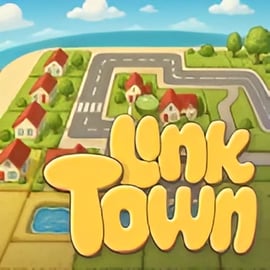
Overview of Link Town
Link Town is a relaxing yet strategic online city building game you can play right in your browser. It blends the satisfying feel of a family board-style game with the planning challenge of a tile laying puzzle game. Every turn, you place tiles to grow a cozy town, connect roads, and balance homes, shops, and services so your little community can thrive.
Unlike complex simulation titles packed with menus, Link Town focuses on clear, visual decisions. You drag and drop tiles onto a grid and instantly see how your choices affect your town’s layout. The result is a cozy town builder that’s easy for new players, but deep enough to keep strategy fans hooked as they try to optimize every square.
Because it runs in a browser, Link Town is perfect for quick breaks, classroom sessions, or relaxed family nights. There’s no huge download, and no steep learning curve—just straightforward browser strategy building that rewards careful planning and clever links between tiles.
How to Play Link Town
Link Town plays like a digital tabletop game, with a simple turn-by-turn flow that anyone familiar with board games will recognize. Here’s a basic rundown of how a typical session works.
- 1. Start with a small town square – You begin with a few starter tiles already placed: usually a Town Hall, a couple of roads, and some empty land. This gives you an anchor point to expand from.
- 2. Draw or select tiles – Each turn, you’re given one or more random tiles: houses, shops, parks, roads, or special buildings. In classic tile laying puzzle game fashion, you must decide where each tile fits best.
- 3. Place tiles to connect your town – Drag a tile onto the board and rotate it if needed. Roads must line up, and some tiles score bonuses when placed next to specific neighbors (for example, homes near parks or shops on busy intersections).
- 4. Earn points from smart connections – The game rewards you for creating continuous roads, shared districts, and balanced neighborhoods. A row of houses with no services won’t do as well as a mix of homes, shops, and parks all linked by accessible streets.
- 5. Manage limited space – The map is finite. As in the best browser strategy building games, space is your most precious resource. You’ll quickly realize every tile placement matters.
- 6. Grow until the board is full or goals are met – Depending on mode, you might play until the grid is filled, until you run out of tiles, or until you complete a set of planning objectives (such as building a commercial hub or linking all neighborhoods).
Because Link Town is designed as a family board-style game, turns are snappy and visual feedback is instant. You’ll see new roads connect, districts form, and scores pop up as soon as you place each tile, which makes it easy for kids and adults alike to understand what worked and what didn’t.
Link Town Features
Link Town is built around accessible depth—simple rules paired with a surprising amount of strategy. Here are some of the standout features that define this cozy town builder.
- Board game-inspired tile placement
Every move is a single tile, just like a tabletop city-building board game. You’re always thinking one or two turns ahead: “If I put this shop here, where will the road continue?” - Road and district linking system
The heart of Link Town is in its name: linking. Roads, neighborhoods, and amenities all chain together. Long, looping routes and well-connected districts earn big rewards, turning each map into a network puzzle. - Relaxing, cozy visuals
Soft colors, clean icons, and tiny animated details make this a truly cozy town builder. It’s easy on the eyes and suitable for all ages. - Replayable puzzles
The random tile order and varied map layouts ensure every session feels fresh. You’ll constantly discover new ways to squeeze just a bit more value out of your limited space. - Browser-based convenience
As an online city building game, Link Town runs directly in your browser with no install. Hop in, play a short round, and hop out without cluttering your device. - Family-friendly design
No violence, no dark themes—just pure planning and creativity. It fits naturally alongside other educational puzzles and logical browser strategy building titles.
How to Build and Link Your Perfect Little Town
Mastering Link Town is all about thinking like a city planner while still embracing the playful nature of a tile laying puzzle game. Use these ideas as a step-by-step mental checklist each time you expand your town.
- Anchor your main road early
Start by imagining a “spine” that runs through your map. Place your first roads so they can easily branch left and right. A strong central avenue makes it easier to attach neighborhoods and business districts as you draw new tiles. - Create recognizable districts
Rather than scattering houses and shops randomly, cluster them. Build a residential block, then a commercial corner, then a recreational area around a park. Linked districts often earn synergy bonuses and feel more satisfying to design. - Use dead-ends intentionally
In many online city building game layouts, dead-end roads feel like mistakes. In Link Town, you can use them to tuck in quiet cul-de-sacs for houses or small parks. Just don’t block access to critical services. - Leave hook points for future roads
When you place a tile with a spare road segment pointing toward open space, think of it as a “hook” for later. Those hooks are perfect for connecting future tiles and completing loops that reward extra points. - Balance beauty and efficiency
Part of the charm of this cozy town builder is watching your city look good and perform well. Sometimes it’s worth sacrificing a small scoring bonus to keep your layout clean and logical, especially if you’re playing with kids who care about the story of their town. - Keep services reachable
If the game includes schools, hospitals, or transit hubs, make sure there’s a simple, direct road to each neighborhood. Well-linked amenities often boost scores for the connected homes and shops nearby.
Over time, you’ll develop your own style—compact grids, winding suburbs, or a symmetrical board that looks like a puzzle art piece. Link Town gives you room to experiment with whichever style of city you love most.
Tips for Planning Roads, Shops, and Cozy Neighborhoods
To push your skills beyond casual play, start thinking more deliberately about how each type of tile supports your browser strategy building goals.
- Road planning
- Favor loops over lines: closed circuits typically generate stronger bonuses and make it easier to route traffic to every corner of your map.
- Stagger intersections so future tiles have options. Three-way intersections can be more flexible than four-way crosses because they leave clean edges for expansion.
- Protect key corridors: don’t choke off your main street with tiles that can’t be extended; always leave at least one clear direction for growth.
- Shop and business placement
- Cluster shops on busy roads where multiple neighborhoods converge. This often multiplies their value as more homes feed into the same commercial center.
- Add corner shops at intersections to maximize adjacency bonuses with both roads and nearby houses.
- Keep an eye on noise & crowding: some modes may penalize placing too many businesses directly inside quiet residential areas.
- Designing cozy neighborhoods
- Alternate homes and parks to keep long rows of houses more valuable and visually pleasing.
- Use short side roads to create cul-de-sacs and small clusters that feel like real neighborhoods, not just lines of tiles.
- Place community tiles (schools, playgrounds, plazas) near the center of each residential pocket for maximum reach.
These small habits turn a random sprawl into a town that looks intentionally designed—exactly what makes Link Town such a satisfying tile laying puzzle game to revisit again and again.
Strategy Guide: Optimizing Space in Your Growing Town
Space is the biggest constraint in Link Town. On a limited grid, every wrong turn can trap you. Use the following strategy principles to make the most of every tile.
- Plan for endgame tiles
As in many strategy and puzzle hybrids, early moves in this online city building game determine whether late tiles are useful or wasted. Leave a few flexible zones—open spaces near roads—so that whatever you draw later has a place to fit. - Think in shapes, not just tiles
Visualize how pairs or triplets of tiles might form patterns: L-shaped neighborhoods, U-shaped park blocks, or small commercial squares. When you place one tile, you’re also setting up space for the next two or three. - Respect the board edges
Hitting the map’s boundary with roads that can’t loop back is one of the most common beginner mistakes in this browser strategy building experience. Curve roads back inward whenever possible so they rejoin the main network. - Minimize single-tile gaps
Lone empty squares surrounded by mismatched road patterns are extremely hard to fill. Try to grow from one side of the map in broad shapes rather than poking tiny branches into the middle of nowhere. - Prioritize multi-bonus spots
When you see a location where one tile could connect several roads and sit between different districts, save it for something important: a major shop, a park hub, or a special building. Don’t waste those power spots on low-impact tiles. - Know when to sacrifice
Sometimes using a tile sub-optimally is better than leaving a gap that may never be patchable. If you can plug a potential dead zone now—even with mediocre points—you might open new paths for future turns.
Treat the grid like a living puzzle. Linking districts, looping roads, and reserving key tiles for powerful positions is what separates casual builders from high-score chasers in Link Town.
Family-Friendly City Building: Teach Planning and Logic
Link Town isn’t just fun; it’s also a gentle educational tool. Because it behaves like a digital family board-style game, it’s perfect for group play, classrooms, or family evenings around a shared screen.
- Teaches spatial reasoning
Kids learn to rotate tiles, predict road paths, and understand how shapes fit together on a grid—core skills behind geometry and design. - Builds planning and foresight
Each move in this online city building game affects future possibilities. Talking through “If we place this here, what can we do next?” helps children practice thinking ahead. - Introduces basic urban planning ideas
Without heavy jargon, Link Town shows how homes, shops, parks, and services rely on each other. This makes it a fun springboard for discussions about real-world cities. - Encourages collaboration
You can treat each game as a cooperative puzzle. One player may handle roads, another focuses on neighborhoods, and together you decide where to drop each tile for the best outcome. - Low-stress challenge
There’s no combat, no countdown timers, and no harsh penalties. Mistakes simply become lessons for the next round, keeping the experience welcoming for all ages.
Because Link Town runs in a browser and plays like a board game, it neatly bridges traditional tabletop play and digital learning. It’s a cozy town builder that supports both casual fun and subtle skill-building.
Performance & Troubleshooting
Even though Link Town is a lightweight browser strategy building experience, performance can vary based on your device and settings. If your town feels sluggish or tiles snap slowly into place, try these tips.
- Use a modern browser
For best results, play on the latest version of Chrome, Edge, Firefox, or Safari. Older browsers may struggle with smooth animations in this online city building game. - Close unused tabs and apps
Too many open tabs or background programs can steal memory and CPU power. Close streaming services, large downloads, or other games while you’re building your town. - Disable unnecessary browser extensions
Ad blockers, script managers, or heavy toolbars sometimes interfere with web games. Temporarily disabling them or whitelisting the game site can improve performance. - Lower in-game visual detail (if available)
If the game offers display settings, choose lower animation quality or simplified graphics. The core tile laying puzzle game mechanics remain the same, but the game will run more smoothly on older machines. - Check your connection
While Link Town doesn’t stream high-end assets constantly, a weak or unstable internet connection can still cause slow loads. Switching to a stronger Wi-Fi channel or a wired connection may help. - Refresh the page
If tiles stop responding or graphics glitch, a quick refresh often clears temporary issues. Just be sure you’re not in the middle of a round you’d lose.
If you still encounter issues, test the game on another browser or device. Because Link Town is fully online, it’s easy to move your cozy town building sessions from a laptop to a desktop or even a tablet when needed.
Browser Performance Tips for Smooth Town-Building Gameplay
To get the absolute best experience out of Link Town’s calm, strategic city-building, fine-tune your browser environment with a few quick tweaks.
- Enable hardware acceleration
In most browsers, turning on hardware acceleration lets your graphics card help with animations. This makes panning around your growing city and placing tiles feel much smoother. - Keep your browser updated
Modern web technologies power this online city building game. Updates often include performance improvements that benefit games directly, so don’t ignore those update prompts. - Use full-screen mode
Playing in full-screen not only makes your cozy town easier to see but can also reduce small rendering quirks that happen when the game window is compressed or partially off-screen. - Limit streaming in the background
If you like to listen to music or watch videos while you play, consider using a separate device. Streaming and interactive web games share bandwidth, and streaming can introduce stutters. - Watch device temperature
On older laptops or tablets, extended gameplay in the browser can heat things up. If your device begins to throttle performance due to temperature, give it a short break, then jump back into your cozy town builder.
With these optimizations, Link Town should run smoothly on most modern browsers, letting you focus entirely on the joy of linking roads and shaping the perfect little community.
Is Link Town Safe to Play Online?
Link Town is designed as a family board-style game experience, and its content is appropriate for a wide range of ages. You won’t find graphic violence, mature themes, or aggressive chat systems here—just gentle tile laying puzzle game action centered on planning and creativity.
- Content
The game focuses on houses, shops, roads, and parks. Visuals are bright, friendly, and non-threatening, making it suitable for kids, teens, and adults. - Online play
As an online city building game, Link Town runs in your browser. If it includes leaderboards or sharing features, remind younger players not to use real names or reveal personal information. - In-game purchases
If optional purchases or ads are present, parents may want to supervise younger children, as with any browser strategy building title. Using child profiles or parental controls at the system level can help. - School and classroom use
Because it’s primarily a logic and planning puzzle, Link Town fits well in classroom environments, after-school clubs, and educational settings that encourage critical thinking.
Overall, Link Town is a safe, family-friendly choice for players looking for a calm, strategic city-building experience they can enjoy together. Its approachable design and cozy presentation make it an excellent entry point into online puzzle and strategy games.
FAQ
What is Link Town?
A: Link Town is a browser-based city-building puzzle game where you place tiles, connect streets, and grow a small town into a lively community.
Do I need to download anything to play Link Town?
A: No. Link Town runs in your web browser, so you can play instantly without any downloads or installations.
Is Link Town suitable for kids and families?
A: Yes. Link Town is family-friendly and easy to learn, making it a great choice for kids, parents, and casual players who enjoy planning and creativity.
Can I play Link Town on mobile devices?
A: In most cases, yes. As long as your phone or tablet has a modern browser and an internet connection, you can open the game and play Link Town online.
How do I get better at Link Town?
A: Focus on planning connected roads, grouping similar buildings, and using limited space wisely. Experiment with different layouts to discover higher-scoring town designs.