Overview of Railways Train Simulator
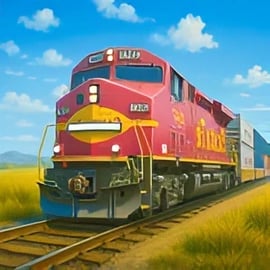
Railways Train Simulator is a browser-based train driving simulator that lets you take the controls of powerful locomotives and manage busy passenger routes in full 3D. You'll drive through realistic railway routes, keep to strict timetables, and make smart decisions at junctions to avoid crashes. It blends strategy and driving, making it perfect for fans of both simulation and railroad games online.
This passenger train game focuses on smooth, realistic operation instead of arcade chaos. You'll learn how to start and stop trains gently, switch tracks at the right moment, and keep passengers safe while you enjoy the view from multiple camera angles. Because it runs in the browser, you can jump into a railroad simulation online session within seconds—no long installs or heavy system requirements.
Whether you're a long-time railfan or just curious about how modern rail networks work, Railways Train Simulator gives you hands-on control of the whole journey: speed, signals, routes, and even how comfortable the ride feels to virtual passengers.
Railways Train Simulator Control Guide
The controls in Railways Train Simulator are designed to be intuitive, so you can focus on the experience of 3D train driving rather than wrestling with menus. Most versions of the game offer both keyboard and mouse support, and on some devices, you'll also get touch input.
Basic driving controls
- Throttle / Acceleration: Use the Up Arrow / W key or an on-screen slider to increase speed gradually. Don't slam the throttle; steady acceleration gives a smoother ride and better control.
- Brake: Use the Down Arrow / S key or the brake slider to slow down. Different braking strengths may be available, from gentle service braking to emergency braking.
- Horn: A dedicated key or button activates the horn—use it at crossings, near workers, or when the game prompts you.
- Directional control: Some scenarios let you change direction (forward / reverse) using a toggle or on-screen lever when the train is fully stopped.
Track and junction controls
- Switching tracks: Click or tap on junction icons, or use number keys to choose the active route. Switching too late can send you down the wrong line or cause conflicts with other trains.
- Signal interaction: Follow color-coded signals—typically green for go, yellow for caution, and red for stop. Some routes require you to acknowledge signals with a key press.
Camera and interface controls
- Camera cycle: Press C or tap a camera icon to rotate through different train simulator views: cab, external, trackside, and overhead.
- HUD elements: A heads-up display shows your current speed, speed limit, upcoming signals, and schedule. You can usually toggle some HUD elements on/off in the options for a cleaner view.
- Pause and menu: Use Esc or the menu button to pause, restart, or tweak settings without losing your progress in a scenario.
Because this is a browser-based railroad simulation online, your controls are streamlined but still deep enough to feel like authentic train handling.
Railways Train Simulator Features
Railways Train Simulator packs a surprising amount of depth into a lightweight, accessible package. You're not just holding down a throttle—you're juggling time, safety, and strategy on realistic railway routes.
- Authentic 3D train driving: Detailed locomotives and passenger cars are rendered in 3D, with smooth animations and believable physics.
- Busy passenger operations: This passenger train game revolves around picking up and dropping off riders at the right time, managing doors, and ensuring smooth stops at every platform.
- Dynamic junctions and signals: You'll control switches, obey signals, and share track with other trains, turning each run into a strategic puzzle.
- Multiple routes and environments: From countryside lines with long, open stretches to dense urban corridors with frequent stops, every route plays differently.
- Challenge-based scenarios: Complete missions like rush-hour commuter runs, tight-schedule express services, or heavy freight hauls that test your braking and acceleration skills.
- Accessible browser play: No huge downloads or accounts required—just load the page and you're in the driver's seat within seconds.
All of these features come together to create a train driving simulator that feels grounded and methodical without overwhelming newcomers.
Performance & Troubleshooting
Because Railways Train Simulator runs right in your browser, performance will depend on your device, browser version, and background apps. If you experience lag, visual glitches, or input delays, try the suggestions below.
Improving game performance
- Close extra tabs and apps: Shut down streaming sites, downloads, or heavy background programs that might compete for memory and CPU.
- Lower graphics options: If the game offers settings for shadows, texture quality, or draw distance, drop them to "low" or "medium" to keep 3D train driving smooth.
- Switch browsers: Modern browsers like Chrome, Edge, and Firefox often handle WebGL and 3D content best. If one browser stutters, try another.
- Disable ad-blockers or extensions: Some extensions interfere with resource loading or input. Temporarily disable them if the game isn't running correctly.
Common issues & quick fixes
- Game not loading: Clear browser cache, refresh the page, or try an incognito/private window to bypass cached errors.
- No sound: Check in-game volume sliders first, then verify your system's output device and volume; some browsers also ask for permission to autoplay audio.
- Controls not responding: Click directly on the game window to ensure it has focus, and confirm that no system keyboard shortcuts are overriding your inputs.
- Choppy camera movement: Reduce graphics quality and avoid running other 3D apps at the same time.
Most issues can be resolved with a quick browser refresh and a small tweak to quality settings, keeping your railroad simulation online experience smooth and responsive.
Is Railways Train Simulator Safe to Play Online?
Railways Train Simulator is designed as a family-friendly train driving simulator with no graphic violence, harsh language, or inappropriate themes. You spend your time transporting passengers safely, managing time, and learning how real rail networks function.
Content and age suitability
- Family-friendly gameplay: While trains can collide or fail a scenario, these events are presented in a clean, non-graphic way.
- No chat requirement: Most browser versions don't include open text or voice chat, which limits exposure to user-generated content.
- Educational value: Players pick up basic concepts of schedules, signals, and route planning, making it appealing to kids interested in engineering and transport.
Online safety tips
- Avoid sharing personal info: If the platform hosting Railways Train Simulator offers accounts or leaderboards, don't use real names or sensitive details.
- Use trusted sites: Play from reputable gaming portals so you avoid malware, misleading downloads, or fake imitators.
- Supervise younger players: Parents should stay nearby, help with basic controls, and ensure kids only click on in-game menus—not on unrelated ads or pop-ups.
When accessed through a well-known gaming site, Railways Train Simulator is a safe, light-hearted way to explore 3D train driving and rail strategy.
Master Realistic Rail Routes and Passenger Schedules
The heart of Railways Train Simulator is learning how to master realistic railway routes while staying on time. Every route has its own rhythm: gradients, curves, long straights, and dense station clusters all require different driving styles.
Learning each route's personality
- Study the map: Before your first run, take a moment to scan the route map or HUD. Note steep hills, tight curves, and closely spaced stations.
- Memorize key landmarks: Bridges, tunnels, and signal masts help you anticipate upcoming stations or speed limits without relying entirely on the HUD.
- Plan braking points: On long-term play, you'll recognize where to begin braking for each station for a smooth, precise stop.
Balancing speed and punctuality
- Respect speed limits: Running too fast into a curve or station can trigger penalties or cause an emergency stop, which destroys your schedule.
- Use coasting: Instead of constantly accelerating, let the train coast on gentle gradients to save time and maintain comfort.
- Arrive, don't slam: A small cushion of time is better than screeching into the platform at the last second. Aim for slightly early arrivals when you can.
As you learn each line, you'll feel yourself settling into a smooth, confident rhythm. That's when this passenger train game really clicks, and you start to feel like a true driver rather than a beginner.
How to Drive, Park and Switch Tracks Like a Pro
Good train driving simulator skills go beyond just staying on the rails. To feel like a pro, you'll need to master starting, stopping, and track switching with finesse.
Smooth, realistic driving
- Gentle starts: Push the throttle up gradually to avoid wheel slip and passenger discomfort. Think of acceleration as a slow, continuous curve, not a staircase.
- Progressive braking: Start braking early with light pressure, then increase smoothly as you near the platform. Avoid last-second emergency stops.
- Watch the gradient: Downhill sections require earlier and stronger braking; uphill segments may need extra throttle to stay on schedule.
Perfecting your parking
- Use a reference point: Aim to line up the middle of the train with the center of the platform, or follow the game's parking marker if provided.
- Stop meter-by-meter: As you approach the stopping point, lower your speed to walking pace. Small adjustments make for perfect alignment.
- Practice consistency: The more consistent your stops, the higher your scores and the happier your virtual passengers will be.
Pro-level track switching
- Plan ahead: Check upcoming switches early; don't wait until you're on top of a junction to decide your path.
- Coordinate with signals: A green or yellow signal often indicates your route is set. If you see red ahead, you may need to wait or adjust your switch choice.
- Avoid conflicting moves: When multiple trains share junctions, give priority to the train that's hardest to stop, or the one with the tightest schedule.
Over time, these small adjustments add up, turning your fun railroad simulation online sessions into convincing, professional-quality runs.
Best Camera Views and Controls for Train Simulation
Railways Train Simulator includes multiple camera angles so you can enjoy both the strategy and the scenery. Choosing the right view at the right moment is a big part of mastering 3D train driving.
Common camera perspectives
- Cab view: Offers the most immersive experience. You'll see instruments, the track ahead, and signals as a real driver would. Best for precise braking and realism.
- Chase / external view: Follows your train from behind or above, helping you gauge train length, curves, and surroundings. Great for scenic screenshots.
- Overhead / strategic view: Gives you a zoomed-out look at junctions, signals, and multiple trains. Ideal for complex route management.
- Trackside view: A cinematic angle that's fun for watching your own skillful driving but less practical for tight schedules.
When to use each camera
- Approaching stations: Switch to cab view for maximum control over braking and door alignment.
- Managing junctions: Use overhead view to see traffic patterns and choose safe switch positions.
- Enjoying scenery: Once you're cruising at a stable speed, jump to chase or trackside views to appreciate the route design.
Experiment with camera hotkeys and sensitivity settings to find a setup that feels natural. Once camera changes become second nature, your performance in this passenger train game will improve noticeably.
Tips to Avoid Crashes and Handle Random Train Events
Even the best driver can face surprises: sudden signal changes, slower trains ahead, or unexpected speed restrictions. Railways Train Simulator sometimes throws random events at you to keep the railroad simulation online experience tense and exciting.
Core habits for crash-free driving
- Always watch signals: Treat every signal as if a train might be just beyond it. Start preparing to slow at yellow aspects and stop fully at red lights.
- Keep a safe following distance: If you see another train ahead, ease off the throttle early. Riding too close can force emergency braking or collisions.
- Control your speed on curves: Curves often have lower limits; obey them to prevent derailment or penalties.
Dealing with random events
- Sudden speed limits: If a new restriction appears, smoothly reduce throttle and apply service brakes; don't panic brake unless absolutely necessary.
- Signal delays: Sometimes a red signal will take longer to clear. Hold position, wait patiently, and be ready to accelerate when it turns green.
- Unexpected stops: If the game simulates faults or obstructions, follow on-screen instructions, then restart smoothly to avoid passenger discomfort.
Staying calm and planning ahead are your best tools. What starts as a relaxed train driving simulator session can quickly become a tense challenge if you ignore signals and speed limits.
Why Train Fans Love Deep Rail Simulation Games
For rail enthusiasts, Railways Train Simulator scratches a very specific itch: the desire to feel what it's like to run real trains over realistic railway routes, without leaving home. But even non-railfans discover a lot to love in a well-crafted railroad simulation online.
The appeal of realistic train driving
- Authentic procedure: Managing signals, speed, and schedules mirrors the real-world responsibilities of train crews.
- Relaxing yet challenging: Long stretches of straight track feel meditative, but stations, junctions, and random events demand focus.
- Visual immersion: 3D graphics, changing weather, and detailed trains create a believable world without needing ultra-high-end hardware.
Strategy meets simulation
- Time management: You're constantly weighing safety against punctuality—slow too much and you're late, push too hard and you risk penalties or crashes.
- Route optimization: Choosing the right tracks and planning overtakes turn this passenger train game into a strategic puzzle.
- Skill progression: As you improve, you'll handle tighter schedules, more complex networks, and heavier traffic with confidence.
That blend of methodical driving, tactical planning, and calming scenery is why many players keep returning to Railways Train Simulator for "just one more route"—only to find they've been playing for hours.
FAQ
What is Railways Train Simulator about?
A: Railways Train Simulator is a realistic train driving game where you control locomotives, follow routes, manage passengers and avoid crashes on busy rail lines.
Can I play Railways Train Simulator for free in my browser?
A: Yes, this version of Railways Train Simulator is designed to be played for free in your browser with no download required, as long as you have an internet connection.
Is Railways Train Simulator kid friendly?
A: Yes, the game is family friendly. There is no graphic violence or inappropriate content, and it focuses on driving skills, timing and problem solving.
Do I need a powerful PC to run Railways Train Simulator?
A: No, most modern browsers on desktop or laptop can run the game. For the best experience, use an up‑to‑date browser and close other heavy applications.
Can I use a keyboard or controller in Railways Train Simulator?
A: Railways Train Simulator is optimized for mouse and keyboard, but some browsers may also support gamepad input if your controller is correctly connected and detected.