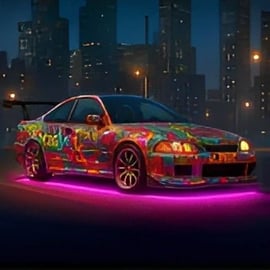
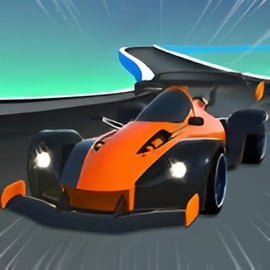
Overview of Nsr Street Racing
Nsr Street Racing is an immersive online street racing game you can play instantly in your browser with no downloads. Inspired by modern open-world racers, it drops you into a lively city where you can cruise freely, queue up for events, and jump into intense multiplayer car races with players from around the world.
The game blends open world car racing, competitive events, and a rewarding car upgrade system. You’ll start with a beginner ride, then use race winnings to improve speed, acceleration, nitro, handling, and brakes, slowly building a dominant garage. Because it’s a browser racing game, Nsr Street Racing works on most PCs and many mobile devices, making it easy to hop in for quick sessions or long grind sessions.
Whether you like exploring the city at your own pace or battling tough AI and real opponents, Nsr Street Racing keeps the focus on fast races, clever driving, and smart upgrades. It’s designed for both casual players and racing fans who want a surprisingly deep experience without installing a full-size game.
How to Play Nsr Street Racing
At its core, Nsr Street Racing is about winning races, earning money, and reinvesting in your cars. The structure is simple enough for beginners but deep enough to keep long-term players busy.
- Start the tutorial: Your first login usually launches a short guided intro explaining basic driving, drifting, and boosting.
- Pick your starter car: Choose an entry-level vehicle with balanced stats so you can handle early races without much trouble.
- Explore the city: Use the minimap to locate events like sprint races, circuit races, time trials, and special challenges scattered across the open world.
- Enter events: Drive to race icons on the map or use menus (if available) to join instant events or multiplayer car races.
- Earn rewards: Finish races to gain cash, XP, and sometimes bonus items, depending on your placement and difficulty.
- Upgrade and expand: Spend your earnings in the garage to improve performance or buy new cars tailored to different race types.
Repeat this loop—race, explore, upgrade—to climb through tougher events, unlock faster cars, and challenge stronger rivals both online and offline AI opponents. The better you drive, the more efficiently you progress.
Nsr Street Racing Game Modes
Nsr Street Racing packs several modes so the action never feels repetitive. Exact names may vary between platforms, but you can expect these common styles of play:
- Open World Free Roam: Cruise the city with no timer or strict objectives. It’s perfect for practicing drifting, learning shortcuts, or just enjoying the physics and city layout.
- Single-Player Races: Go up against AI drivers in Sprint, Circuit, or Lap Knockout races. These are great for learning lines and farming cash safely.
- Multiplayer Car Races: Jump into online lobbies and race real players. Expect aggressive competition, unpredictable driving, and big rewards for top placements.
- Time Trials: Race against the clock to beat target times. Time trials are ideal for mastering tracks and finding the fastest racing lines.
- Drift or Stunt Events: Some challenges focus less on pure speed and more on style or control, rewarding chained drifts and precise car handling.
- Daily & Weekly Challenges: Rotating tasks like “Win 3 races,” “Drift for X seconds,” or “Reach a top speed goal” provide bonus cash and XP.
Because the city functions as a hub, you’ll often drive to an event marker to start a race, then get dropped back into free roam when it’s over. This design makes Nsr Street Racing feel like a full, connected world rather than a set of disconnected tracks.
Performance & Troubleshooting
Nsr Street Racing is a browser racing game, so performance depends on both your device and your internet connection. If you run into lag, stutters, or freezes, try these quick fixes:
- Close extra tabs and apps: Browsers can use a lot of memory. Shut down unused tabs, streams, or downloads to free up system resources.
- Lower in-game settings (if available): Many versions of Nsr Street Racing offer basic graphics options. Choose lower detail or effects for smoother play.
- Switch browsers: Chromium-based browsers (like Chrome or Edge) tend to handle WebGL and canvas graphics well. If one browser stutters, try another.
- Check your internet: For multiplayer car races, a stable connection matters as much as raw speed. If you see teleporting cars or lag, try Wi-Fi closer to your router or a wired connection.
- Update your browser: Make sure you’re on the latest version so the game can use newer web graphics features.
- Disable heavy extensions: Ad blockers or script-heavy extensions can interfere with performance. Test the game in a clean or incognito window.
If performance is still poor on an older device, stick to single-player or smaller lobbies where fewer cars and effects are being rendered at once. Reducing traffic density and view distance (if the option exists) can also improve framerate.
Is Nsr Street Racing Safe to Play?
Nsr Street Racing is designed as a family-friendly online street racing game, focusing on cars, speed, and skill rather than graphic violence or mature themes. There’s no offensive language or explicit content in the core gameplay, and crashes are stylized rather than realistic or gory.
As with any online game, safety mostly depends on where and how you play:
- Play on trusted platforms: Stick to reputable browser gaming sites that host the official version of Nsr Street Racing. Avoid unofficial downloads or suspicious installers.
- Watch the chat: Some platforms offer in-game chat or lobby chat. While the game itself is safe, other players might use inappropriate language. Many portals provide mute or block functions—use them if needed.
- No third-party hacks or mods: Don’t install cheat tools or hacked clients; they can include malware and may violate game terms of service.
- Privacy: Avoid sharing personal information in chats or player names. A nickname that doesn’t reveal real-world details is always safer.
For parents, this game generally fits into the same category as other arcade-style racing titles: fast-paced, competitive, and focused on vehicles rather than real-world violence. Supervision is mainly recommended to monitor online interactions and make sure kids stick to legitimate websites.
How to Play Nsr Street Racing Online in Your Browser
One of the biggest perks of Nsr Street Racing is that it’s an online street racing game built for instant browser play. You don’t need to install a huge client or register a full account on most portals.
- Open your browser: Use a modern browser like Chrome, Edge, Firefox, or a compatible mobile browser.
- Visit your favorite gaming portal: Navigate to the site that hosts Nsr Street Racing and open the game’s page.
- Wait for the game to load: The first load may take a bit as assets and the city map download. Subsequent loads are usually faster.
- Adjust settings: If the game provides quality or resolution options, choose the best balance between visuals and performance for your device.
- Sign in (optional): Some sites allow you to log in to save progress across sessions and devices. This is especially handy in a game with a long-term car upgrade system.
- Complete the tutorial: Follow the prompts to learn basic driving, drifting, and boosting before jumping into tougher races.
Because it’s a browser racing game, you can easily switch between PC, laptop, or compatible mobile browser and still enjoy the same city, events, and cars—all without lengthy downloads.
Game Modes and Features in Nsr Street Racing
Nsr Street Racing packs a number of features that make it stand out among browser racers, especially for players who enjoy open world car racing with progression and customization.
Core Features
- Open World City: Drive through streets, highways, and back alleys to find new events, shortcuts, and scenic routes.
- Multiplayer Car Races: Challenge real players in online lobbies, ranked events, or casual street sprints.
- Deep Car Upgrade System: Improve engine power, nitro, handling, and more to match your style and the demands of each race mode.
- Multiple Cars & Classes: Unlock a roster of vehicles, from agile compacts to high-speed supercars, each with distinct stats.
- Daily Tasks & Events: Log in regularly to complete missions that offer bonus cash and parts.
- Responsive Driving Physics: Balance arcade speed with enough realism in weight transfer, braking, and drifting to reward skilled driving.
Why It Works Well in a Browser
Unlike many simple browser racers, Nsr Street Racing feels closer to a full open-world racing title. The combination of free roam, structured races, and online competition makes it easy to jump in for five minutes yet still feel like your progress matters every time you play.
Controls Guide for PC and Mobile Racers
Precise control is everything in a fast-paced online street racing game. While exact bindings can vary slightly by platform, most PC versions use the following layout:
PC Keyboard Controls
- W or Up Arrow: Accelerate / Move forward
- S or Down Arrow: Brake / Reverse
- A or Left Arrow: Steer left
- D or Right Arrow: Steer right
- Spacebar: Drift or handbrake for tight turns
- Shift (Left Shift): Activate nitro boost when available
- Mouse drag: In some views, drag to look around the car or city
Mobile & Tablet Controls
On mobile devices, Nsr Street Racing typically shows an on-screen control layout:
- Left/Right arrows: Steer left and right
- Pedal icons: Gas and brake / reverse
- Drift button: Initiate drifts or handbrake turns
- Nitro button: Trigger nitro boosts on straights or exits of corners
If you’re switching from PC to mobile, take a few free roam laps to get comfortable with touch input before jumping back into competitive multiplayer car races. Small control differences can have a big impact on lap times.
Tips to Upgrade Your Car and Win More Races
The car upgrade system in Nsr Street Racing is the heart of your long-term progression. Smart decisions here can matter more than raw driving skill, especially as you climb into tougher events and higher-performance classes.
Upgrade Priorities
- Start with acceleration and handling: Faster launches and better cornering give you consistent gains on every track.
- Add nitro power next: A stronger nitro boost helps you overtake on straights and recover from mistakes.
- Then boost top speed: Once you can exit corners cleanly, higher top speed matters more on long straights and highway-style routes.
- Don’t ignore braking: Upgraded brakes let you brake later and carry more speed into turns without losing control.
Match Cars to Events
- Short city circuits: Choose a nimble car with strong acceleration and handling.
- Highway or long sprints: Use a high top-speed car with solid nitro performance.
- Drift-focused events: Pick a car with responsive steering and a setup that’s easy to slide without spinning.
Smart Money Management
- Avoid over-upgrading your starter: It’s often better to partially upgrade early cars, then save for a higher-class vehicle before maxing everything.
- Take advantage of daily rewards: Log in for bonus cash, then invest it in key stat upgrades before jumping into competitive races.
- Test before you buy: If the game allows test drives or previews, try cars before committing your hard-earned funds.
With a thoughtful approach to the car upgrade system, you’ll find that each new race feels easier, letting you tackle higher difficulties and more intense online street racing events.
Multiplayer Street Racing and Open-World Challenges
While single-player races are great for practice, Nsr Street Racing truly shines when you dive into its online and open-world challenges.
Multiplayer Car Races
- Ranked or casual lobbies: Some portals offer ranked matchmaking, while others focus on casual rooms you can join and leave freely.
- Fair play: Try to race clean—blocking, ramming, and reckless driving can slow you down more than it harms others.
- Learn the meta: Pay attention to which cars and upgrade builds fast players are using; it can hint at strong setups.
Open-World Challenges
- Hidden events: Explore off the main roads to discover side missions, drift zones, speed traps, or time-limited challenges.
- Route planning: Learn shortcuts, alleyways, and alternate routes that can shave seconds off your times.
- Free roam practice: Use open world sessions to master braking points, drift entries, and traffic patterns without the pressure of a race.
The blend of open world car racing and structured races is what keeps Nsr Street Racing fresh. One session you might be cruising and discovering new corners of the map; the next, you’re locked into a heated multiplayer battle for first place. Because it’s all wrapped into a convenient browser racing game, you can jump in and out whenever you’ve got a few minutes to spare.
FAQ
What is Nsr Street Racing?
A: Nsr Street Racing is a free browser-based street car racing game featuring open-world driving, multiple race modes, car upgrades, and online multiplayer events.
Can I play Nsr Street Racing for free?
A: Yes. Nsr Street Racing can be played online for free in your browser with no download required. Some versions may include optional in‑game purchases or ads.
Which controls are used in Nsr Street Racing on PC?
A: On PC you typically steer with A/D or the arrow keys, accelerate with W or Up Arrow, brake with S or Down Arrow, use Space to drift, and Shift to activate nitro if available.
Does Nsr Street Racing have multiplayer races?
A: Yes. Nsr Street Racing includes multiplayer racing modes where you can compete with other players online in various events and challenges.
Can I upgrade and customize cars in Nsr Street Racing?
A: Yes. You can earn in‑game currency from races to unlock new cars and upgrade stats such as speed, acceleration, nitro, handling, and braking, with visual customization options in some versions.