Labubu Shooter

Played 574 times.
5.0 (1 Reviews)
Developer: SAFING
Published on: January 2026
Updated on: January 2026
Game technology: html5
Game rating: 5.0
Platforms: Desktop, Mobile, Tablet

Introduction to Labubu Shooter

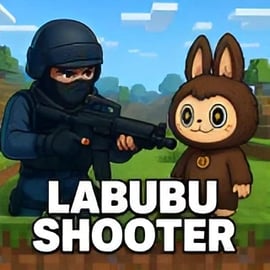
Labubu Shooter is a fast-paced blocky FPS shooter that drops you into a chaotic toy invasion. Mischievous Labubu creatures swarm city streets, alleys, and rooftops while you fight back in intense urban firefight action. With a loyal AI teammate at your side, you'll battle through endless waves of enemies, upgrade your weapons, and face a giant furry boss that dominates the skyline.

This first person shooting game blends colorful, voxel-style visuals with tight gunplay and arcade pacing. Instead of military realism, Labubu Shooter leans into playful toy chaos: blocky environments, exaggerated enemy designs, and over-the-top weapons that turn each match into a miniature action movie. If you enjoy cooperative battles, survival modes, and satisfying gun handling, this is a great browser game to jump into for quick sessions or extended grinds.

Because it's a browser-based title, you can hop into free online FPS battles within seconds—no downloads, no launchers, just instant shooting fun. Whether you're new to shooters or a seasoned fan, the mix of simple controls, smart enemy AI, and your trusty AI teammate co-op keeps matches engaging and replayable.

Labubu Shooter Control Guide

Labubu Shooter uses familiar PC shooter controls so you can start playing right away. Here's a quick breakdown of the key inputs you'll rely on during every round of urban firefight action:

  • Move: WASD keys
  • Look / Aim: Mouse movement
  • Shoot / Fire Weapon: Left Mouse Button (LMB)
  • Aim Down Sights / Flashlight: Right Mouse Button (RMB)
  • Reload: R
  • Use / Interact: F (for doors, pickups, and switches)
  • Throw Grenade: G
  • Melee Attack: H
  • Crouch: C (for cover and tighter aim)
  • Jump: Spacebar
  • Sprint / Run: Shift (hold while moving)
  • Mute Audio: M
  • Select Weapons: Number keys 1–9
  • Pause Menu: Tab

These controls make it easy to slide from room clearing to rooftop sniping without ever breaking the flow. Learning to combine movement, aiming, and weapon swapping is the key to mastering this first person shooting game and surviving longer against the toy invasion.

Labubu Shooter Features

Labubu Shooter packs a surprising amount of variety and depth into its compact, browser-friendly package. Here are the standout features that define this blocky FPS shooter:

  • Blocky, Toy-Themed Visuals: Colorful, Minecraft-style levels with chunky props, neon signs, and labyrinthine city blocks. It's lighthearted, but don't let the look fool you—the firefights get intense.
  • AI Teammate Co-Op: You're never alone. A computer-controlled partner fights by your side, draws aggro, and helps lock down key chokepoints in every arena.
  • Endless Waves & Boss Battles: Face swarms of Labubu toys, then challenge the giant furry boss in cinematic showdowns that push your aim and movement to the limit.
  • Diverse Weapon Arsenal: Progressively unlock pistols, shotguns, assault rifles, SMGs, and heavier weaponry. Each gun has its own recoil pattern, fire rate, and ideal range.
  • Urban Firefight Action: Levels are packed with alleys, stairs, balconies, and corners that encourage flanking, kiting, and smart use of cover.
  • Fast, Browser-Based Play: Launch the game right in your browser—no hefty downloads, drivers, or long installations.
  • Responsive FPS Controls: Tight mouse aim and familiar shooter inputs let you focus on tactics instead of wrestling with the interface.

Taken together, these features turn Labubu Shooter into a compact but fully featured 3D action experience that feels at home next to larger FPS titles, while still being easy to access anytime.

Where to Play Labubu Shooter

Labubu Shooter is designed as a free online FPS that runs directly in modern web browsers, making it easy to jump into urban firefight action from almost any desktop or laptop. To get the best experience:

  • Use a modern browser: Chrome, Edge, Firefox, or other up-to-date browsers tend to handle 3D WebGL content smoothly.
  • Enable hardware acceleration: In your browser settings, make sure hardware acceleration is turned on for smoother frame rates in this 3D first person shooting game.
  • Stable internet connection: Even though matches are mainly local and AI-driven, a solid connection guarantees quick loading and snappy menus.

You'll typically find Labubu Shooter featured in Shooting, Action, or 3D categories on browser gaming platforms. Just search for "Labubu Shooter" and look for trusted, family-friendly portals that host the game.

Once the page loads, click the play button, wait for the assets to download, and you're dropped straight into your first toy invasion mission—no account required on most platforms.

Is Labubu Shooter Safe to Play Online?

Labubu Shooter is built as a lighthearted, arcade-style toy invasion game. The combat is focused on blocky creatures and stylized environments, not realistic violence. That makes it generally suitable for older kids, teens, and adults who enjoy blocky FPS shooter experiences without graphic content.

Some safety and content notes:

  • Cartoon Violence Only: Enemies are toy-like Labubu monsters and blocky bosses. There's shooting and explosions, but no gore or realistic injury.
  • No Real-World Weapons Branding: Guns are generic or stylized; they don't promote specific real-world models or brands.
  • Mostly Single-Player + AI Co-Op: You're playing with an AI teammate, not strangers, so there's no in-game chat toxicity to worry about.
  • Ad Safety Depends on Platform: Content around the game (such as banner ads) varies by site. For younger players, parents may want to use reputable game portals or an ad-blocker.

As always, kids should play under parental guidance, but in terms of core gameplay, Labubu Shooter is a relatively safe and family-friendly action shooting experience.

How to Survive Endless Waves in This Blocky FPS

Once you're comfortable with the controls, the real test is surviving increasingly dense waves in this blocky FPS shooter. Here are key tactics to last longer and push your high scores:

1. Control the Arena, Don't Chase Every Enemy

Instead of rushing randomly, pick a strong position with at least two exits—a corner room, a stair landing, or a balcony. From there, you can:

  • Funnel enemies into a narrow approach where your aim matters more than their numbers.
  • Fall back through a second exit if you're overwhelmed.
  • Use verticality (stairs, ramps) to break line of sight and reload safely.

2. Manage Distance Based on Your Weapon

Distance control is critical in any first person shooting game:

  • Shotguns: Stay close and use doors and corners to ambush wave entries.
  • SMGs & ARs: Hold mid-range angles; strafe left and right while firing short bursts.
  • Rifles & DMRs: Use long sightlines—rooftops or end of streets—so you can pick off toys before they surround you.

3. Always Keep an Escape Route

Never corner yourself completely. Before each wave, quickly scan the area and pick:

  • Primary retreat path: A hallway, ramp, or alley to back into if things go wrong.
  • Secondary fallback: A balcony or alternate floor where you can regroup and reload.

Staying mobile, but not reckless, is what separates quick defeats from long, successful runs in this toy invasion game.

4. Use Grenades to Reset a Losing Fight

When enemies cluster too tightly, grenades become your "panic button." Toss one into chokepoints, doorways, or under the boss's feet when smaller Labubus are crowding you. This clears space, buys reload time, and keeps you from being boxed in.

Mastering Weapons and Gear in the Toy Invasion

Your growing arsenal is at the heart of Labubu Shooter's progression. To dominate free online FPS battles, you need to understand your tools.

Primary Weapons: Your Main Damage Dealers

  • Pistols: Reliable sidearms with good accuracy. Great for conserving ammo on weaker enemies.
  • Shotguns: Devastating up close. Perfect for tight corridors and cleaning out stairwells.
  • Assault Rifles: Best all-rounders—solid at most ranges with manageable recoil.
  • SMGs: High fire rate for close-to-mid range, ideal for shredding small, fast Labubus.
  • Heavy Weapons (if available): Great against the giant furry boss and clustered waves, but watch your ammo.

Smart Reloads and Ammo Management

In this kind of first person shooting game, reloading at the wrong moment can get you swarmed. Try to:

  • Reload behind cover, not in the open.
  • Top off between waves so you start fresh.
  • Switch to a sidearm instead of reloading mid-fight if enemies are too close.

Gear and Utilities

Beyond guns, don't neglect your supporting tools:

  • Grenades: Break up groups or interrupt dangerous rushes.
  • Melee: Use in emergencies when an enemy is practically hugging you.
  • Flashlight (RMB on some weapons): Helps in darker corners of the urban map so you're never surprised.

Experiment to find loadouts that fit your style. Some players lean on shotguns + grenades for aggressive pushes; others prefer long-range rifles and careful positioning for a more methodical approach to the toy invasion.

Co-Op Tactics With Your AI Teammate

One of the most unique parts of Labubu Shooter is its built-in AI teammate co-op. While you can't give complex verbal commands, you can still "coordinate" through positioning and behavior.

1. Let Your Teammate Take the First Contact

When entering a new area, allow the AI partner to walk slightly ahead. They'll often draw initial aggro, giving you:

  • A chance to flank the toy invasion from the side.
  • Safe time to aim for headshots while enemies focus on your ally.

2. Support Their Position With Overwatch

If your AI ally holds a choke point, take a position slightly behind and above them:

  • Use rifles or ARs to finish off enemies they've softened up.
  • Throw grenades if you see them getting overwhelmed.

This mimics classic co-op tactics found in larger FPS games but in a streamlined, browser-friendly format.

3. Revive the Fight When They're Pinned

If you notice your AI teammate surrounded, push in aggressively for a few seconds to:

  • Draw some enemies away.
  • Use a melee swing or shotgun blast to thin the pack.
  • Create breathing room so both of you can reposition.

Treated well, your AI partner is more than a distraction—they're a key pillar in surviving higher waves of this blocky FPS shooter.

Controls Guide: Movement, Aiming, and Combat Tips

Even with a strong arsenal, your survival in this urban firefight action hinges on movement and aim. Here's how to squeeze the most out of the controls:

Movement Fundamentals

  • Strafing (A/D + Mouse): Move side to side while tracking enemies with your crosshair. This makes you harder to hit without ruining your accuracy.
  • Peeking Corners: Approach doorways at an angle; only expose a small part of your hitbox at a time.
  • Sprinting (Shift): Use to reposition between fights, not during active gunfights—sprinting can throw off your initial aim.
  • Crouching (C): Drop to crouch for more stable shots when holding long angles.

Aiming Techniques

  • Aim Down Sights (RMB): ADS for mid-to-long range shots; stay hip-fire for close range to keep your view wide.
  • Short Bursts: With automatic weapons, fire in 3–6 round bursts to maintain accuracy.
  • Head & Torso Focus: Target upper body to quickly drop enemies without over-aiming.

Combat Flow

  • Open with a grenade or a few long-range shots.
  • Fall back to a better angle as the wave closes in.
  • Use melee if an enemy slips into your personal space.
  • Switch weapons instead of reloading mid-swarm whenever possible.

With time, your inputs will become second nature, letting you fully enjoy the smooth pacing of this first person shooting game.

Tips to Defeat the Giant Furry Boss in Urban Battles

The giant furry boss is the centerpiece of Labubu Shooter's urban firefight action. Beating it consistently requires pattern recognition and ruthless positioning.

1. Learn the Boss Attack Patterns

Most big Labubu bosses cycle through recognizable moves, such as:

  • Direct Charges: The boss rushes straight at you—sidestep with a sprint, then punish from the side.
  • Ranged Swipes or Projectiles: Take cover behind cars, crates, or walls when you see wind-up animations.
  • Summoned Minions: Smaller toys flood the street to distract and overwhelm you.

Once you know the rhythm, it's easier to time reloads and grenades between dangerous phases.

2. Use the Urban Layout to Your Advantage

The city environment is your biggest ally:

  • Pillars and Corners: Break line of sight to dodge long-range attacks.
  • Stairs and Ramps: Gain height for safer shots at the boss's weak spots.
  • Wide Streets: Create lateral space to dodge charges without getting stuck.

3. Prioritize Minions Strategically

Don't tunnel-vision the boss. When it spawns small Labubus:

  • Quickly clear immediate threats around you and your AI teammate.
  • Use area damage (grenades, shotguns) to sweep clusters.
  • Once the crowd is thin, refocus your fire on the main health bar.

4. Focus Fire During Vulnerable Windows

After big attacks, the boss may pause or slow. That's when you:

  • Unload your strongest weapon.
  • Time grenades to land exactly as its recovery window opens.
  • Coordinate with your AI partner by staying near them so you both fire from similar angles.

Repeat this cycle—dodge, clear minions, burst damage, reposition—and the towering toy terror eventually falls, wrapping up one of the most satisfying battles in this blocky FPS shooter.

Whether you're grinding waves, experimenting with new weapons, or perfecting your boss runs, Labubu Shooter delivers a compact but exciting first person shooting game experience you can jump into anytime, straight from your browser.


FAQ

What is Labubu Shooter?

A: Labubu Shooter is a free first-person shooter where you battle mischievous Labubu toys in blocky arenas and urban maps, fighting alongside an AI teammate.

How do I play Labubu Shooter?

A: Use WASD to move, mouse to aim and shoot, R to reload, Space to jump, Shift to run, and number keys to switch weapons as you fight off enemy waves.

Is Labubu Shooter free to play?

A: Yes, Labubu Shooter is free to play in your browser. You don’t need to download a client or pay to start playing.

Can kids play Labubu Shooter?

A: Labubu Shooter uses cartoon-style graphics but includes shooting action, so it is best for older kids and teens with parental guidance.

Do I always have an AI partner in Labubu Shooter?

A: Yes, an AI teammate joins you in every mission, providing cover fire and helping you handle tougher Labubu enemies and boss fights.


×

Report Game