Overview of Fnaf Strike 2
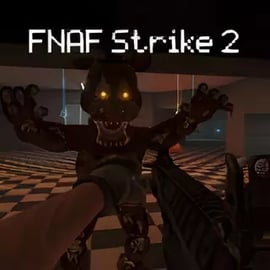
Fnaf Strike 2 is a browser-based horror FPS game online that drops you into a dark, maze-like restaurant overrun by murderous animatronics. Instead of just hiding like in classic security-cam horror, this time you fight back with guns, grenades, and pure reflex. The result is an intense first person scary shooting game that blends jump scares with fast-paced action.
You play as a lone soldier trapped in a creepy pizzeria at night. The lights flicker, the halls echo, and metallic footsteps are never far behind. Your goal is simple in theory but brutal in practice: survive the animatronic assault long enough to find the exit in each level. Along the way you’ll juggle ammo, health, and limited visibility while trying not to get cornered in the creepy restaurant maze game layout.
Because Fnaf Strike 2 runs in the browser, it’s easy to jump into a quick session and test your survival skills. If you enjoy browser survival horror with proper weapons, movement, and FPS mechanics, this animatronic survival shooter is built to keep your heart rate up and your crosshair busy.
Fnaf Strike 2 Control Guide
Having full control over your movement and aim is crucial in a tight, dimly lit restaurant. Fnaf Strike 2 uses familiar keyboard and mouse controls so anyone who’s played a PC shooter can jump in right away.
Default PC Controls
- W / A / S / D – Move forward, left, backward, right
- Mouse Move – Look around / Aim
- Left Mouse Button – Shoot / Attack
- Right Mouse Button – Aim down sights or flashlight (depending on weapon / build)
- Spacebar – Jump (useful for dodging and navigating obstacles)
- Shift (Hold) – Sprint for faster movement
- C – Crouch to lower your profile and sneak through tight spots
- R – Reload your weapon
- Mouse Wheel or 1–9 Keys – Switch weapons in your inventory
- F – Use / Interact with buttons, doors, or items
- G – Throw grenade (if available)
Movement Tips
- Use WASD + Mouse together constantly. Standing still is the fastest way to get swarmed.
- Tap S + A / D to strafe backward while shooting so animatronics can’t easily land melee hits.
- Alternate sprint and normal movement to conserve stamina in long hallways.
- Crouch when peeking around tight corners to minimize your hitbox.
Combat Input Basics
- Keep your left mouse button ready but don’t waste ammo—aim for head or torso.
- If the game build supports aiming down sights, use right click for precision on distant animatronics.
- Get into the habit of pressing R to reload every time a fight ends so you’re not caught with an empty clip mid-swarm.
- Use the mouse wheel or number keys to quickly switch between close-range and long-range weapons as the corridor space changes.
Objectives & Win Conditions
Every run in Fnaf Strike 2 revolves around clear survival rules, but the haunted restaurant layout and relentless enemies make each match feel different. Understanding what the game expects of you will keep you from wandering in circles while animatronics close in.
Main Objective
Your primary goal in each level is to:
- Stay alive long enough to
- Navigate the maze-like restaurant and
- Reach the marked exit door or zone.
The exit is usually located deep inside the map, forcing you to move carefully through tight hallways, storage rooms, and dining areas. Animatronics spawn over time and often appear in groups, so you can’t safely backtrack forever.
Secondary Objectives
Depending on the level layout, you may encounter optional or soft objectives such as:
- Conserving ammo so you’re not forced into melee range later.
- Holding key chokepoints where you can funnel incoming enemies.
- Clearing specific rooms before moving on, to avoid getting attacked from behind.
- Surviving timed waves until a door unlocks or a path opens.
Failure Conditions
- If your health reaches zero, your run ends and you’ll need to restart the level.
- Getting surrounded without ammo or space to move almost always leads to defeat.
- Losing track of the exit and wandering too long raises the density of enemies and makes survival harder.
Win by combining sharp aim, smart pathing, and constant awareness of both your health and your escape route.
Where to Play Fnaf Strike 2
Fnaf Strike 2 is designed as a browser survival horror experience, meaning you can jump into the action without long downloads or installs.
Playing in Your Browser
You can typically play Fnaf Strike 2 directly in a modern web browser such as:
- Google Chrome
- Microsoft Edge
- Mozilla Firefox
- Opera or other Chromium-based browsers
Just load the game’s page, wait for the assets to download, and then start your run. Because it’s a horror FPS game online, you’ll want a stable internet connection the first time so textures and audio can load smoothly.
Recommended System Setup
- Desktop or Laptop PC with keyboard and mouse for best control.
- Full-screen mode for better immersion and easier aiming.
- Headphones so you can hear animatronics approaching from different directions.
- Stable connection if the game streams or fetches assets in the background.
Different gaming portals may host Fnaf Strike 2, but the core experience remains: an animatronic survival shooter you can run straight from your browser with no big setup process.
Offline Play Availability for Fnaf Strike 2
Because Fnaf Strike 2 is typically offered as a browser-based first person scary shooting game, it’s mainly built for online play. In most cases:
- You need an internet connection to load the game page and assets.
- Progress and features may rely on being connected to the hosting website.
Some browsers can cache certain files, but you shouldn’t rely on that for true offline functionality. For a consistent experience, treat Fnaf Strike 2 as an online horror FPS game and play while connected.
If a particular platform later offers a downloadable or standalone version, offline support will depend on that specific release. Always check the instructions on the site where you’re playing for the most accurate info.
How to Survive the Animatronic Onslaught in Fnaf Strike 2
Fnaf Strike 2 is unforgiving if you run blindly into the dark. Surviving the animatronic onslaught requires a mix of map awareness, resource management, and nerves of steel.
Control the Space, Not Just the Trigger
- Never stay in dead ends. Before moving down a corridor, glance behind you and make sure there’s a retreat path.
- Fight in chokepoints. Doorways and narrow halls let you line enemies up instead of getting flanked.
- Clear your back. Periodically spin 180 degrees and check behind you; animatronics love sneaking up during reloads.
Use Your Flashlight and Vision Wisely
- If your version includes a flashlight on right-click or F, use it to scan corners before stepping into new rooms.
- Don’t tunnel-vision. While aiming down sights, keep an eye on your peripheral surroundings for movement.
- Listen for audio cues like footsteps or metallic scraping to predict where the next attack will come from.
Health and Ammo Management
- Conserve bullets. Two or three well-placed shots are better than a panicked full magazine spray.
- Prioritize threats. Enemies closest to you or sprinting at you should be targeted first.
- If there are pickups, don’t grab them at full health or ammo. Leave them as “safety nets” to retreat to mid-fight.
Mindset for Survival Horror
- Expect jumpscares. Don’t let one scare cause you to lose control of your crosshair.
- Play with sound on. This is a survival tool, not just atmosphere.
- Move deliberately—rushing blindly almost always leads to running into an unseen pack of animatronics.
Fnaf Strike 2 Controls and PC Keyboard Shortcuts
Mastering keyboard shortcuts turns you from easy prey into a confident hunter. Here’s a focused breakdown of the most useful binds for this animatronic survival shooter.
Essential Combat Keys
- W / A / S / D – Core movement. Always be moving during combat.
- Mouse Move + Left Click – Aim and fire. Practice smooth tracking on moving targets.
- R – Reload. Hit this after every engagement if it’s safe.
- G – Grenade. Perfect for tight corridors filled with multiple animatronics.
- 1–9 – Immediate weapon swap. Keep your main rifle on 1, close-range weapon on 2, and explosives or specials on higher numbers.
Mobility and Positioning
- Shift – Sprint for repositioning or escaping bad fights.
- Spacebar – Jump over debris or small obstacles.
- C – Crouch behind cover or to stabilize your aim in some browser builds.
Utility and Interaction
- F – Use / Interact with doors, switches, or key objects.
- Mouse Wheel – Quick swapping weapons when surprised.
- Esc – Pause menu, change settings, or exit to main menu.
Spend a few minutes in early waves just moving, peeking corners, and swapping weapons until the controls become muscle memory. That way, when things get terrifying, your hands know what to do even if your brain is panicking.
Best Weapons and Combat Tips for Fnaf Strike 2
Choosing the right gear is just as important as good movement. Fnaf Strike 2’s arsenal gives you options for crowd control, close-quarters defense, and long-range pick-offs.
Recommended Weapon Roles
- Primary Rifle or Assault Weapon
- Balanced damage, decent accuracy, and solid magazine size.
- Use for general hallway fights and mid-range encounters.
- Shotgun (if available)
- High burst damage at close range.
- Ideal when animatronics break through doors or rush you in tight corners.
- Pistol / Sidearm
- Backup when your main gun is empty and there’s no time to reload.
- Use for single isolated enemies to save rifle ammo.
- Grenades
- Great for groups funneling through a doorway or chasing you down a narrow path.
- Throw, then immediately strafe or backpedal to avoid blast damage.
Combat Strategies
- Aim for upper body or head to drop animatronics faster and conserve bullets.
- Kite enemies by backing through corridors while firing, using doors as temporary blockers.
- Don’t reload in the open. Duck into side rooms or behind obstacles before hitting R.
- Use sound. If you hear enemies but don’t see them, prep your strongest weapon before moving forward.
Common Mistakes to Avoid
- Standing still while firing full-auto at distant enemies.
- Letting enemies get within melee range before reacting.
- Ignoring your ammo counter until you hear the “click” of an empty gun mid-swarm.
- Throwing grenades too close and damaging yourself more than the animatronics.
Play aggressively when you have ammo and space, but the moment you’re low on bullets or health, switch to a defensive, escape-focused mindset and prioritize reaching the exit.
Levels, Objectives, and Exit Strategy in Fnaf Strike 2
Each level in Fnaf Strike 2 feels like navigating a living nightmare inside a haunted restaurant. The structure is simple—enter, survive, escape—but execution is where the challenge lies.
Maze-Like Restaurant Layouts
Levels often feature:
- Long, dark corridors connecting dining rooms, kitchens, and storage.
- Side rooms where enemies may spawn or hide.
- Intersections that can either be shortcuts or ambush points.
Treat each map like a puzzle. As you move, mentally track:
- Where you started
- Which paths you’ve cleared
- Where you saw doors, exits, or locked routes
Finding and Reaching the Exit
- Look for marked doors, lights, or signs that hint at the exit.
- When you think you’re close, clear nearby enemies first so you don’t get taken out right at the finish line.
- Keep a mental “escape route”—a path you can sprint through if you’re low on health and just need to get out.
Balancing Exploration and Survival
- If you explore too slowly, enemy density builds up behind and around you.
- If you rush, you may run straight into a group you aren’t prepared to handle.
- Try to move steadily forward—clear, advance, clear, advance—until you reach the exit.
Every completed level feels like a small victory against the restaurant itself, which always seems to be trying to trap you deeper inside.
Horror FPS Features That Make Fnaf Strike 2 So Intense
Fnaf Strike 2 stands out among browser survival horror titles by mixing the tension of animatronic horror with the immediacy of FPS gameplay.
Atmospheric Restaurant Setting
- Dim lighting, flickering bulbs, and long shadows create constant unease.
- The creepy restaurant maze game design keeps you guessing what’s around each corner.
- Environmental sounds—vents creaking, metallic clanks—keep you on edge.
Relentless Animatronic Enemies
- Enemies often come in packs, forcing you to manage crowds, not just single targets.
- Melee attacks punish you if you let them get too close.
- Randomized spawns and routes make each run feel slightly different.
Fast-Paced FPS Combat
- Real-time aiming and shooting demand quick reflexes.
- You’re constantly balancing movement, reloads, and weapon choice.
- Running low on ammo at the worst possible time adds to the horror.
Simple but Effective UI
- Visible health and ammo counters keep pressure high.
- Minimal HUD lets you focus on the environment and threats.
- Clear feedback when you’re hit or under heavy attack.
Combined, these features make Fnaf Strike 2 feel like a fully loaded horror FPS game online rather than a simple browser mini-game, offering a surprisingly deep jolt of fear and action straight from your web browser.
FAQ
What is Fnaf Strike 2?
A: Fnaf Strike 2 is a first-person horror shooting game where you fight hostile mascots in a dark restaurant while trying to find the exit and survive.
How do I play Fnaf Strike 2?
A: Use WASD to move, the mouse to aim and shoot, Space to jump, C to crouch, Shift to sprint, R to reload, and the number keys to switch weapons.
Is Fnaf Strike 2 free to play online?
A: Yes, Fnaf Strike 2 can be played for free in your browser on sites that host the game legally and support the developer.
Can kids play Fnaf Strike 2?
A: Fnaf Strike 2 includes shooting, jump scares, and a scary atmosphere, so it is better suited for teens and older players rather than young children.
Do I need to download Fnaf Strike 2?
A: No download is usually required. You can play directly in a modern web browser as long as you have a stable internet connection.