Zombie Road

Played 435 times.
5.0 (1 Reviews)
Developer: GameVoda
Published on: March 2026
Updated on: March 2026
Game technology: html5
Game rating: 5.0
Platforms: Desktop, Mobile, Tablet

Overview of Zombie Road

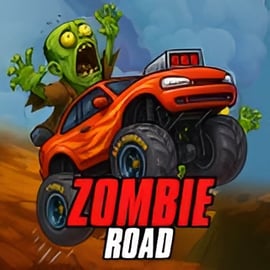
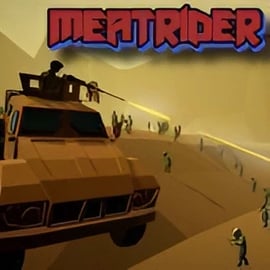
Zombie Road is a fast-paced zombie driving game that throws you onto an endless, post-apocalyptic highway swarming with the undead. Your goal is simple: keep your car moving, smash through zombies, dodge traffic and road hazards, and survive as long as you possibly can. It plays like an endless highway runner mixed with arcade racing and light car combat.

Instead of quietly sneaking past zombies, Zombie Road encourages you to floor the gas pedal. Every second you stay alive adds to your score, and every zombie you crush boosts it even higher. As you rack up points, you can unlock better vehicles and upgrades to turn your ride into a zombie-crushing tank. If you love car vs zombies chaos, quick reflexes, and short, replayable runs, this online zombie racing experience is made for you.

The game runs directly in your browser with no downloads or sign-ups needed. Just load, drive, and try to survive the harsh, post apocalyptic road game landscape. With simple controls and escalating difficulty, it’s easy to jump in but hard to walk away from once you’re chasing that next high score.

How to Play Zombie Road

Zombie Road is designed to be intuitive even for first-time players. Here’s how a typical run works from start to finish.

Starting a Run

  • Click the Play or Start button on the main menu.
  • Choose your starting car (you’ll have a basic vehicle at first, with more unlocked as you play).
  • Once you’re on the highway, your car begins moving automatically in most versions.

Basic Driving and Survival

On the road, you’ll face three main threats: zombies, traffic, and environmental obstacles. The key loop of this zombie driving game is to keep moving while staying in control.

  • Steer left/right: Use the arrow keys or on-screen controls to weave between other cars and obstacles.
  • Smash zombies: Running over zombies adds to your score; tougher zombies may take more impact or better upgrades.
  • Avoid collisions: Slamming into another car, barrier, or large wreckage can destroy your vehicle and end your run.
  • Collect pickups: Grab fuel, repair kits, coins, or temporary power-ups scattered on the road.

Progression During and Between Runs

As an endless highway runner, Zombie Road measures your success in distance traveled and zombies eliminated.

  • During a run: Focus on staying alive, maximizing combos of zombie hits, and collecting as many bonuses as you can.
  • After a run: Use earned coins or points to unlock new cars, armor, or offensive upgrades.

Over time, these upgrades make each new run more explosive and let you push deeper into the apocalypse.

Zombie Road Features

Zombie Road packs a lot of replayable action into a lightweight browser package. Here are the key features that make it stand out among online zombie racing titles.

  • Endless highway gameplay: The road stretches on forever, getting more dangerous the longer you survive.
  • Simple, responsive controls: Perfect for quick sessions on desktop or mobile.
  • Car vs zombies combat: Turn your vehicle into a weapon and mow down undead hordes.
  • Progression and upgrades: Unlock new cars, improve armor, speed, and more.
  • Score chasing: Compete with your own best distance and kill counts each run.
  • Family-friendly visuals: Cartoon-style effects keep the carnage from getting too graphic.

Together, these systems create a tight, arcade-style loop where every attempt feels a little different but always instantly familiar.

Where to Play Zombie Road

You can play Zombie Road directly in most modern browsers. It’s built as an HTML5 post apocalyptic road game, which means:

  • No download required: The game loads from the web page itself.
  • No account necessary: Just press play to jump into a run.
  • Cross-device support: Works on desktop, laptop, many tablets, and compatible mobile browsers.

For the best experience:

  • Use an up-to-date browser like Chrome, Edge, Firefox, or Safari.
  • Close extra tabs if you notice performance dips.
  • Play in full-screen if the site offers it, so you can clearly see upcoming obstacles and zombies.

Because Zombie Road is browser-based, you can jump into this zombie driving game anywhere you have a decent connection—perfect for short sessions or quick breaks.

Is Zombie Road Safe to Play Online?

Zombie Road is generally considered safe and family-friendly, provided you’re playing from a trusted gaming site. There’s cartoon-style violence against zombies, but no realistic gore or disturbing imagery. Younger players who are comfortable with basic zombie themes should be fine.

To keep your experience safe and smooth:

  • Use reputable browser game sites: Avoid random download prompts or suspicious pop-ups.
  • Don’t install extra software: Zombie Road should run in your browser without separate installers.
  • Keep ad-blockers or security tools active: If you already use them, they can reduce unwanted pop-ups around the game frame.
  • For kids: Parents may want to supervise at first, explain that it’s fantasy action, and check that the surrounding site content is appropriate.

In terms of gameplay safety, there are no real-money purchases built into the browser version by default, so you don’t have to worry about surprise charges as you would with some mobile apps.

How to Play Zombie Road Online in Your Browser

Zombie Road was built to be quick to launch and easy to understand. Here’s a step-by-step overview of how to start playing and what to expect.

Step 1: Load the Game Page

  • Open your browser and navigate to your chosen gaming portal.
  • Search for Zombie Road or browse in categories like Action, Racing, or Zombie.
  • Wait for the game canvas to fully load before pressing play.

Step 2: Configure Basic Options (If Available)

  • Sound & music: Toggle on/off or adjust volume.
  • Graphics: Some versions may offer simple quality toggles (low/medium/high) depending on your device.

Step 3: Start Driving

  • Hit Start or Play to begin your first run.
  • Use the controls (detailed in a later section) to steer, accelerate, and keep your car out of trouble.
  • Focus on two things: staying alive and hitting zombies whenever it’s safe to do so.

Step 4: Learn Through Short Runs

Your first few attempts in this endless highway runner probably won’t last long. That’s by design:

  • Notice how fast your car responds to steering.
  • Watch how zombies move and where they tend to spawn.
  • Get used to judging distance so you can slip between cars and obstacles.

Each run is quick, so you’ll naturally improve as you internalize the feel of your car and the rhythm of traffic and zombies.

Tips to Survive Longer on the Zombie-Infested Highway

If you want higher scores and deeper runs in this online zombie racing challenge, strategy matters. These survival tips can help you push further every time.

1. Prioritize Survival Over Style

It’s tempting to swerve aggressively for every zombie, but a reckless move that ends your run is never worth a few extra points. Always ask yourself: “Can I hit this zombie without risking a crash?” If not, let it go and keep your run alive.

2. Stay in the Center Lanes When Possible

Hugging the center of the road gives you the most reaction time to dodge obstacles. From the middle:

  • You can move left or right to avoid sudden cars or debris.
  • You can adjust quickly if zombies spawn on either side.

3. Learn Enemy and Traffic Patterns

Even though this is an endless highway runner, many patterns repeat:

  • Waves of zombies may appear after you pass certain distances.
  • Traffic density often spikes just before big clusters of zombies.

Once you recognize these rhythms, you’ll know when to slow movement slightly and when to prepare for quick dodges.

4. Use Power-Ups Wisely

Some power-ups give temporary boosts like shields, speed bursts, or increased damage in this car vs zombies showdown.

  • Shields: Great for plowing through dense packs of zombies or squeezing around crowded sections of traffic.
  • Speed boosts: Best used on straighter stretches where you can safely line up zombie hits.
  • Score multipliers: Try to grab these right before entering heavy zombie zones for huge point gains.

5. Upgrade Thoughtfully Between Runs

Every coin or credit you earn is a chance to improve your odds next time. Don’t spread upgrades too thin—focus on two or three core strengths that match your playstyle, like armor plus handling, or speed plus ramming power.

Best Vehicle Upgrades for Smashing Zombies

Upgrades are where Zombie Road transforms from a basic zombie driving game into a more personalized post apocalyptic road game. The “best” upgrades can depend on your style, but some stats universally boost survivability and fun.

Armor & Durability

Why it’s good: More durability means your car can survive more hits from zombies and accidental scrapes with traffic. In a game where one bad crash can end everything, extra durability buys you valuable mistakes.

  • Lets you push harder into dense zombie clusters.
  • Reduces the punishment from minor misjudgments.

Handling & Steering Response

Why it’s good: Precise control is crucial in an endless highway runner. Better handling makes threading between cars and steering into (or away from) zombies far more comfortable.

  • Refined steering makes high-speed runs less risky.
  • Easier lane changes help you snag more pickups and avoid traps.

Speed & Acceleration

Why it’s good: Higher speed can boost your score faster, and acceleration helps you recover quickly after slowing down.

  • Faster runs mean you reach higher difficulty tiers sooner, which often brings better rewards.
  • But be careful—speed without good handling can be a quick route to crashing.

Ramming Power / Damage

Why it’s good: In a car vs zombies game, upgrading your impact damage makes every collision more effective.

  • One hit can take out multiple zombies, especially if they’re packed together.
  • You need fewer risky swerves to finish off tougher undead.

Suggested Upgrade Order for Beginners

  1. Armor / Durability – stay alive longer, learn the game safely.
  2. Handling – gain finer control to avoid fatal mistakes.
  3. Ramming Power – make your zombie hits count more.
  4. Speed – add more challenge and faster scoring once you’re comfortable.

Endless Driving, Obstacles, and Undead Hords Explained

Zombie Road is more than just holding down a button and hoping for the best. Understanding how the road, obstacles, and zombies interact will help you plan smarter routes.

The Endless Highway

The core of this online zombie racing experience is an ever-scrolling highway that never truly ends. As you drive farther:

  • Traffic density increases, leaving you less room to maneuver.
  • Zombies appear more frequently and sometimes in larger clusters.
  • Obstacles get trickier, with tighter gaps and less reaction time.

Types of Obstacles

Depending on the version you’re playing, you’ll see combinations of:

  • Abandoned cars and trucks: Static hazards you must weave around.
  • Roadblocks and barriers: Can appear in lanes, forcing quick lane changes.
  • Debris and wreckage: May slow you down or damage your car if hit.

Zombie Behavior

The undead hordes in this zombie driving game typically behave in a few recognizable ways:

  • Shamblers in the lane: Stationary or slow-moving targets that are easy to hit if you line up early.
  • Clusters and waves: Groups that fill one or more lanes, where a well-timed run-through can earn big points.
  • Side spawns: Zombies that appear on the road edges, encouraging you to risk the shoulder for extra score.

Once you see how zombies tend to appear relative to traffic and obstacles, you can start predicting safe “paths” through the chaos instead of reacting at the last second.

Mobile and Desktop Controls Guide for Zombie Road

Zombie Road keeps controls intentionally simple so you can focus on the action. Whether you’re playing on a computer or a mobile device, you’ll be able to steer, accelerate, and smash zombies with just a few inputs.

Desktop Controls (Keyboard)

  • Left Arrow / A: Steer left.
  • Right Arrow / D: Steer right.
  • Up Arrow / W (if used): Accelerate or maintain higher speed.
  • Down Arrow / S (if used): Slightly slow down or brake.
  • Spacebar (in some versions): Activate a special ability, nitro boost, or horn.

On desktop, many players prefer the arrow keys for tight control, but WASD works similarly. Try both and stick with what feels natural.

Mobile & Tablet Controls (Touch)

  • Tap and hold left side of the screen: Steer left.
  • Tap and hold right side of the screen: Steer right.
  • Drag left/right: In some versions, you can slide your finger to smoothly move the car between lanes.
  • On-screen buttons: Some builds show separate left/right arrows or a boost icon you can tap.

Because Zombie Road is designed as a flexible online zombie racing game, the exact layout can vary slightly between portals, but the core idea stays the same: simple, two-direction steering with optional accelerate or boost.

Control Tips

  • Use small adjustments: Gentle taps or short key presses give more precise control than holding a direction too long.
  • Practice lane drifting: Move early toward the lane where you expect the safest gap to open, rather than reacting late.
  • Stay relaxed: Overcorrecting after a sudden dodge often causes more crashes than the initial threat.

Mastering the controls is what transforms Zombie Road from a chaotic post apocalyptic road game into a satisfying rhythm of near-misses, perfectly lined-up zombie hits, and long, high-scoring runs.


FAQ

What is Zombie Road?

A: Zombie Road is an action racing game where you drive along a post-apocalyptic highway, avoid obstacles, and crush zombies to survive and score points.

Can I play Zombie Road for free?

A: Yes, Zombie Road can be played for free in your browser without any download. Some versions may offer optional in-game purchases or ads.

How do I control the vehicle in Zombie Road?

A: On desktop, you typically use the left and right arrow keys or A and D to steer. On mobile, you swipe or tilt your device, depending on the version.

Are there upgrades or power-ups in Zombie Road?

A: Many versions of Zombie Road include power-ups, fuel, ammo, and vehicle upgrades that help you survive longer and deal more damage to zombies.

Is Zombie Road suitable for kids?

A: Zombie Road features cartoon-style zombie smashing and mild animated violence. Parents should review the game first to decide if it fits their family’s preferences.


×

Report Game