Backrooms Sandbox

Played 10 times.
5.0 (1 Reviews)
Developer: GameVoda
Published on: April 2026
Updated on: April 2026
Game technology: html5
Game rating: 5.0
Platforms: Desktop, Mobile, Tablet

Overview of Backrooms Sandbox

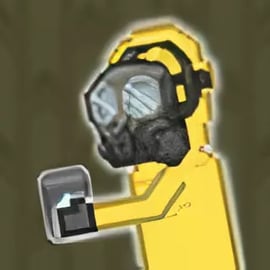
Backrooms Sandbox is a creepy yet creative 3D sandbox building game set inside the endless yellow halls of the Backrooms. Instead of just running from monsters, you get a full backrooms horror sandbox where you place walls, props, traps, and terrifying creatures, then hit play to watch your experiment unfold. It feels like a mix of an open world sandbox simulator and a monster ragdoll playground, all wrapped in the tense atmosphere of classic browser horror games online.

You’re dropped into strange, low-lit levels filled with buzzing lights and stained carpets. From there, you can drag and drop blocks to design your own maze, spawn different monsters, and decide what happens to the unlucky hero that wanders through your creation. Some players build escape routes and puzzles; others build brutal arenas and narrow death corridors. The game doesn’t tell you what to do — it simply gives you the tools and lets you turn your imagination loose.

Because it runs in the browser, you don’t need a powerful PC or long installs. Just load the page, tweak a few settings, and you’re ready to start experimenting with monsters, physics, and chaos in this eerie open world sandbox simulator.

Basic Rules & Mechanics

Backrooms Sandbox follows simple rules so you can focus on experimentation rather than memorizing complex systems. Think of it as a horror-themed construction set:

  • Drag-and-drop building: Choose blocks, walls, doors, props, traps, and monsters from the bar at the bottom of the screen, then place them in the play area.
  • Cause-and-effect gameplay: Each item has its own behavior. Monsters chase, traps trigger, blocks block paths, and heroes try to survive (or fail spectacularly).
  • Paused building vs. active simulation: In build mode the scene is frozen so you can design freely. Once you press play, the physics and AI kick in, turning your plan into reality.
  • Ragdoll-style interactions: When characters collide, fall, or get hit by traps, you’ll see ragdoll reactions that make every run-through feel slightly different.
  • Full control over reset: Don’t like the outcome? You can delete individual items or wipe the whole board and start again in seconds.

There are no strict level limits or linear missions. The “rules” exist mostly to help you understand how monsters, heroes, and the environment interact. The rest is up to you: build escape rooms, survival challenges, or pure chaos playgrounds full of monsters and collapsing structures.

Backrooms Sandbox Features

Even though it’s a browser game, Backrooms Sandbox packs in a surprising amount of content and tools for creative horror building. Some of the key features include:

  • Backrooms-themed maps: Work inside unsettling liminal spaces with buzzing lights, long corridors, and maze-like rooms that capture the classic Backrooms vibe.
  • Sandbox building tools: Place walls, floors, blocks, stairs, and structural elements to sculpt your own nightmare. It functions like a compact level editor built into a horror game.
  • Monster ragdoll playground: Spawn different monsters and watch them move, chase, collide, and occasionally get flung across the map in ragdoll fashion.
  • Hero and victim characters: Drop in heroes, NPCs, or test subjects to see how well your designs can be escaped — or how quickly they get overwhelmed.
  • Traps and hazards: Set up deadly traps, falling objects, blocked exits, or surprise ambushes that trigger when characters move through the level.
  • Instant testing: Switch from build to simulation instantly and watch your horror scenario play out from a top-down or free camera view, depending on the version.
  • No downloads needed: As a browser horror game online, everything runs directly in your web browser with simple controls and fast loading.
  • Replayable open world sandbox simulator: There are no fixed endings, only new designs and outcomes every time you tweak your layout or monster lineup.

These features make Backrooms Sandbox appealing whether you love designing levels, experimenting with horror physics, or just watching over-the-top monster chaos unfold.

Survive and Build in the Infinite Backrooms Sandbox

The heart of Backrooms Sandbox is the combination of survival tension and creative building. You’re not just dropping monsters randomly — you’re trying to craft a playable (or barely survivable) horror scenario in endless, maze-like rooms.

There are two main ways players tend to approach the game:

  • As a designer: You focus on building realistic Backrooms levels, with logical corridors, dead ends, and secret pathways. Monsters become part of the level design, carefully placed to create jump scares, patrol routes, or climactic chases.
  • As a chaos creator: You turn it into a pure monster ragdoll playground. Pack small rooms with creatures, stack props in unstable towers, or create trap corridors where everything explodes into movement as soon as the simulation starts.

Good survival-focused builds usually include:

  • Clear objectives: For example, “reach this door,” “hit the switch,” or “survive for 30 seconds in this room.”
  • Risk–reward paths: Safer routes might be longer, while shorter ones pass dangerously close to monsters or traps.
  • Line-of-sight design: Use corners and pillars so monsters can ambush or be avoided, depending on how players move.

Because Backrooms Sandbox gives you such freedom, it blurs the line between level designer and player. You’ll constantly tweak layouts, adjust monster positions, and fine-tune traps until the balance between terror and fun feels right.

How to Play Backrooms Sandbox Online on Your Browser

Getting started with Backrooms Sandbox in your browser is straightforward and quick. Follow these general steps (exact buttons can vary slightly by site):

  1. Open a supported browser: Use a modern browser like Chrome, Edge, Firefox, or Safari for best performance.
  2. Load the game page: Visit a trusted gaming platform that offers Backrooms Sandbox. Wait a few moments for the assets to load.
  3. Start or continue: Click the Play or Start button. Some portals may show a short ad before the game begins.
  4. Choose your mode (if available): Many builds go straight into sandbox mode; others offer preset maps you can edit.
  5. Enter build mode: Use the lower toolbar to select blocks, structures, monsters, and traps. Click in the main area to place them.
  6. Test your level: Press the play/simulation button to watch your design in action. Observe how monsters move and where characters get stuck.
  7. Iterate: Pause or reset, adjust placements, then run the simulation again until you’re happy with the chaos or challenge.

Because it’s a browser horror game online, you can usually jump in from school or work devices (where allowed) without admin rights. Just remember that performance and loading speed depend on your internet connection and device specs.

Backrooms Sandbox Controls and Gameplay Basics

The control scheme in Backrooms Sandbox is meant to be simple, even if you’ve never tried a 3D sandbox building game before. Exact keys can vary slightly, but these are the most common inputs:

Mouse Controls

  • Left-click: Select an item in the toolbar, place blocks, props, monsters, or delete objects (when in delete mode).
  • Right-click (or long press on some versions): Rotate items, cancel placement, or open context actions.
  • Scroll wheel: Zoom the camera in and out of the Backrooms environment.

Keyboard Controls

  • W / A / S / D or Arrow Keys: Move the camera around the map to see different parts of your level.
  • Space or Enter: Start or pause the simulation in some versions.
  • R: Reset the current scenario and stop all active monsters and ragdolls.
  • ESC: Open the in-game menu or return to the main hub of the platform.

Gameplay usually follows this loop:

  1. Build: Place walls, corridors, props, and hazards to create a Backrooms-style maze.
  2. Populate: Drop in monsters and, if available, a hero or test character.
  3. Simulate: Hit play and watch interactions unfold with ragdoll physics and AI behavior.
  4. Tune: Notice what feels boring, unfair, or broken, then adjust your layout or monster count.

Because you aren’t punished for failure, the basic gameplay is incredibly forgiving. You can try wild ideas, see what happens, and instantly undo them if you don’t like the results.

Best Tips for Creating Monster-Filled Backrooms Levels

To get the most fun out of this backrooms horror sandbox, it helps to think like a game designer. Here are practical tips for building better levels in your open world sandbox simulator:

1. Start Small, Then Expand

Instead of filling the entire map instantly, begin with a single room or short corridor. Add one or two monsters and a basic goal. Once that feels interesting, extend the layout with new branches, secret routes, or extra ambushes.

2. Use Corners to Build Tension

Straight hallways are predictable. Break sightlines with corners, pillars, and tight turns so monsters can surprise players. A monster placed just around a bend creates a stronger scare than one you see from far away.

3. Mix Monster Types and Numbers

In any good monster ragdoll playground, variety is key. Combine fast but weak creatures with slower, tougher ones. Use small packs in open areas and single, powerful threats in narrow corridors. Too many monsters can feel chaotic but not scary; too few can feel empty.

4. Build Safe Zones and Checkpoints

Include occasional safe rooms or open spaces where nothing attacks. This creates contrast and gives players a mental break before the next intense section. You can also place props in these rooms to tell mini-stories or hint at what’s coming.

5. Add Environmental Hazards

Traps, falling blocks, and physics-based hazards turn your backrooms horror sandbox into a true challenge. For example:

  • Drop ceilings or shelves that can fall onto characters.
  • Cramped halls with swinging obstacles or blocking props.
  • Dead-end rooms with powerful monsters but valuable rewards, if your version supports items.

6. Test from the Player’s Perspective

After building, run the simulation a few times while focusing on what the player would see and feel. Are the monsters too close to the spawn point? Is there any warning before a deadly trap? Make small adjustments until the pacing feels right — tense, but not instantly hopeless.

7. Embrace Ragdoll Chaos

Don’t be afraid to design levels specifically to showcase ragdoll physics. Long drops, chain reactions, and cramped arenas can all create hilarious or shocking outcomes. This is where the game truly shines as a monster ragdoll playground.

Where to Play Backrooms Sandbox

Backrooms Sandbox is designed primarily as a browser game, so you can jump in without big downloads or complicated launchers. While specific platforms can change over time, you’ll typically find it on:

  • Browser gaming portals: Large arcade-style sites that host many action, adventure, and sandbox titles.
  • Backrooms-focused sites: Niche portals dedicated to Backrooms and horror experiences often feature Backrooms Sandbox and similar builds.
  • Sandbox and ragdoll collections: Sites that focus on physics and ragdoll playgrounds may include Backrooms Sandbox alongside classic sandbox titles.

When searching, use phrases like Backrooms Sandbox browser horror games online or backrooms horror sandbox to locate active, playable versions. Always choose reputable platforms to avoid fake downloads or misleading links.

Offline Play Availability for Backrooms Sandbox

Backrooms Sandbox is mainly built as an online browser experience, so it typically requires an internet connection to load game files and run in your window. Most versions don’t offer an official offline mode, standalone installer, or downloadable client.

Here’s what that means in practice:

  • No internet = no initial load: If you’re offline, you won’t be able to start the game from scratch.
  • Progress is usually session-based: Many browsers clear data regularly, so don’t rely on long-term saved levels unless the site clearly supports it.
  • Play in stable connections: For smooth building and simulation, use Wi-Fi or wired internet rather than an unstable mobile hotspot.

If you need a game that works fully offline, consider looking for downloadable sandbox horror games inspired by the Backrooms instead. But for quick, low-commitment sessions of building and monster experimentation, the online browser format of Backrooms Sandbox is ideal.

Is Backrooms Sandbox Safe to Play Online?

Backrooms Sandbox is generally safe to play on trusted gaming platforms, but there are a few things to keep in mind, especially for younger players:

  • Horror content: The game uses eerie environments, monsters, and sometimes violent or intense ragdoll interactions. While there’s no realistic gore in most versions, it’s still themed around fear and danger.
  • No downloads from shady sources: Play directly in your browser on reputable sites. Avoid sites that try to push suspicious downloads, extensions, or unrelated installers.
  • Ads and external links: Many browser portals use ads to stay free. Don’t click on pop-ups or banners that look misleading, and close any new windows that aren’t clearly part of the game.
  • Online safety basics: You typically don’t need to create an account or share personal information to enjoy Backrooms Sandbox. If a site asks for sensitive data, double-check that it’s a legitimate platform.

For parents, it’s a good idea to treat Backrooms Sandbox like any other mild horror game: suitable for older kids and teens who are comfortable with scary themes, but not recommended for very young children or players sensitive to jump scares and creepy atmospheres.

Similar Sandbox Horror Games You Can Try Next

If you enjoy Backrooms Sandbox and want more browser horror games online with creative tools, there are several titles and subgenres worth exploring:

  • Other Backrooms builders: Some games focus on exploring the Backrooms, while others offer editing tools similar to this 3D sandbox building game. Look for variations that emphasize different levels or monster types.
  • Monster and ragdoll sandboxes: Games inspired by SCP-style labs or physics playgrounds let you spawn creatures and test how they interact in weird arenas, much like a monster ragdoll playground.
  • General sandbox simulators: Open world sandbox simulators with horror elements allow you to build structures, set traps, and watch AI characters react, even outside of a Backrooms setting.
  • Puzzle-horror hybrids: Some titles focus more on escape-room design, where you create or solve puzzles within creepy environments rather than filling them with monsters.

Rotating between these games can give you new ideas for your Backrooms Sandbox builds. Every time you come back, you’ll think of fresh ways to use monsters, traps, and tight corridors to craft your own personalized horror experience.


FAQ

What is Backrooms Sandbox?

A: Backrooms Sandbox is a browser-based horror sandbox where you build levels, place monsters, and create your own chaotic Backrooms scenarios.

Is Backrooms Sandbox free to play?

A: Yes, Backrooms Sandbox is free to play in your browser with no download required. Just load the game page and start building and experimenting.

Can kids play Backrooms Sandbox?

A: Backrooms Sandbox has creepy visuals and monster attacks, so it is better suited for teens and older players who enjoy mild horror themes.

Do I need to install anything to play Backrooms Sandbox?

A: No installation is needed. Backrooms Sandbox runs directly in modern web browsers, so you only need a stable internet connection to play.

What can I do in Backrooms Sandbox?

A: You can place blocks, traps, and creatures, design buildings, and then watch monsters chase or fight characters in the eerie Backrooms environment.


×

Report Game