Overview of Super Robot Chogokin
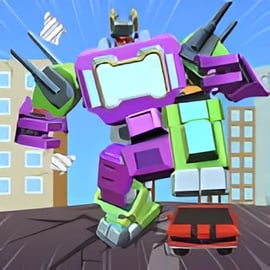
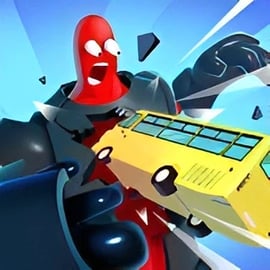
Super Robot Chogokin is a fast-paced robot fighting game online where you control a towering mech and unleash chaos across the city. Your mission is simple but satisfying: stomp through streets, smash cars, demolish skyscrapers, and survive waves of military forces trying to shut you down. If you love a good mech destruction game with big explosions and arcade-style action, this browser title fits perfectly into the Action, Fighting, and Arcade categories.
Played directly in your browser, Super Robot Chogokin is designed as a quick pick-up-and-play experience. There’s no long tutorial, no complicated menus—just you, your super-powered robot, and a city that’s about to be reduced to rubble. As you progress, the game introduces new missions, regions, and tougher enemies, making each run feel more intense than the last.
Because it’s a free online mech battle game, you don’t need to download anything or create an account to start playing. Just load it up, learn the controls in a minute or two, and you’re ready to burn, blast, and crush everything in sight.
How to Play Super Robot Chogokin
Super Robot Chogokin keeps its rules light and easy so you can jump straight into the chaos. Still, understanding the basic systems helps you survive longer and clear missions more efficiently—even when the helicopters and tanks start to swarm.
Basic rules of this city destruction browser game
- Follow your mission goals: Each level gives you a destruction target in the top corner (for example, a number of cars or buildings to destroy). You must hit that quota to clear the stage.
- Destroy everything in sight: Buildings, cars, walls, billboards, and other objects count toward your objective. Experiment to see what breaks and what gives more points.
- Survive enemy counterattacks: Military units will arrive to push you back. If your health reaches zero, the mission fails and you’ll need to retry.
- Complete missions quickly: The game rewards aggressive, fast play. The quicker you hit your goals, the easier it is to stay ahead of enemy waves.
Core systems you’ll use every level
- Movement and positioning: Staying mobile lets you dodge missiles and line up multiple targets for your heavy-hitting skills.
- Combo attacks: Chaining basic attacks with special skills helps you destroy large structures or clusters of cars in seconds.
- Health management: You’ll need to balance aggression with survival. Sometimes it’s smarter to move out of a hot zone, then come back for a second wave of destruction.
- Mission progression: Finishing objectives unlocks new levels, challenges, and sometimes extra power-ups or tougher enemy types.
Super Robot Chogokin Controls
Even though there’s plenty of on-screen chaos, the Super Robot Chogokin control guide is very simple. Most players can get comfortable in just a few minutes.
Keyboard controls (PC and laptop)
On desktop, Super Robot Chogokin plays like a classic arcade brawler mixed with a robot fighting game online experience:
- W / A / S / D: Move your mech up, left, down, and right
- J: Primary attack or laser/eye beam
- K: Fire-based attack or heavy skill
- L: Additional special skill or area attack
These three attack keys give you different ranges, damage types, and timings. Mastering when to use each ability is the key to fast city-wide destruction.
Touch controls (mobile & tablet)
Exact touch layouts can vary slightly by platform, but most mobile versions use:
- A virtual joystick or directional pad on the left side for movement
- Three ability buttons on the right side, mirroring J, K, and L
On phones and tablets, keep your thumbs close to the attack icons so you can activate combos quickly without covering too much of the screen.
Combos and special skills
Super Robot Chogokin isn’t just button mashing. With a little timing, you can string attacks into powerful combos:
- Basic combo chains: Tap your primary attack repeatedly to shred cars and small buildings rapidly.
- Skill canceling: Use a heavy skill (K or L) right after a basic attack animation starts to stack damage and speed up destruction.
- Range management: Eye beams and fire attacks can hit targets slightly farther away, letting you fry helicopters or distant tanks safely.
Experiment with different sequences (for example, J > J > K or J > L) to find the most efficient way to bring down various structures.
Super Robot Chogokin Features
This browser-based mech destruction game focuses on fast action and massive damage numbers. Here are some of the standout features:
- Instant browser play: No downloads or installs—just load the page and start smashing.
- Explosive city destruction: Buildings crumble, cars fly, and the environment reacts to your every hit.
- Arcade-style missions: Clear, straightforward objectives keep each level focused and replayable.
- Multiple attack types: Eye lasers, fire sprays, and brute-force melee give you several ways to approach each target.
- Military resistance: Helicopters and other forces prevent this from becoming mindless; you’ll need to dodge and counter.
- Unblocked robot games appeal: Because it runs in the browser, Super Robot Chogokin fits nicely into the unblocked robot games niche for quick sessions.
Combined, these features make Super Robot Chogokin feel like an old-school arcade cabinet updated for modern browsers.
Where to Play Super Robot Chogokin
You can play Super Robot Chogokin directly in most modern desktop and mobile browsers. There’s no dedicated client or console version to worry about—just an HTML5-style city destruction browser game focused on accessibility and quick fun.
Supported devices
- Desktop & Laptop: Play with a keyboard in Chrome, Edge, Firefox, or other modern browsers.
- Android phones & tablets: Launch the game in your mobile browser and use on-screen buttons.
- iPhone & iPad: Open the game page in Safari or your preferred browser to start playing.
Because the game is lightweight, it usually runs well even on modest hardware, making it ideal for quick mech battles at home, school, or on the go.
Is Super Robot Chogokin Safe to Play Online?
Super Robot Chogokin is built as a family-friendly robot fighting game online with cartoon-style explosions and mechanical combat. There’s no graphic gore or realistic violence—just mechs, military vehicles, and lots of rubble.
Safety & content overview
- Content: Robot vs. military combat, environmental destruction, and arcade-style action.
- No real-world weapons focus: All weapons are stylized and attached to the robot—eye beams, fire breath, and heavy melee strikes.
- Browser-based: No installer or external launcher is required, which reduces the risk of downloading unwanted software.
As always, younger players should have an adult nearby to help choose trustworthy browser portals, but the core game itself focuses on fantasy mech battles rather than realistic warfare.
How to Play Super Robot Chogokin Online in Your Browser
Starting a free online mech battle in Super Robot Chogokin only takes a few steps. Here’s a simple walkthrough to get going quickly.
Step-by-step browser setup
- Open a modern browser: Chrome, Firefox, Edge, or Safari are recommended for the smoothest performance.
- Navigate to a trusted gaming portal: Look for reputable browser game platforms that offer Super Robot Chogokin as an online title.
- Wait for the game to load: The loading bar or spinning icon should complete within a few seconds on most connections.
- Enter fullscreen (optional): Use the fullscreen button if available to make it easier to see enemies and destruction goals.
- Check the controls: Confirm that WASD and the J/K/L keys (or touch buttons on mobile) are responding correctly.
- Start your first mission: Follow the on-screen mission instructions and begin demolishing your first district.
Browser performance tips
- Close extra tabs or background apps if the game stutters.
- Make sure hardware acceleration is enabled in your browser settings when possible.
- On laptops, plug in the charger so power-saving modes don’t throttle performance.
Super Robot Chogokin Controls, Combos, and Special Skills Guide
To dominate this mech destruction game, you’ll need more than random button presses. Understanding your robot’s skill set turns you into a true city-leveling machine.
Movement and spacing
- Stay on the move: Constantly strafe and reposition with WASD or the virtual joystick to make helicopters and tanks miss more often.
- Use corners: Buildings can temporarily block enemy fire while you line up your next attack.
- Cluster targets: Herd cars and enemies into groups before locking in a big special attack.
Understanding your three skill buttons
- J – Precision or rapid-fire attack: Ideal for quickly deleting cars, small buildings, and low-health enemies. Think of it as your reliable bread-and-butter hit.
- K – Heavy destruction or fire spray: Great for melting down chunks of buildings or damaging multiple targets at mid-range.
- L – Big impact or crowd-control skill: Use this for high-pressure situations, such as when several helicopters and ground vehicles surround you.
Sample combos to try
- Fast clear combo: J > J > K on weak targets like cars and walls.
- Building breaker: Get close to a large structure, then J > K > L to stack damage and bring it down quickly.
- Defense combo: When swarmed, hit K or L first for space, then reposition and finish with J on survivors.
Practice a few sequences in early levels until your fingers remember which button does what, and you’ll fly through later missions with ease.
Tips to Destroy Buildings, Cars, and Military Forces Quickly
If you want to feel like a true invading super-robot, efficiency is everything. These tips will help you optimize your destruction and stay alive longer.
Efficient city destruction strategies
- Scan your objective first: Check the counter in the corner so you know whether to prioritize cars, buildings, or specific targets.
- Hit structural weak points: Stand near the base of buildings, then unleash heavy attacks to collapse them faster.
- Chain car explosions: Cars often sit in groups. Drop a heavy skill in the center to blow up several at once.
- Don’t overkill small targets: Use your primary attack instead of burning big cooldowns on weak enemies.
Dealing with helicopters and military forces
- Prioritize threats: Take down helicopters first, since they can track you from above and are harder to avoid.
- Stay unpredictable: Change direction often so missiles and gunfire have a harder time hitting you.
- Use buildings as cover: Duck behind tall structures briefly, then retaliate as enemies reposition.
- Clear spawn zones: Sometimes it’s safer to push forward and destroy enemy spawn points instead of staying in one place.
Unblocked Super Robot Mech Fighting Game for PC and Mobile
Many players search for unblocked robot games they can enjoy at school, at work breaks, or on shared devices. Super Robot Chogokin fits that style nicely because it’s a browser-based action title with simple controls and short missions.
Playing on PC
- Use a keyboard for precision: WASD plus J/K/L gives you tight control over movement and attack timing.
- Fullscreen mode: This helps you see helicopters and buildings clearly, especially on larger monitors.
- Quick sessions: Since each mission is short, it’s perfect for a fast mech fighting game online break.
Playing on mobile
- Portrait vs. landscape: If the game supports landscape mode, use it—it generally provides a wider view of incoming enemies.
- Thumb placement: Keep thumbs low on the screen so you don’t block your robot or incoming shots.
- Stable connection: While gameplay is mostly local, a stable internet connection keeps the browser from lagging mid-mission.
Because it’s a free online mech battle with no installation, you can switch between devices easily—play a few missions on PC, then pick it up again on your phone later.
Missions, Levels, and Power-Ups in This Robot Invasion Game
Super Robot Chogokin isn’t just mindless smashing; it builds a loose sense of progression through its mission structure, new locations, and escalating challenges.
Mission structure
- Objective-based gameplay: Each stage asks you to destroy a certain number or type of objects—cars, buildings, or mixed targets.
- Timer pressure: While not always strict, time pressure encourages aggressive play and rewards players who master combos.
- Enemy escalation: Early missions spawn light resistance; later levels send more helicopters, tougher vehicles, and heavier firepower.
Level variety
- Different drop zones: You’ll be dropped into varied urban sectors, each with a slightly different layout and density of targets.
- Changing enemy patterns: Some stages focus more on air units, others on ground forces or dense infrastructure.
Power-ups and progression
Depending on the version and portal, Super Robot Chogokin may offer various boosts or improvements as you progress:
- Temporary buffs: Short-term damage or defense boosts that make quick work of large objectives.
- Skill effectiveness: As missions get tougher, you’ll naturally learn the most efficient times to deploy each attack for maximum impact.
This “robot invasion game” feel—dropping into new areas, wrecking everything, then moving on to the next zone—keeps the experience energetic and replayable, especially for players who enjoy fast, arcade-style robot fighting game online action.
FAQ
What is Super Robot Chogokin?
A: Super Robot Chogokin is a free online action game where you control a giant robot, destroy targets like cars and buildings, and avoid military attacks to complete missions.
How do I play Super Robot Chogokin?
A: Use WASD or arrow keys to move your robot and keys like J, K, and L to activate special skills such as laser eyes and fire attacks, then destroy the required objects to finish each level.
Can I play Super Robot Chogokin for free?
A: Yes, Super Robot Chogokin is completely free to play in your browser. You do not need to pay, download, or install anything to start playing.
Is Super Robot Chogokin playable on mobile devices?
A: Yes, the game can be played on most modern devices, including desktop computers, laptops, Android phones, iPhones, and tablets, as long as you have a web browser and internet connection.
Is Super Robot Chogokin suitable for kids?
A: Super Robot Chogokin features cartoon robot battles and city destruction but no realistic blood or gore. Parents should review the game first and decide if the action is appropriate for their children.