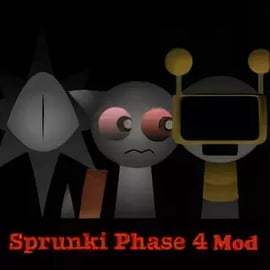
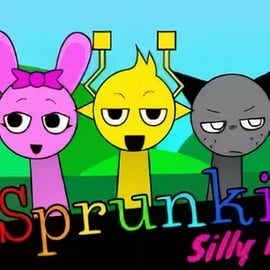
Sprunki Phase 4 Mod is a fan-made, Halloween-flavored spin on the classic Incredibox-style experience. It turns your browser into a spooky sound sandbox where you can drag characters onto the stage, layer beats, and build your own creepy tracks in seconds. Instead of a serious studio, you get a playful browser music mixer full of ghosts, glitchy creatures, and eerie effects perfect for October vibes or anytime you want darker sounds.
This mod keeps the simple drag-and-drop formula that Sprunki fans love, but wraps it in a horror-lite style that still feels safe and fun for kids, teens, and casual players. Think of it as a cartoonish Halloween music game: no jumpscares, no gore, just unsettling atmospheres, weird faces, and a whole lot of offbeat rhythm. Whether you're new to interactive beat making or you’ve spent hours in earlier phases, Sprunki Phase 4 Mod gives you a fresh toolkit of spooky loops and voices to experiment with.
Because it runs in your browser, you don’t need to download anything or create an account. You simply hit play, choose characters, and start mixing. It’s ideal for classrooms, parties, content creators wanting creepy background loops, or kids who want an easy introduction to interactive beat making games without dealing with complex DAW software.
Sprunki Phase 4 Mod leans heavily into Halloween: foggy backgrounds, haunted lighting, and character designs that look like they crawled out of a glitchy cartoon instead of a horror movie. The whole point is to make music that sounds strange and unsettling but still playful enough for all ages. Many players treat it as a spooky sound sandbox where you can experiment freely, delete everything, and start again in seconds.
The sound palette focuses on:
What makes this an effective Incredibox style mod is how easy it is to stack elements. You don’t worry about timing or scales; the mod takes care of synchronization so everything stays on-beat. That frees you up to focus on storytelling: do you want your song to feel like a cursed carnival, a haunted mansion, or a slow build into a horror climax?
Because of its lighter tone, Sprunki Phase 4 Mod fits nicely in the Music, Kids, and Casual categories. It’s the kind of game you can open for five minutes to kill time or sit with for an hour, fishing for the perfect eerie combo to show your friends.
Even if you’ve never touched a music app before, Sprunki Phase 4 Mod is easy to learn. It’s designed so kids, parents, and casual players can jump right in without tutorials. Everything revolves around a simple drag-and-drop interface that turns your browser into a mini browser music mixer.
Here’s how the basic flow works:
There’s no way to “lose” in Sprunki Phase 4 Mod. It’s a pure sandbox: you’re building and editing loops until you’re happy. That’s why it’s so popular as an interactive beat making game for beginners.
The whole game is built around simple mouse or touch controls:
On touchscreens, controls are the same: just tap and drag with your finger. It’s intuitive enough for kids to learn in a couple of minutes.
What really separates Sprunki Phase 4 Mod from earlier phases is how tightly it leans into Halloween and horror themes. Every visual and audio detail is tuned toward creating a spooky-but-fun scene. If you’re searching for a Halloween music game that doesn’t rely on loud scares, this mod hits a sweet spot.
Atmosphere details you’ll usually notice:
Because the loops are short and repeatable, you naturally start thinking like a producer—adding one piece at a time, muting parts, listening to the groove, then building a full haunted soundtrack. It’s a low-pressure way to try sound design concepts without needing music theory knowledge.
Most players jump into this mod to explore what’s new versus earlier phases. Sprunki Phase 4 Mod typically adds more stylized characters, extra sound layers, and upgraded visuals that enhance immersion.
Phase 4’s expanded sound bank usually focuses on:
These elements make Sprunki Phase 4 Mod feel more cinematic than some earlier phases. You can build not just a beat but an entire eerie scene out of your loops.
Characters are the heart of this Incredibox style mod. In Phase 4 Mod, you’ll typically see:
Because each character is tied to a specific loop, you quickly memorize who to grab when you want a certain mood—like a slow bell pattern or a distant choir pad.
Visually, Sprunki Phase 4 Mod usually includes:
These touches don’t change the core gameplay, but they make the whole sandbox feel more alive and rewarding, especially in fullscreen.
One of the biggest advantages of Sprunki Phase 4 Mod is that it’s built as a browser music mixer. You can jump in from most modern browsers with no installations or complicated setup.
Sprunki Phase 4 Mod is typically hosted on various online gaming portals that specialize in casual music games, Sprunki mods, and Incredibox-style experiences. To stay safe and ad-friendly, look for platforms that:
Once you’ve found a trusted site, playing is usually as simple as:
You don’t need to sign up, log in, or create a profile to start mixing. That makes it perfect for quick sessions at home, in class (if allowed), or on shared devices.
Because it runs in-browser, Sprunki Phase 4 Mod usually works well on phones and tablets too, as long as your device is fairly recent and your internet connection is stable.
The touch-based drag-and-drop works naturally, so kids can experiment just by tapping, dragging, and listening. If performance feels choppy, close other tabs or apps to free up memory.
If you want your song to feel truly haunted instead of just “random spooky,” a few basic mixing tips go a long way. Even as a casual player, you can think a bit like a producer inside this spooky sound sandbox.
Begin with one or two drum characters only. Listen to how their patterns lock together. A slower, heavier beat usually feels creepier than a fast, busy rhythm. Once your base groove feels solid, add just a single bass or melody.
Don’t fill every slot all the time. Horror soundtracks often rely on space—moments where almost nothing happens. In Sprunki Phase 4 Mod, try:
This creates tension and release, even in a simple browser game.
Use characters that add wind, whispers, or glitchy textures quietly under your drums and melody. These background sounds give your track depth and make the Halloween vibe stronger without overwhelming the main rhythm.
Pick one melody or vocal character to be the “star” of your mix. Build everything else around that lead. If too many melodic parts play at once, the track can get muddy and lose its eerie focus.
Sprunki mods often hide special scenes or visual effects behind certain combos. Try:
You’ll quickly build your own toolkit of “go-to” creepy recipes for future sessions.
Sprunki Phase 4 Mod stands out in the crowd of music games because it blends accessibility with a strong theme. Here are the key features that make it worth loading up in your browser.
Combined, these features create a tight, approachable interactive beat making game that feels more like play than work, but still teaches you how layers and loops interact.
Because Sprunki Phase 4 Mod uses real-time audio and animation inside your browser, performance will depend on your device and connection. If the game feels laggy or unresponsive, a few simple tweaks usually help.
If a specific portal isn’t working, testing a different trustworthy gaming site that hosts Sprunki Phase 4 Mod can sometimes solve load issues, since each site may embed the mod slightly differently.
Sprunki Phase 4 Mod is primarily designed as an online, browser-based experience. In most cases, you can’t fully play it offline because the files are streamed from the hosting site, and ads or analytics may need an active connection.
Here’s what you should expect:
For the best experience, plan to play Sprunki Phase 4 Mod when you have a stable internet connection. That ensures all audio, visuals, and any special scenes load properly.
Once you’ve spent some time inside Sprunki Phase 4 Mod and built a few creepy masterpieces, it’s natural to want more. The Sprunki community is packed with other mods that act like alternate sound packs or visual themes for this style of music mixing.
Depending on the portal you’re using, you might find:
If you love the horror tone of Phase 4, look for other mods tagged as Halloween music games, creepy, dark, or spooky. Each one gives you a new playground of loops to explore, keeping that satisfying Incredibox-style creativity going with fresh characters, sounds, and visuals.
Exploring multiple Sprunki mods is also a fun way for kids and beginners to understand how different drums, melodies, and textures can completely change the mood of a track—even when the controls stay the same.
A: Sprunki Phase 4 Mod is a fan-made music game inspired by Incredibox, where you drag and drop spooky characters to build your own Halloween-style songs.
A: No, you can play Sprunki Phase 4 Mod directly in your browser without downloading anything, as long as you have a stable internet connection.
A: Yes, Sprunki Phase 4 Mod is family-friendly. It has a spooky Halloween theme but no graphic violence, making it suitable for most children and teens.
A: Some platforms let you record or capture your screen to save and share mixes. Check the site’s features for any built-in save, share or fullscreen options.
A: Yes, most browsers on Android and iOS can run Sprunki Phase 4 Mod. For the best experience, use fullscreen mode and keep your device in landscape.