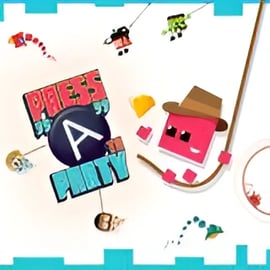
Press A To Party is a fast-paced couch multiplayer arcade that turns your keyboard into a party controller. It's a browser minigame collection built around one button arcade games, letting 2–4 players mash a single key each and battle it out in quick, chaotic rounds. If you like couch multiplayer games, silly reactions, and instant pick-up-and-play fun, this is exactly the kind of family friendly arcade game you can launch in seconds.
Instead of complex combos or long tutorials, Press A To Party focuses on timing and reactions. Every minigame uses the same idea: press your button at the right moment. Sometimes you'll be swinging on a rope, sometimes dashing up a tower, sometimes jumping through hoops. Because the rules change every round, the game feels fresh even during long local party games online sessions.
Best of all, you can play it straight from your browser as a free couch arcade online, so there's no installation and almost no setup. Just open the page, pick your keys, and start mashing.
Press A To Party is designed as a one-button experience, which makes it perfect for casual players, younger kids, and anyone who just wants to join the fun without learning complex controls. Each player gets exactly one key, and that's all you need to interact with every minigame.
On most browser platforms, the default keyboard layout looks like this:
Every action in the game is tied to that single input: jumping, grabbing, accelerating, stopping, or triggering special moves—depending on the current minigame. The beauty of this design is that absolutely anyone on the couch can understand it in seconds.
Some quick control tips:
Because everything is so simple, Press A To Party doubles as a great "first game" for younger kids or non-gamers. It's one of those rare family friendly arcade games where a grandparent, a younger sibling, and a seasoned gamer can all compete on fairly equal footing.
Press A To Party is structured like a compact browser minigame collection with a focus on replayable, competitive modes. While each hosting site may present menus a little differently, the overall structure stays similar.
If you're playing solo, you can dive into a high-score style mode that cycles through the different one button arcade games. Your goal is simple: survive as long as possible and rack up points. The challenge ramps up quickly as speeds increase and obstacles appear faster.
This mode is ideal if you want to:
This is where Press A To Party truly shines as a local party game online. Up to four players sit around the same keyboard and use their one-button inputs to compete in short, randomized rounds. Each minigame awards points based on performance, and at the end of a set, one person is crowned champion.
Common elements in VS mode include:
Some versions of the game feature a "championship" or "party" mode that automatically strings multiple minigames together into one longer session. This is perfect for family game night because you can set up a run, pass around the keyboard, and let the game do the rest.
Across all modes, the core idea remains the same: low-stress fun that feels like a digital board game. If you're building a rotation of couch multiplayer games for your browser, Press A To Party slots in perfectly between longer, more complex titles.
Press A To Party runs directly in modern desktop browsers using HTML5 / WebGL technology. That means there's no heavy download or installer—just open the game page and start your session.
You can usually find it on major browser gaming platforms under categories like:
To get the smoothest experience when you play this free couch arcade online, keep in mind:
Because it's browser-based, sharing the fun is easy. For family gatherings or office breaks, you can simply send a link, gather everyone around one screen, and start your tournament.
Press A To Party is built as a family friendly arcade game with simple visuals, bright colors, and clean, non-violent gameplay. Characters are stylized and cartoonish, challenges focus on timing and movement, and sessions are short and light-hearted.
From a content perspective, it's well-suited for:
As with any browser-based title, it's still good practice for parents or guardians to:
On its own, Press A To Party focuses purely on humorous, competitive arcade action—no chat systems, no user-generated content, and no real-money purchases in typical web versions. That makes it a safe pick when choosing local party games online for your next get-together.
Even if you've never touched a one-button game before, Press A To Party is incredibly simple to learn. Here's how a typical session works from start to finish:
Because every round is so short, it's easy for people to drop in or out between games. This makes Press A To Party a natural centerpiece when you're rotating through several couch multiplayer games over the course of a night.
To keep play sessions running smoothly:
Press A To Party features multiple distinct minigames, each designed around the same one-button input but with a different twist. While the exact lineup can vary by platform, you can generally expect variations on these ideas:
In some stages, you'll need to press your button to jump at just the right moment—over gaps, through hoops, or onto platforms. These are classic one button arcade games where success is all about rhythm.
Other minigames put your character on a rope, zipline, or tower. Press to latch on, release, or boost upward. Because everyone uses the same control scheme, it becomes a chaotic race to see who can make the most of each swing.
Some rounds are relentless obstacle courses, where pressing your button makes your character jump, duck, or change state. These stages feel like bite-sized runners, perfect for a fast round in a local party game online.
The most replayable mode strings these challenges together into a mixed "championship" playlist. Because minigames appear in random order, nobody can rely solely on one favorite event. You'll have to prove your skills across the entire browser minigame collection to take home the crown.
With only one button, winning in Press A To Party might seem like pure luck at first—but there's actually a surprising amount of depth. Here are some practical tips to help you dominate your next set of couch multiplayer games:
Most minigames give you a short "Ready?" or countdown sequence. Use this moment to:
Some events reward rapid tapping, while others require precise, longer presses:
Spend a few solo runs testing how your character reacts to each style in different stages.
Because many matches are short and randomized, losing one round doesn't mean losing the entire session. Stay calm, especially in championship modes. The next minigame might be one that suits your strengths.
In shared-screen local party games online, you can actually learn by watching your rivals:
A quick solo session in high-score mode can sharpen your timing before your next family get-together. You'll recognize patterns faster, which makes multiplayer rounds feel much easier.
Since Press A To Party is built as an on-the-couch experience, arranging players around the keyboard comfortably is almost as important as mastering the games themselves.
This is great for a quick head-to-head match, with one person on each side of the keyboard.
Try seating players like this:
If you're playing at a big table during a party, pull the keyboard slightly forward so everyone has an easy reach. This physical setup goes a long way toward making Press A To Party one of the smoothest couch multiplayer games you can launch from a browser.
Press A To Party hits a sweet spot that many family friendly arcade games aim for but rarely nail: instant accessibility plus genuine competition.
Here's why it works so well for family game night:
If your household enjoys simple, competitive local party games online, adding Press A To Party to your rotation is an easy win. It's light, approachable, and built from the ground up for people sitting on the same couch, sharing the same keyboard, and laughing at the same tiny arcade disasters.
A: Press A To Party is a casual arcade collection of fast minigames where up to 4 players compete on the same screen using simple one-button controls.
A: Yes. Up to 4 players can share the same keyboard and compete locally in quick party-style matches.
A: No download is needed on supported sites. You can play directly in your web browser as an HTML5 WebGL game.
A: Typically Player 1 uses Space, Player 2 uses Enter, Player 3 uses Backspace, and Player 4 uses the A key, with all actions done by a single button.
A: Yes. The game is designed as a family-friendly party experience with simple controls, colorful 2D graphics, and short, fun minigames.