Introduction to Magic Princess Dress Up Doll
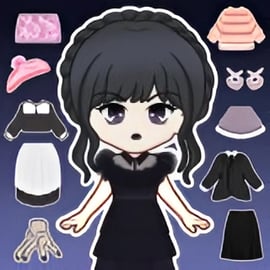
Magic Princess Dress Up Doll is a charming browser-based princess dress up game where you design your own anime-style royal doll from head to toe. If you enjoy cute chibi characters, pastel colors, and endless outfit combinations, this online dress-up experience feels like a digital wardrobe you can play with anytime. There’s no pressure, no timers, and no complicated combos—just pure fashion creativity.
In this anime avatar maker, you can mix hairstyles, eye shapes, outfits, accessories, and backgrounds to create your dream princess. Whether you want a magical fairy queen, a gothic chibi doll, or a casual modern princess headed to school, the game gives you the tools to experiment with different looks in seconds.
Because Magic Princess Dress Up Doll runs in the browser, it’s perfect for quick play sessions. Kids and teens can enjoy it between classes, after homework, or during a break, and parents can relax knowing it’s a family-friendly fashion makeover game with no violent content. You simply dress, style, and pose your character, then screenshot or save your creation.
Magic Princess Dress Up Doll Control Guide
Controls are simple and intuitive, designed so even younger kids can jump in and start playing right away. The game focuses on clicking or tapping through options to customize your chibi doll creator avatar.
Desktop & Laptop Controls
- Mouse click: Select menus, outfits, hairstyles, makeup, and accessories.
- Click & hold (where supported): Scroll through longer lists of items like dresses, shoes, or jewelry.
- Sidebar or icons: Use category icons (hair, eyes, clothes, background, etc.) to quickly switch between customization panels.
- Back/undo button (if available): Step back to a previous choice or clear specific items like hats or glasses.
Mobile & Tablet Controls
- Tap: Choose any item, open a category, or confirm a style change.
- Swipe: Scroll horizontally or vertically through long outfit lists.
- Pinch to zoom (if supported by your browser): Zoom in to see details of your princess doll’s face and accessories.
There are no complex keyboard shortcuts or gamepad setups. The entire experience is point-and-click (or tap-and-swipe), which keeps the focus on creativity instead of mechanics.
Key Features
Magic Princess Dress Up Doll offers a generous set of options that make it stand out from other girls dress up online games. Even though it’s easy to learn, there’s enough depth to keep players experimenting with new ideas for a long time.
- Chibi-style anime princesses: Create adorable, big-eyed characters in a distinct chibi art style that anime fans love.
- Full character customization: Adjust skin tone, hairstyle, hair color, eye style, facial expression, and more to build a unique anime avatar maker look.
- Huge wardrobe selection: Mix gowns, skirts, tops, shoes, stockings, capes, and accessories for hundreds of fashion combinations.
- Themed outfits: Design fantasy queens, seasonal princesses, modern students, magical girls, or royal brides with coordinated sets.
- Accessory overload: Add tiaras, crowns, necklaces, bags, wings, wands, and hair clips to finish your chibi doll creator design.
- Background scenes: Place your princess in castles, gardens, ballrooms, or dreamy fantasy landscapes to match her outfit.
- Screenshot-ready poses: Once your design is complete, pose and capture your character for sharing with friends or using as an avatar.
- Casual, no-stress gameplay: No scores, timers, or losing—just pure fashion makeover fun at your own pace.
Because it’s a browser game, you don’t need to download an app or worry about storage space. Simply load the page, and your fashion makeover adventure begins.
Performance & Troubleshooting
Magic Princess Dress Up Doll is lightweight and built to run smoothly on most modern browsers, even on low-spec devices. If you ever run into issues, a few quick fixes usually solve them.
Game Running Slowly or Lagging
- Close other tabs and apps: Too many open programs can eat up memory and make your dress up game feel slow.
- Switch browser: The game works best in up-to-date versions of Chrome, Edge, Firefox, or Safari.
- Check your connection: Although the game is light, a very weak connection can cause slow loading of art assets.
Game Not Loading At All
- Refresh the page: A simple refresh often fixes a stuck loading screen.
- Disable aggressive ad-blockers for the site: Some blockers may interfere with the game canvas.
- Clear browser cache: Old cached data sometimes conflicts with the newest game files.
- Update your browser: An outdated browser can prevent HTML5 games from displaying correctly.
Controls Not Responding
- Click directly inside the game frame: Make sure the game canvas is active before trying to scroll or tap items.
- On mobile, rotate your device: Switching between portrait and landscape can realign display issues.
If problems continue, try another device or browser to see whether the issue is local to one setup. Since Magic Princess Dress Up Doll is a web-based casual title, technical issues are usually quick and easy to fix.
Is Magic Princess Dress Up Doll Safe to Play Online?
Magic Princess Dress Up Doll is designed as a kid-friendly dress up game with a focus on creativity and styling, making it a safe pick for younger players and families.
- No violence or horror: The content centers on fashion, beauty, and fantasy princess themes—no combat, jumpscares, or disturbing imagery.
- No chatting with strangers inside the game: It’s a single-player customization experience, so there’s no in-game text or voice chat.
- Modest, stylized designs: Outfits are playful and stylized rather than realistic or mature, fitting well within typical children’s fashion makeover games.
- Browser-based safety: Kids don’t need to download files or install apps on devices, which reduces the risk of unwanted software.
Parents should still encourage good digital habits: supervise younger children, explain not to share personal details online, and ensure they play on trusted, reputable browser gaming platforms. But within the game itself, the focus stays on safe, imaginative, princess-themed fun.
How to Play Magic Princess Dress Up Doll Online
Starting a session of Magic Princess Dress Up Doll only takes a few clicks. Here’s a simple walkthrough so new players know exactly what to do from the moment the page loads.
Step 1: Launch the Game in Your Browser
Open your favorite browser and load the game page. After a short loading screen, you’ll see a base princess doll in the center of the screen with menus or icons around her.
Step 2: Customize Your Princess’s Face and Hair
- Pick a skin tone: Choose from a range of shades to match your ideal character.
- Select eye shape and color: Go for bright anime eyes, sleepy princess eyes, or anything that fits your story.
- Choose a hairstyle: Long curls, twin tails, straight bangs, ponytails, buns—mix color and shape for a unique look.
- Add makeup (if available): Soft blush, cute lip colors, and subtle eye makeup can complete your anime avatar maker design.
Step 3: Dress Up Your Magic Princess
- Open the clothing categories: Dresses, tops, skirts, shoes, stockings, and coats usually have separate tabs.
- Try multiple styles: Tap or click on different items to instantly see them on your doll. There’s no penalty for changing your mind.
- Layer your outfit: For example, combine a fancy dress with a cape, then add matching shoes and stockings.
Step 4: Add Accessories and Backgrounds
- Choose accessories: Crowns, necklaces, earrings, headbands, wings, bags, and magical wands help tell your princess’s story.
- Pick a background: Place your character in a throne room, garden, starry sky, or other themed scene.
- Adjust details: Change colors or swap items until everything feels perfectly balanced.
Step 5: Save or Share Your Creation
When your chibi doll creator masterpiece is ready:
- Take a screenshot: Use your device’s screenshot tool to save the image.
- Share with friends: Send your outfit designs over messaging apps, or use them as profile pictures and wallpapers.
After that, you can clear the outfit, start over, and design a whole new character with a different theme.
Create Your Own Anime Princess Avatar
One of the biggest appeals of Magic Princess Dress Up Doll is how it functions as an anime avatar maker. You’re not just swapping clothes—you’re bringing a full character to life.
Build a Unique Character Identity
- Personality through style: Soft pastel tones can suggest a shy, gentle princess, while bold colors and sharp accessories can imply a confident, adventurous royal.
- Storytelling with outfits: Design a winter snow queen, a summer beach princess, or a magical academy student simply by changing clothes and backgrounds.
- Expression choices: Adjust eyes and small face details to make your princess look happy, dreamy, serious, or playful.
Use Your Avatar Beyond the Game
Because the art is crisp and colorful, completed designs from this chibi doll creator game work well for:
- Social media profile pictures or banners
- Story or roleplay character references
- Inspiration for drawings, cosplay, or original characters (OCs)
- Decorating digital planners, slideshows, or blogs
Kids and teens who enjoy anime and manga often use these avatars as a starting point for their own artwork and storytelling.
Dress Up Tips and Fashion Ideas for Your Magic Doll
Even though there’s no “wrong” way to style your princess, a few simple fashion makeover tips can help your designs look extra polished.
1. Pick a Color Palette
Choose 2–3 main colors and repeat them in your outfit:
- For a classic princess: Pink, white, and gold.
- For a gothic look: Black, purple, and silver.
- For a nature fairy: Green, brown, and soft yellow.
Matching dress, shoes, and accessories in the same palette makes your anime princess avatar feel more complete.
2. Balance Simple and Detailed Pieces
- If the dress is highly decorated with patterns, choose simpler shoes and more subtle accessories.
- If the dress is plain, go bolder with a crown, necklace, or statement shoes.
3. Match Background to Outfit Theme
Think of the background as part of the story:
- A ballroom scene works with long gowns and glittering jewelry.
- A garden or forest suits floral dresses and soft, flowing hair.
- A night sky looks great with darker, starry, or magical outfits.
4. Create Character “Collections”
Turn Magic Princess Dress Up Doll into your own fashion design studio by creating sets of characters:
- Seasonal princesses: Spring, summer, fall, and winter looks.
- Elemental queens: Fire, water, earth, and air outfits.
- Event themes: Birthday party, royal ball, school festival, or wedding day.
Saving screenshots of each collection lets you track how your style evolves over time.
Features of the Magic Princess Dress Up Doll Game
Compared with many other fashion makeover games, Magic Princess Dress Up Doll focuses strongly on variety and replay value. Here’s a deeper look at what makes it engaging.
- Rich wardrobe options: From elegant ball gowns to cute casual outfits, there’s something for every mood.
- Layered customization: You aren’t limited to a single “set” outfit—you can mix tops, bottoms, outerwear, and accessories for a custom style.
- Consistent art style: All clothes and accessories share the same polished anime aesthetic, so combinations always look cohesive.
- Instant preview: Clothing and accessories update in real time, encouraging experimentation without frustration.
- Endless combinations: By mixing facial features, hair, outfits, and backgrounds, you can design countless unique princess dolls.
- No strict progression: Everything is about expression; you don’t have to grind levels, complete quests, or unlock chapters.
This makes Magic Princess Dress Up Doll ideal for both quick “five-minute outfit” sessions and longer creative play where kids build entire casts of characters.
Why Kids Love Magic Princess Dress Up Doll
Magic Princess Dress Up Doll hits a sweet spot for kids, tweens, and even older anime fans who want a cozy creative outlet. Several factors make it especially popular among girls dress up online audiences:
- Creative freedom: There’s no “right answer.” Kids can express their own taste in fashion and color without worrying about failing.
- Instant results: Every click changes something onscreen, which feels satisfying and encourages experimentation.
- Relatable fantasy: Many children dream of being a princess or magical hero; this game lets them visualize that dream instantly.
- Safe, calm atmosphere: Gentle music and peaceful visuals make it a relaxing experience rather than a stressful challenge.
- Replayability: New outfit ideas, character concepts, and themed designs keep kids coming back to try more combinations.
For parents and guardians, Magic Princess Dress Up Doll is a positive, imaginative way for kids to play with aesthetics, storytelling, and design in a contained, browser-based environment. For players, it’s a delightful mix of princess dress up game, anime avatar maker, and fashion makeover games all rolled into one magical package.
FAQ
What is Magic Princess Dress Up Doll?
A: Magic Princess Dress Up Doll is a casual fashion and makeover game where you create a cute princess doll, choose her hairstyle, makeup, outfits, and accessories, then save or share your designs.
Is Magic Princess Dress Up Doll free to play online?
A: Yes, you can play Magic Princess Dress Up Doll for free in your browser. There is no download required, and you can enjoy unlimited dress up combinations without paying.
Do I need an account to play Magic Princess Dress Up Doll?
A: No account is required to start playing. Just open the game in your browser, pick a doll, and begin styling her look right away.
Is Magic Princess Dress Up Doll suitable for kids?
A: Yes, the game is family-friendly and designed for kids and teens who enjoy princesses, fashion, and creative dress up play. There is no violent or scary content.
Can I save or share my princess doll designs?
A: Yes, after you finish styling your princess, you can take a screenshot or use your device’s capture tools to save the picture and share your favorite looks with friends or family.