Lost Things

Played 20 times.
5.0 (1 Reviews)
Developer: GameVoda
Published on: January 2026
Updated on: January 2026
Game technology: html5
Game rating: 5.0
Platforms: Desktop, Mobile, Tablet

Overview of Lost Things

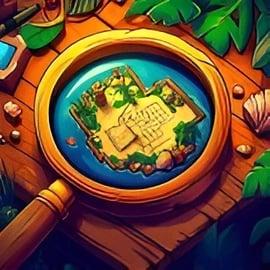
Lost Things is a relaxing yet mysterious hidden object puzzle game you can play right in your browser. It blends classic point and click mystery gameplay with a gentle, story driven puzzle experience. Each scene is packed with cleverly concealed items, atmospheric details, and small narrative moments that slowly reveal a world built around misplaced memories and forgotten treasures.

Instead of rushing you with timers, Lost Things encourages you to slow down, observe carefully, and enjoy the process of discovery. You’ll scan cozy rooms, strange attics, and dreamy realms to find lost objects online, following clues that connect each level into a larger adventure. It’s easy to pick up, kid-friendly, and perfectly suited for short breaks or long chill sessions.

Whether you love casual puzzles, point and click mystery adventures, or simply the satisfaction of clearing a hidden object scene, Lost Things offers a comforting blend of challenge and calm. Best of all, it runs in your browser, with no download or sign-up required on most gaming sites.

How to Play Lost Things

At its core, Lost Things is a straightforward browser puzzle adventure, designed so anyone can start playing within seconds. The interface is clean and intuitive, which makes it a great entry point if you’re new to hidden object games.

Here’s how a typical round of this story driven puzzle game works from start to finish:

  • Enter a scene: Each level loads a detailed location filled with objects. It might be a bedroom, a cluttered study, or a surreal dreamscape.
  • Check your task list: On the side or bottom of the screen, you’ll see a list (or icons) of items you need to find. These can be everyday objects, sentimental keepsakes, or story-critical clues.
  • Search visually: Use your eyes and memory skills to scan the scene. Objects can be blended into the environment by color, shape, or partial hiding behind other items.
  • Click to collect: When you spot a target item, click or tap it. If it’s correct, it disappears from the scene and from your list.
  • Use hints sparingly: If you get stuck, tap the hint button (when available) to highlight or briefly indicate where a hidden object might be.
  • Advance the story: Once you’ve collected all items in a level, you’ll unlock the next chapter and often see a short story snippet or visual transition.

The game gradually increases in complexity by layering more objects, trickier hiding spots, and subtle environmental storytelling. However, it stays welcoming by providing clear lists, generous hints, and simple controls that make the experience satisfying rather than stressful.

How to Play Lost Things: Explore a World of Forgotten Objects

Lost Things isn’t just a collection of isolated puzzles. It’s a gently unfolding point and click mystery that leads you through a world built from forgotten possessions and fading memories. Every scene you clear adds a new piece to the overall narrative.

Here’s a simple step-by-step way to approach your first play session:

  1. Start with the opening chapter: The early levels serve as a tutorial, introducing the basic hidden object mechanics and easing you into the story.
  2. Follow the narrative prompts: Small bits of dialogue, notes, or visual cues appear between scenes. Pay attention – they often explain why specific objects matter.
  3. Explore every corner of the scene: Move your mouse or finger around the edges, corners, and layered areas. Objects may be tucked into shelves, resting in shadows, or subtly blended with background textures.
  4. Look for visual patterns: Similar colors, repeating shapes, and mirrored layouts can help you narrow down where items might be hiding.
  5. Revisit clues in your mind: When you pick up a meaningful item – for example, an old photograph or a broken locket – think about how it connects to previous levels. That mental thread makes the story more engaging.
  6. Take your time: Lost Things rewards careful observation. You don’t need to rush; taking a slower, more deliberate approach often makes scenes easier and more relaxing.

As you progress, you’ll realize that each “lost thing” belongs to someone or something. Piecing together who these items belonged to, and why they were lost, transforms each scene from a simple list of objects into a small chapter in a larger tale.

Basic Rules & Mechanics

While the visual presentation feels rich and atmospheric, the underlying systems in Lost Things are simple. This balance between clarity and detail is what makes it such a satisfying hidden object puzzle game.

Core Gameplay Rules

  • Find all listed items: Your main objective is to locate every item shown on your list to complete the level.
  • Click accuracy matters: Clicking randomly may have minor penalties on some platforms (such as a short cooldown or reduced score), so careful searching is encouraged.
  • No hard fail state: There’s typically no “game over” for taking too long. You can keep searching until you’ve found everything, which keeps the experience friendly for all ages.
  • Story progression: Completing levels unlocks new environments and story beats, guiding you through an overarching mystery.

Hidden Object & Puzzle Layers

While the main challenge is finding items, Lost Things often weaves in light puzzle elements to keep things interesting:

  • Context-based clues: Certain objects are easier to locate if you interpret the scene’s theme or narrative hint (for example, “something that reminds them of home”).
  • Partial objects: Some items are only partially visible – tucked behind other objects, under furniture edges, or merged with decorative details.
  • Sequence interactions: In advanced levels, you might need to find items in a rough order, or uncover one object to reveal another behind it.

These small twists add depth without turning the game into a complex logic puzzle, maintaining the focus on observation and relaxation.

Lost Things Game Modes

Lost Things is primarily a linear story driven puzzle game, but many browser versions still offer subtle variations in how you can experience the adventure.

Standard Story Mode

This is the default way to play and the best option for first-time players. You’ll move scene-by-scene through the overarching narrative, discovering new locations and characters as you go. The difficulty ramps up slowly, and hints are usually available if you need them.

Challenge or Timed Variants (Platform-Dependent)

Some platforms that host Lost Things may provide optional challenge twists, such as:

  • Timed runs: Try to clear scenes within a certain time limit for bonus points or stars.
  • Limited hints: Play with strict hint limits to push your observation skills.
  • Score chasing: Earn higher ratings by finding items quickly and avoiding mis-clicks.

These modes are ideal if you’re already comfortable with hidden object gameplay and want a more competitive edge while you find lost objects online.

Accessibility-Focused Options

Lost Things places emphasis on comfortable play. Depending on the hosting site, you may see:

  • Relaxed mode: Play with no timers, generous hints, and reduced penalties for mistakes.
  • Replayable scenes: Revisit favorite levels to improve your time or simply enjoy the artwork and story details again.

Regardless of mode, the core loop remains the same: explore, observe, and uncover the story behind each forgotten object.

Tips and Tricks to Find Hidden Items Faster in Lost Things

If you’d like to sharpen your skills and make each scene smoother, these practical tips will help you master this browser puzzle adventure without spoiling the fun.

  • Scan in sections: Mentally divide the screen into quadrants and search one section at a time. This keeps your eyes organized and prevents you from missing obvious items.
  • Read the list first: Take a few seconds to memorize or at least glance through all target items. Your brain will start spotting them subconsciously as you scan the scene.
  • Look for unique silhouettes: When an object name is generic (like “key” or “book”), focus on shapes and outlines. It’s often easier than identifying by color alone.
  • Use peripheral vision: Don’t stare in one small spot. Let your eyes wander and use your side vision to notice unusual shapes or colors that stand out from the background.
  • Zoom if available: If the platform supports zooming, use it to check dense or dark areas where tiny objects could be hiding.
  • Save hints for last: Keep hints for the final one or two stubborn items. Solving most of the list on your own makes the scene more rewarding.
  • Take short breaks: If you’re stuck, look away from the screen for a moment. When you look back, hidden items often “pop out” that you missed before.

These habits turn you into a more efficient seeker and make each mystery scene smoother without sacrificing the cozy, relaxed feeling that defines Lost Things.

Lost Things Game Levels: From Cozy Homes to Mysterious Realms

One of the biggest joys of Lost Things is its variety of locations. Instead of repeating the same kind of room over and over, the game gradually expands into a full journey through different spaces and emotional tones.

Everyday Spaces

The adventure usually begins in familiar places – bedrooms, living rooms, attics, and home offices. These cozy environments are packed with household objects, childhood mementos, and sentimental keepsakes that hint at the lives of the people who lost them.

Transitional Locations

As you advance, the settings shift to liminal spaces like train stations, parks at dusk, abandoned shops, or dusty libraries. These levels often carry a slightly wistful mood, reflecting moments of change and transition in the story.

Mysterious & Dreamlike Realms

Later chapters lean into a more magical, mysterious tone. You might explore surreal landscapes, half-remembered places, or symbolic rooms where reality and memory blur together. These stages are especially rich for fans of point and click mystery adventures, as the objects you find grow more metaphorical and story-heavy.

This progression—from ordinary homes to otherworldly realms—keeps the game visually fresh while reinforcing the idea that every lost thing, no matter how small, carries a deeper story.

Who Will Enjoy Lost Things? Fans of Puzzles, Story, and Mystery

Lost Things is designed to be welcoming for a wide audience. If any of the following describes you, there’s a good chance this game will fit your taste.

  • Hidden object fans: If you already love scanning packed scenes for cleverly concealed items, this is a natural fit.
  • Casual puzzle players: You enjoy puzzles that are thoughtful but not overwhelming. Lost Things offers challenge without steep learning curves.
  • Story lovers: If you like narratives about memory, nostalgia, and small everyday mysteries, the game’s gentle storytelling will resonate.
  • Relaxed gamers: Players who prefer calm, no-pressure experiences over high-intensity action will appreciate the slow pace and soothing visuals.
  • Families & younger players: The content is family-friendly, with simple mechanics that kids and adults can enjoy together in short sessions.

If you’re looking for a story driven puzzle game you can play in your browser, without downloads or complex rules, Lost Things is especially well-suited to you.

Lost Things Controls

Controls in Lost Things are intentionally streamlined so you can focus on observation rather than inputs. You’ll mainly be using a mouse on desktop or touch controls on mobile.

Desktop & Laptop Controls

  • Mouse move: Move the cursor to explore the scene.
  • Left-click: Select an object you believe matches your list.
  • Hint button: Click the on-screen hint icon (when available) to receive guidance for a hard-to-find item.
  • Pause / Menu: Click the menu or gear icon to pause, adjust options, or return to the level select.

Mobile & Tablet Controls

  • Tap: Tap on objects to select them and interact with the scene.
  • Pinch (if supported): On some platforms, pinch to zoom in or out for more precise searching.
  • On-screen buttons: Tap hint, pause, or settings icons for additional functions.

This simple game control guide makes Lost Things highly accessible and easy to share with friends or family members who may not usually play games.

Where to Play Lost Things

Lost Things is typically available as an HTML5 browser puzzle adventure on various gaming portals. While the exact list of sites can change over time, here are general guidelines for finding and playing it:

  • Browser-based platforms: Look for Lost Things under Puzzle, Adventure, or Hidden Object categories on popular gaming sites that support WebGL or HTML5 titles.
  • No download required: In most cases, you can play directly in your browser window without installing extra software.
  • Cross-device support: Many hosts let you play Lost Things on desktops, laptops, and mobile browsers, though performance can vary by device and connection quality.

As with any online game, performance and features (like hints, timers, or extra modes) may differ slightly depending on the platform hosting the game, but the core hidden object experience remains intact.

Lost Things Controls, Hints, and Accessibility Options

Because Lost Things is meant to be inclusive, it often includes options that make the experience more comfortable for a wide range of players.

Hint & Assistance Systems

  • Hint button: Highlight or briefly flash the area where a missing object is located.
  • Cooldowns (platform-dependent): Some versions include a short cooldown between hints to keep challenge intact while still helping you through difficult moments.

Visual & Comfort Options

Exact options vary by hosting site, but you may encounter:

  • Fullscreen toggle: Enlarge the game to reduce clutter and make smaller objects easier to see.
  • Sound toggles: Turn music or sound effects on or off to suit your environment.
  • Brightness or contrast controls: On some platforms, adjusting display settings can help you distinguish objects from the background more easily.

These options support players with different visual preferences or sensitivities and help ensure that the game remains approachable and enjoyable over longer sessions.

Is Lost Things Safe to Play Online?

Lost Things is designed as a family-friendly hidden object puzzle game with gentle themes and accessible gameplay. Here are a few points to consider regarding safety and content:

  • Content rating: The game avoids graphic violence, strong language, or inappropriate themes, making it broadly suitable for younger players with adult guidance where needed.
  • No competitive chat: As a single-player hidden object experience, Lost Things doesn’t rely on public chat systems, which reduces exposure to inappropriate user-generated content.
  • Browser safety: Always play on reputable gaming platforms and keep your browser and security software updated. Avoid third-party downloads claiming to be the game, as Lost Things is usually playable directly in your browser.

Overall, when accessed through trusted gaming sites, Lost Things is a safe, calm, and thoughtful point and click mystery adventure suitable for most players looking to relax while they find lost objects online.


FAQ

What is Lost Things about?

A: Lost Things is a hidden object puzzle adventure where you explore whimsical locations, search for misplaced items, and uncover the stories behind them.

Is Lost Things free to play online?

A: Yes, Lost Things is designed to be played for free in your browser, with no download required.

Do I need to create an account to play Lost Things?

A: No, you can start playing Lost Things instantly without signing up. Some platforms may offer optional accounts to save progress.

Is Lost Things suitable for kids and families?

A: Yes, Lost Things is family-friendly, featuring non-violent gameplay focused on observation, logic, and light narrative mystery.

Can I play Lost Things on mobile devices?

A: If your browser supports HTML5 games, you can play Lost Things on most modern smartphones and tablets as well as desktop computers.


×

Report Game