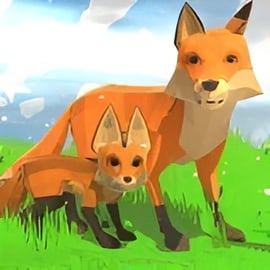
Fox 3D is a 3D animal simulator that lets you step into the role of a wild fox roaming a vast open world. Instead of controlling a human hero, you live life as a fox: hunting for food, completing quests, and protecting your growing family in a living, breathing forest. If you enjoy a relaxed but engaging wildlife adventure game with light RPG systems and survival elements, this fox simulator online is a great browser-friendly pick.
The game blends action, simulation, and adventure. You dash through forests, sneak up on prey, and interact with humans and other animals across a large map. As you play, you earn experience to upgrade your stats, unlock new abilities, and customize how your fox and its family look. It feels like an open world animal game but with simple controls and straightforward goals, making it accessible for both kids and adults.
Because Fox 3D runs in the browser through WebGL, you don't need a powerful gaming PC or a dedicated console. You just load it up, press play, and you're instantly exploring the wild as a graceful fox, learning to survive in nature and build your own fox pack from scratch.
Fox 3D keeps the controls simple so you can focus on exploration and survival. Most actions are handled with standard PC keys and a few mouse clicks. Here's a breakdown of the basic control layout you'll typically see in this 3D animal simulator:
In some builds of the game, you'll see on-screen icons that indicate quest givers, shops, or your den location. You can often click these icons or navigate toward them to start missions. The control scheme is intentionally minimal so the focus stays on enjoying the forest, completing tasks, and managing your fox's survival needs.
If you're playing on a device that supports gamepads, many browsers can map controller input automatically. Left stick usually moves, right stick looks around, and the trigger or face buttons can handle attack and jump. However, keyboard and mouse remain the most reliable option for responsive control in this browser-based fox simulator online.
Fox 3D packs a surprising amount of depth for a browser-based animal survival game. It's not just about running around as a fox; there are multiple systems working together to make the world feel alive and to give you long-term goals.
Together, these features create a relaxed but engaging wildlife adventure game. There's no strict "win" screen. Instead, the main objective is to thrive: explore as much as you can, grow stronger, expand your fox family, and see how long you can survive in the wild.
Fox 3D is designed first and foremost as a browser-based 3D animal simulator. That means you can typically play it directly in modern web browsers without extra downloads.
To enjoy Fox 3D smoothly, keep these general guidelines in mind:
Many online gaming portals categorize Fox 3D under Action, Simulation, or Adventure, so if you're browsing collections of open world animal games you'll often see it listed alongside other animal simulators. Simply look for "Fox 3D" or "Fox Simulator 3D" in the search bar of your favorite browser game site, then click Play to start.
Because availability can vary by region or portal, it's a good idea to bookmark the page once you find a version that runs well on your device. That way you can jump back into the forest with a single click whenever you're in the mood for a quick wildlife adventure game session.
Fox 3D is generally considered safe for most players when accessed through reputable browser gaming platforms. It's designed as a family-friendly animal survival game with cartoon-style violence and no realistic gore. You'll see your fox attack other animals and humans in a stylized way, but it stays within typical "everyone" to "young teen" content levels on most sites.
Here are a few safety points to keep in mind:
If you're a parent, you can sit with your child for the first session to see how Fox 3D handles hunting and combat. Because it stays stylized and non-graphic, most families find it acceptable as a gentle introduction to wildlife themes and food-chain style survival. As always, use your own judgment and the rating guidelines of the site you're playing on.
Getting started with Fox 3D in your browser only takes a few steps. Once you've played one run, dropping back in for another fox adventure becomes quick and easy.
From here, you're free to roam. Many players like to start by exploring the area around the fox den, getting used to the controls before taking on larger quests. Once you're comfortable, you can search for humans who offer tasks, track down prey, and start working toward building your fox family.
Because everything runs inside the browser window, you can easily pause your wildlife adventure game by switching tabs or closing the page. Just remember that some versions of Fox 3D save your progress locally, so playing on the same browser and device gives you the best chance for consistent save files.
The heart of Fox 3D is its combination of exploration, quests, and survival mechanics. Together, they create a loop that keeps you engaged session after session.
The map in this open world animal game is more than just a backdrop. You'll find:
Every area hides its own mix of animals, challenges, and possible tasks, so wandering off the beaten path is often rewarded.
Quests give structure to your time in the wild. Typical mission types include:
Completing quests grants experience and sometimes resources, letting you upgrade your fox more quickly and unlock new customization options.
Underneath the quests sits a light survival system. You'll need to:
This gives Fox 3D more tension than a simple walking simulator, while still keeping it accessible for casual players who just want to enjoy a relaxing wildlife adventure game.
One of the most satisfying parts of Fox 3D is building a strong fox family. Instead of staying alone, you can eventually travel with a mate and cubs that help you survive. Here are some practical tips to get the most out of that system:
Think of your fox family as a long-term investment. Early sessions might be spent alone, gathering strength and learning the map, but once your family is established, the entire game starts to feel more like a pack-based open world animal game than a solo adventure.
To really enjoy this fox simulator online, it helps to understand how movement, combat, and progression fit together into a smooth gameplay loop.
Stay in motion. Use running and jumping to:
Learn a few landmarks near your starting den so you don't get lost. Trees, rocks, and rivers all help you mentally map the area.
Alternate between free roaming and questing. Quests give structured goals and strong rewards; free roaming lets you explore and gather food at your own pace. Over time, this mix naturally builds you into a powerful survivor within the Fox 3D world.
If you enjoy Fox 3D and want more 3D animal simulator and wildlife adventure game experiences, there are plenty of browser and mobile titles with a similar feel. Many come from the same style of developers who specialize in open world animal games.
Each of these games offers its own twist on the formula Fox 3D uses so well: you live as an animal, explore an open environment, complete quests, and gradually grow stronger. If you're looking for more fox simulator online style experiences, this broader family of animal simulators will keep you exploring the wild for a long time.
A: Fox 3D is a 3D animal simulation game where you play as a wild fox, explore an open world, complete quests, hunt for food, and build a fox family.
A: Yes, Fox 3D can be played for free in your web browser without any download. Some versions may also be available as mobile apps.
A: Fox 3D is generally family-friendly, but it includes mild animal hunting and survival elements. Parents may want to supervise younger children.
A: Typically you use WASD or arrow keys to move, the mouse or left click to attack, Space to jump, and Shift to run. Controls may vary slightly by platform.
A: Yes, one of the main features in Fox 3D is finding a mate, starting a fox family, and upgrading and customizing your family members.