Snowflight

Played 6 times.
5.0 (1 Reviews)
Developer: GameVoda
Published on: April 2026
Updated on: April 2026
Game technology: html5
Game rating: 5.0
Platforms: Desktop, Mobile, Tablet

Overview of Snowflight

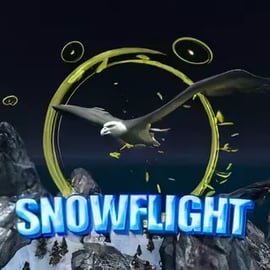
Snowflight is a calm yet captivating winter flying game where you guide a small bird through a vast, snowy landscape. Instead of fast-paced shooting or endless obstacles, this snowy adventure browser game focuses on relaxing exploration, smooth flying controls, and the cozy atmosphere of a quiet winter day. It plays right in your browser as a free animal flying game, so there’s no download or signup required.

As you soar above frosted trees, icy lakes, and snow-covered hills, your goal is to collect hidden items, follow glowing trails, and discover new corners of the map. Snowflight blends adventure, arcade, and flying elements into one accessible package that suits casual players, kids, and anyone who wants a break from high-pressure action games.

Because the game is built as an online winter arcade experience, sessions can be as short or as long as you’d like. You can spend a few minutes gliding peacefully or dive into the various challenge modes to test your reflexes, path-planning, and item-hunting skills. Either way, Snowflight makes winter exploration feel cozy instead of harsh, with gentle pacing and intuitive controls.

Basic Rules & Mechanics

Snowflight keeps its rules simple so you can start playing immediately. The mechanics are easy to understand even if you’re new to a winter flying game, but there’s enough nuance to stay interesting as you chase better routes and faster times.

  • You control a single bird: Your character is a nimble winter bird, always in motion once you start flying.
  • Continuous forward movement: The bird glides through the air while you adjust direction and speed. Think of it as steering through the sky rather than stopping and starting.
  • Explore, collect, and compete: The core loop is simple: explore the snowy map, discover hidden items, and complete challenge objectives tied to time, accuracy, or collection goals.
  • Gentle learning curve: Early sections of the world are wide and forgiving. Later routes ask for tighter turns, sharper climbs, and smarter use of acceleration.

There’s no complicated inventory to manage and no story text to memorize. Instead, Snowflight leans into pure movement—gliding, banking, diving, and climbing through layered winter scenery that rewards curiosity.

Because it’s an online winter arcade title, your main “score” comes from how well you perform in each mode: how many items you collect, how quickly you finish routes, or how efficiently you trace hidden paths around the landscape. The rules stay consistent across modes, which makes this snowy adventure browser game feel approachable while still offering replay value.

Snowflight Control Guide

Learning how to control your bird smoothly is the key to enjoying this relaxing bird exploration game. The input is intentionally minimal, making it easy to play on most devices that support a mouse or touchpad.

  • Mouse movement – Steer your bird: Move your mouse to adjust the bird’s flight direction. Sliding left or right tilts your path, while pushing the cursor up or down adjusts climb and descent. Small movements are usually enough for gentle turns.
  • Left mouse button – Accelerate: Hold the left button to give your bird a burst of speed. This is useful for climbing hills, dashing through open sky, or racing through timed challenges.
  • Tab or Esc – Pause menu: Pressing Tab (or sometimes Esc, depending on implementation) pauses the game, letting you take a break, change modes, or restart a run.

You don’t need a keyboard or gamepad to play, although some platforms may offer optional controls. Mouse-based steering keeps the entire experience light and accessible, which suits the gentle pacing of this free animal flying game.

To master the feel of Snowflight’s controls:

  • Use small, steady motions: Dramatic swings of the mouse can over-steer your bird. Smooth, short movements help you glide around obstacles gracefully.
  • Tap acceleration, don’t spam it: Instead of holding boost all the time, tap or pulse it to maintain control. A quick burst lets you clear a gap or climb, but constant speed can make tight corners harder.
  • Read the terrain: As you get used to the layout, anticipate hills, trees, and ice formations so you can begin your turns early, not at the last second.

Within a few minutes, you’ll feel the difference between stiff steering and fluid motion. That smooth flow is what makes Snowflight stand out among winter flying games.

Snowflight Game Modes

Snowflight features multiple modes that all use the same core controls but emphasize different parts of the experience. This variety makes the game flexible: you can relax with slow exploration or jump into more intense challenges when you’re in the mood.

  • Exploration Mode: This is the heart of Snowflight’s relaxing bird exploration design. You’re free to roam the snowy world at your own pace, following your curiosity without strict timers. The focus is on discovering new views, listening to the ambient sound, and feeling the glide of your bird.
  • Hidden Item Hunt: In this mode, the map becomes a giant treasure hunt. Collectibles are tucked into caves, perched on ridges, or nestled behind trees. You’re rewarded for careful observation and learning the environment rather than pure speed.
  • Timed Challenges: For players who enjoy arcade-style pressure, timed routes ask you to fly through checkpoints or gather a set of items before the clock runs out. These challenges highlight precise steering and smart use of acceleration.
  • Score or Combo Runs: Some variants reward chaining item pickups, flying clean lines, or completing laps without collisions. These add a more competitive twist while still keeping the tone family-friendly.

Because all modes are wrapped in the same snowy environment, you’re constantly getting better at navigating the world. The more you play this snowy adventure browser game, the more natural its routes and shortcuts will feel, turning the entire map into your personal sky playground.

Performance & Troubleshooting

Snowflight is an HTML5 browser title, built to run smoothly on most modern devices. Still, as with any online winter arcade game, a few tweaks can help if you experience lag or stuttering.

Recommended setup

  • Modern browser: Use the latest version of Chrome, Firefox, Edge, Safari, or another updated browser that supports WebGL and HTML5.
  • Stable internet connection: While gameplay isn’t heavily networked, a stable connection helps with initial loading and asset streaming.
  • Desktop or laptop: You’ll get the smoothest experience steering with a mouse or trackpad, though some platforms may support touch.

Simple fixes for common issues

  • Game feels laggy or slow: Close extra browser tabs, pause downloads or streaming video, and make sure no heavy background apps are running.
  • Frozen loading screen: Refresh the page, clear the browser cache, or try an alternate browser. Ad-blockers or script blockers can sometimes interfere, so consider whitelisting the site.
  • Controls feel unresponsive: Plug in a wired mouse if possible and check your system’s pointer sensitivity. On laptops, disable “enhanced pointer precision” if it makes your steering feel inconsistent.

In most cases, simply updating your browser and restarting it solves minor glitches. Since Snowflight is a lightweight winter flying game, you shouldn’t need a high-end PC to enjoy smooth, relaxing sessions.

How to Control Your Bird in Snowflight

Mastering the bird’s motion turns Snowflight from a simple online winter arcade game into a genuinely soothing flight experience. Think of your mouse as guiding a tiny kite in a gentle breeze.

Fine-tuning your flight path

  • Plan wide arcs: Instead of snapping into sharp turns, begin curving your path early. Wide arcs keep your speed up while still lining you up for collectibles or gates.
  • Balance altitude: Flying too high can make it harder to spot hidden items; flying too low gives you less time to react to obstacles. Find a comfortable mid-level altitude where you can see ahead clearly.
  • Use gravity smartly: If the terrain slopes downward, ease off acceleration and let gravity and momentum carry you. Save boosts for climbs and tight timing windows.

Staying relaxed while you fly

Snowflight is designed as a relaxing bird exploration experience. Treat mistakes as part of the process rather than failures. Missed an item or took a clumsy turn? Just loop back around and enjoy the extra flight time. The absence of harsh penalties is what makes this free animal flying game appealing for players of all ages.

Game Modes and Challenges in Snowflight

The mode structure in Snowflight gently pushes you to explore new skills without overwhelming you. Whether you’re playing as a quick break or for a longer session, there’s always one more path or objective to try.

Exploration-focused challenges

  • Scenic routes: Some paths are built purely for beauty. These routes let you glide past frozen waterfalls, snowy forests, and distant mountains, with only light item collection along the way.
  • Free roam zones: Larger open areas allow you to wander without a fixed finish line, making Snowflight feel like an open-air sandbox instead of a rigid race.

Arcade-style challenges

  • Checkpoint chains: Fly through glowing rings or markers in the correct order, sometimes under a soft time limit. This rewards route memorization and smooth flying lines.
  • Collection sprints: Quickly gather a set number of items scattered in a small region. You’ll need to spot patterns and decide the most efficient route on the fly.

These layered modes help Snowflight bridge the gap between pure relaxation and light competition, making it a versatile snowy adventure browser game to keep bookmarked.

Tips to Find Hidden Items in the Snowy World

One of the biggest draws of Snowflight is hunting down hidden collectibles tucked into the environment. If you enjoy exploration-based games, this winter flying title gives you plenty of reasons to look beyond the main path.

Search strategies

  • Scan the edges: Many hidden items are near the edges of your usual routes—on cliff faces, behind tree clusters, or along the borders of frozen lakes.
  • Follow visual cues: Look for subtle glows, unusual rock shapes, or slightly different snow textures. Designers often use these cues to hint at secret spots.
  • Vary your altitude: Replaying a path at different heights can reveal items you missed before. Try one run low to the ground, then another gliding high above.

Make use of free exploration

Because Snowflight’s exploration mode doesn’t rush you, you can methodically sweep through regions multiple times. This unhurried pace makes the game particularly satisfying for players who like piecing together every last collectible in a world.

Hidden-item hunting also encourages you to deepen your understanding of the terrain. As you find secret pockets of the map, the snowy world starts to feel more like a familiar neighborhood than a generic backdrop—a big part of what makes this winter flying game so memorable.

Relaxing Winter Exploration for All Ages

Snowflight was clearly built with a family-friendly, low-stress design philosophy. Unlike many arcade titles that focus on enemies and explosions, this relaxing bird exploration game keeps things peaceful and gentle.

  • No violent combat: You won’t find weapons, attacks, or mature content. The experience centers on movement, scenery, and light challenge.
  • Soft visuals and audio: Calm winter colors and gentle sound design help create a tranquil mood, making it a good option for winding down.
  • Short, restartable runs: If you make a mistake, you can quickly restart or choose another mode. There’s no heavy penalty or frustration loop.

This makes Snowflight suitable for kids, teens, and adults alike. Parents looking for a safe online winter arcade experience will appreciate the absence of inappropriate themes. Meanwhile, older players who just want a quiet ten-minute break from work or studying can slip into a session without any learning curve.

Because the game is browser-based and free, it’s also an easy choice for classrooms, computer labs, and shared family devices—no logins, microtransactions, or downloads to manage.

Browser Requirements and How to Play Snowflight Online

Getting into Snowflight is as simple as opening a tab. As long as your browser supports modern HTML5 games, you can start flying within seconds.

Minimum browser requirements

  • Updated browser: Chrome, Firefox, Edge, Safari, or a similar modern browser with JavaScript enabled.
  • WebGL / hardware acceleration: Most systems have this on by default. If the game feels unusually sluggish, check your browser’s settings to ensure hardware acceleration is enabled.
  • Input device: A mouse or precise touchpad helps with steering. Touch controls may be offered on some sites, but mouse control is generally more accurate.

How to start playing

  1. Open your preferred browser on a desktop or laptop.
  2. Navigate to a trusted browser gaming platform that hosts Snowflight.
  3. Wait for the game to load fully—this usually takes just a few moments.
  4. Read the simple control instructions on the start screen.
  5. Choose your desired mode (exploration, hidden items, or a challenge variant) and begin flying.

Because it’s a free animal flying game, there’s no purchase step. Just click to play and enjoy the snowy skies. If your first session feels tricky, give yourself a couple of runs to adjust to the steering—it becomes second nature quickly.

Is Snowflight Safe to Play Online?

Snowflight is designed as a safe, family-friendly browser game with content appropriate for most ages. There’s no graphic imagery, offensive language, or mature themes. Instead, the focus is entirely on flying, exploring, and collecting in a peaceful winter landscape.

  • No downloads required: Because you play directly in the browser, you don’t have to install any extra software for this winter flying game, reducing the usual risks associated with downloading files.
  • Simple interface: Menus are straightforward and easy for kids to navigate with a parent’s guidance.
  • Ad safety depends on host site: As with any snowy adventure browser game, the safety of surrounding ads and links depends on the platform you choose. Stick to reputable gaming portals that moderate their advertising and avoid suspicious pop-ups.

For added peace of mind, parents and guardians can play a quick test session or enable standard browser protections and ad filters. Once you’re satisfied with the host site, Snowflight itself offers a calm, cozy, and wholesome way to enjoy winter-themed flying without worry.

Whether you’re chasing hidden items, gliding over frosty valleys, or just enjoying a few quiet minutes of flight, Snowflight delivers a charming online winter arcade experience that’s easy to recommend.


FAQ

What is Snowflight about?

A: Snowflight is a relaxing browser game where you control a bird flying through peaceful snowy landscapes, exploring, collecting hidden items, and completing light challenges.

How do I control the bird in Snowflight?

A: You use your mouse to move the bird and control its flight direction. The left mouse button lets you accelerate, and the Tab key pauses the game in some versions.

Is Snowflight free to play?

A: Yes, Snowflight is a free online game. You can play it directly in your browser without downloading or paying for anything.

Can kids play Snowflight safely?

A: Yes, Snowflight is family-friendly. There is no graphic violence or inappropriate content, and the relaxing winter atmosphere makes it suitable for kids and adults.

Do I need to install any plugins to play Snowflight?

A: No additional plugins are needed. Snowflight runs in modern browsers via HTML5, so you just open the game page and start playing online.


×

Report Game