Overview of Drive Zone
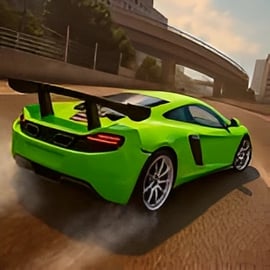
Drive Zone is an open world car simulator that lets you explore a huge coastal city, drift through tight corners, and jump into intense street racing game online events. It blends realistic physics with arcade-style fun, so you can cruise casually, push for perfect drifts, or challenge other players in fast-paced multiplayer races.
The game drops you into a massive 20x20 km map with highways, city streets, airports, race tracks, and hidden shortcuts. You can drive solo, invite friends, or join lobbies packed with up to dozens of players. Whether you’re into realistic drifting mobile games, high-speed races, or just free-roaming, Drive Zone is built as a flexible sandbox for car lovers.
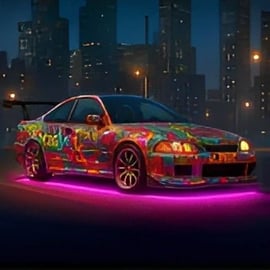
On top of that, Drive Zone offers deep car tuning and customization. You can tweak suspension, tune your engine, adjust camber, install body kits, and create completely custom liveries. Every change affects how your car looks and feels, letting you build the ultimate drift machine, drag racer, or street cruiser.
Drive Zone Control Guide
Learning the controls is the first step to enjoying this open world car simulator. While layouts can vary by device and platform, most versions share the same core inputs and options.
Basic driving controls
- Steering: On mobile, you can usually choose between tilt steering, on-screen arrows, or a virtual wheel. Tilt uses your device’s motion sensors, while arrows and wheels offer more precise taps and drags.
- Throttle / Brake: Right side for acceleration, left side for braking or reverse. Hold the gas for speed, tap brake lightly for weight transfer and better cornering.
- Handbrake: A separate button for initiating drifts and tight turns. This is crucial if you enjoy realistic drifting mobile games.
- Gear control: Many players use automatic transmission, but manual shifting (if available) gives more control in races and drag events.
Camera and interface controls
- Camera view toggle: Switch between third-person, hood, bumper, and full cockpit views. Interior views are great for immersion and judging apexes in corners.
- Mini-map and GPS: Tap to expand or track set waypoints for events, garages, and hidden locations.
- Pause / Settings: Adjust graphics, sound, and control sensitivity mid-drive without leaving the session.
Best control options for beginners
- Start with automatic transmission and button steering (arrows) to reduce mistakes.
- Keep steering sensitivity in the mid-range so cars don’t feel twitchy.
- Enable basic driving assists like traction control until you’re comfortable drifting and racing at high speeds.
Drive Zone Features
Drive Zone isn’t just a standard racer. Its mix of sandbox freedom, multiplayer, and advanced customization is what makes it stand out among other street racing games online.
Massive open world map
- 20x20 km coastal region: Explore city districts, ports, highways, mountain roads, and desert airfields.
- Race tracks and stunt areas: Dedicated circuits, drag strips, and jump zones designed for skill tests and drifting.
- Hidden bonuses: Collectibles and secret spots scattered across the map that reward exploration and skillful driving.
Deep car tuning and customization
- 50+ vehicles: From hatchbacks and sedans to supercars, hypercars, SUVs, and classics.
- Body kits and cosmetics: Bumpers, spoilers, widebody kits, exhaust tips, and custom rims to build your dream car.
- Vinyl editor: Create unique liveries, logos, and patterns. Sell rare skins to other players in supported versions.
- Performance tuning: Upgrade engine, turbo, gearbox, suspension, and brakes to improve each car’s behavior.
Multiplayer and events
- Online lobbies: Drive with up to dozens of players in the same open world session.
- Competitive modes: Drift battles, circuit races, drag contests, and skill tests.
- Social play: Cruise with friends, show off builds, and organize your own street meets.
Where to Play Drive Zone
Drive Zone is designed primarily as a multiplayer car driving and open world experience on mobile platforms. Availability can differ by region, but these are the most common ways to play.
Mobile and tablet platforms
- iOS (iPhone & iPad): Look for Drive Zone: Car Simulator in the official App Store. Always download from the legitimate store listing to avoid clones.
- Android phones & tablets: Search for Drive Zone in the Google Play Store or other trusted app stores depending on your region.
Playing on PC with emulators
If there isn’t a native PC version in your area, you can often play the mobile build on desktop using an Android emulator. For a smoother experience:
- Choose an emulator with strong game optimization and controller support.
- Map your keyboard or gamepad to throttle, brake, steering, and camera controls.
- Lower graphics settings initially and raise them gradually to test stability.
Cross-device progress
Where supported, link your Drive Zone profile to an email or platform account so your car collection, currency, and tuning setups stay synced across devices. Check in-game settings for cloud save or account linking options.
Is Drive Zone Safe to Play Online?
Drive Zone is built as a family-friendly open world car simulator focused on cars, driving, and competition rather than violence. Still, there are a few safety and privacy points to understand, especially for younger players.
Content and age suitability
- Non-violent gameplay: The core experience is racing, drifting, and exploring. Crashes are stylized and don’t include graphic damage to drivers.
- In-app purchases: Players can often buy currency, cars, or cosmetics. Parents may want to disable one-tap purchases on mobile devices.
Online interactions
- Multiplayer lobbies: As a street racing game online, Drive Zone can include voice or text chat and visible usernames in some versions.
- Safe play tips: Use in-game mute or block tools if needed, avoid sharing personal information, and keep usernames non-identifiable.
Account and data protection
- Enable account recovery through email or platform login to secure progress.
- Use unique passwords and log out of shared devices.
Master Open-World Driving Challenges in Drive Zone
The heart of Drive Zone is its open-world design. Unlike linear racers, you can pick your own pace, route, and style. Treat the world like a massive training ground for every driving skill you want to master.
Exploration and hidden rewards
- Follow coastal highways to practice high-speed stability and lane changes.
- Use city districts for tight cornering, traffic weaving, and quick acceleration tests.
- Visit airfields and ports to experiment with jumps, drifting, and stunt chains that reward you with currency.
Skill-focused challenges
- Drift zones: Marked areas where you earn points based on angle, speed, and drift duration.
- Speed traps: Blast through checkpoints at the highest speed possible for bonus cash.
- Time trials: Solo runs that push you to find cleaner lines and braking points.
Balancing risk and reward
Driving aggressively brings bigger rewards but also higher chances of crashing. To thrive in this multiplayer car driving world:
- Learn when to push for risky stunts and when to drive cleanly to secure rewards.
- Use quieter roads as test tracks before showing off in crowded multiplayer hubs.
Best Cars, Upgrades, and Tuning Builds for Drive Zone
Drive Zone’s car tuning and customization systems let you transform stock vehicles into specialized builds. Picking the right car and setup for each activity is key.
Recommended starter cars
- Balanced hatchbacks or sedans: Cheap to buy and upgrade, forgiving handling, and perfect for beginners.
- Early RWD coupes: Great entry to drifting once you’re comfortable with basic driving.
Drift build basics
- Choose RWD or AWD cars with decent power.
- Suspension & camber: Lower the car slightly, add negative camber on front wheels for sharper turn-in.
- Differential: Tighten to keep both rear wheels spinning during slides.
- Tires: Go for medium grip so you can break traction without losing all control.
Race and top-speed builds
- Engine & turbo upgrades: Focus here first for straight-line performance.
- Gearbox tuning: Shorter gears for circuits, longer gears for highway runs.
- Aero & stability: Spoilers and diffusers can improve high-speed grip and reduce sliding.
Visual customization tips
- Use the vinyl editor to create signature race liveries or drift-team themed designs.
- Match rims and body kits to your car’s role: clean street racer look for circuits, flashy widebody for drift builds.
Multiplayer Races, Drifting, and Events Explained
Multiplayer is where Drive Zone transforms from a solo open world car simulator into a living, competitive world. You’ll find multiple event types and social features designed for both casual and serious players.
Main multiplayer event types
- Drift battles: Compete for the highest drift score within a time limit or fixed section. Style, angle, and combo chains matter more than pure speed.
- Circuit races: Lap-based races through city streets or race tracks. Clean lines and braking points are crucial.
- Drag races: Short sprint duels down straight strips where reaction time and gearing decide the winner.
- Skill tests: Obstacle courses, jump lines, or technical layouts that reward precise control.
Playing with friends
- Create or join private lobbies when supported to race only with friends.
- Agree on car class or power limits for fair battles.
- Use open world meet-up spots like parking lots or car shows to compare builds and practice together.
Climbing the ranks
To stand out in this street racing game online community:
- Specialize in one discipline first—drift, drag, or circuit—and refine a dedicated car build.
- Record your best runs, then review where you’re losing time: late braking, poor exits, or inconsistent lines.
Beginner Tips to Earn Money Fast and Unlock New Cars
Progress in Drive Zone is all about earning currency to buy cars and upgrades. With the right approach, you can build a solid garage without feeling stuck or forced to spend.
Focus on consistent events first
- Start with low-difficulty races and drift events where you can reliably finish in the top half.
- Aim for clean driving to avoid crash penalties and repair costs where applicable.
Use free-roam for steady income
- Chain drifts and stunts across quiet areas of the map to build score multipliers.
- Hunt for hidden bonuses and collectibles that give one-time or repeated cash rewards.
Smart spending strategy
- Upgrade one main car at a time rather than spreading money across several vehicles.
- Prioritize performance upgrades (engine, gearbox, suspension) before expensive visual mods.
- Only move to a higher-tier car when your current build consistently underperforms even with good driving.
Avoid common beginner mistakes
- Don’t buy the most expensive car early—maintenance and upgrades can be costly.
- Avoid over-tuning: a too-powerful car with weak handling is harder to control and may lose you more races.
Drive Zone Controls, Camera Views, and Graphic Settings Guide
Fine-tuning your controls, camera, and graphics can instantly make Drive Zone feel smoother and more responsive, especially on mobile devices.
Optimizing control settings
- Sensitivity: Increase steering sensitivity slightly for drifting; lower it for high-speed racing stability.
- Button layout: If allowed, move throttle, brake, and handbrake buttons so you can reach them comfortably with your thumbs.
- Input method: Try tilt, arrows, and wheel modes to see which matches your style best.
Best camera views for each mode
- Third-person chase cam: Great for beginners and drifting—wider view of your car and surroundings.
- Cockpit or hood cam: Ideal for competitive racing where apex precision and depth perception matter.
- Bumper cam: Useful for drag races where you only need to focus straight ahead.
Graphics settings for smooth performance
Because Drive Zone is a visually rich realistic drifting mobile game, adjusting graphics can greatly improve frame rate and control feel.
- Resolution / quality preset: Lower these on older or mid-range devices to keep gameplay smooth.
- Shadows and reflections: Turning them down or off boosts performance significantly.
- Frame rate cap: Use higher frame rates if available; smoother motion makes precise drifting easier.
Balancing visuals and battery life
- Use medium settings for long play sessions to avoid overheating.
- Lower brightness slightly and close background apps to help device stability.
Final thoughts
Drive Zone brings together open-world exploration, multiplayer car driving action, and deep car tuning and customization tools in one flexible package. With the right control setup, smart early-game decisions, and a bit of practice in drifting and racing events, you can turn this open world car simulator into your personal racing playground.
FAQ
What is Drive Zone about?
A: Drive Zone is an open-world car simulator where you can race, drift, complete challenges, and explore a large map while unlocking and upgrading cars.
Is Drive Zone free to play?
A: Yes, Drive Zone is free to play. Optional in-game purchases are available for cosmetic items, cars, and faster progression.
Can kids play Drive Zone safely?
A: Drive Zone features non-realistic driving in a virtual world with no graphic violence. Parents should review in-app purchase settings before children play.
Does Drive Zone have multiplayer races?
A: Yes, Drive Zone includes online multiplayer where you can join rooms with other players for racing, drifting, and free roaming.
Can I customize my cars in Drive Zone?
A: You can customize cars with body kits, rims, spoilers, paints, and tuning options like suspension and engine upgrades to change both style and performance.