Neighborhood Defense

Played 123 times.
5.0 (1 Reviews)
Developer: GameVoda
Published on: January 2026
Updated on: January 2026
Game technology: html5
Game rating: 5.0
Platforms: Desktop, Mobile, Tablet

Introduction to Neighborhood Defense

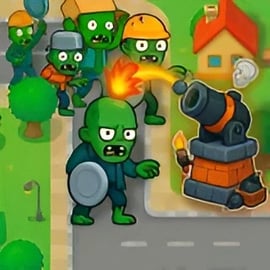
Neighborhood Defense is a casual browser tower defense game where you place turrets along the road to stop waves of enemies from reaching your quiet suburban block. It combines simple click-to-place controls with surprisingly smart pathing, so it’s easy for beginners but still satisfying for players who love strategy. You can jump in directly in your browser with no downloads, making it perfect for a quick break or a longer defense session.

If you enjoy a tower defense game online that feels classic yet approachable, Neighborhood Defense fits right in. You’ll experiment with different turret types, upgrade your defenses, and figure out the best layouts to hold back increasingly tough enemy waves. Because it’s one of those online defense games designed for all ages, it also works well as one of the safer free strategy games for kids on desktop or laptop.

In this guide, you’ll learn how to play Neighborhood Defense, how to optimize your strategy, and what makes it stand out among popular browser tower defense titles.

How to Play Neighborhood Defense

Neighborhood Defense is built to be intuitive, so you can start defending the neighborhood in seconds. Here’s how the basic flow of a round works when you play this tower defense game online:

Basic Rules & Mechanics

The core idea is straightforward: enemies walk along a fixed road from the entrance to the exit of your neighborhood. Your job is to place towers next to this road so they automatically shoot any enemy that comes into range.

  • Starting a level: Click the play button to load a map. Early levels usually have a simple path and fewer waves of enemies.
  • Placing towers: Use your starting cash to buy basic towers. Click a tower icon, then click a valid tile next to the road to build it.
  • Automatic attacking: Once placed, towers fire on their own whenever enemies come into range. You don’t need to aim manually.
  • Wave progression: Enemies come in waves. Each wave is slightly tougher, with more units or faster movement.
  • Lives or health: If enemies reach the end of the road, you lose lives. Lose all your lives, and the level is over.
  • Economy: You earn money each time you destroy an enemy. Use it to build new towers or upgrade existing ones.

This loop makes the game easy to understand yet rewarding to master, especially if you’re new to browser tower defense games.

Neighborhood Defense Control Guide

Controls are kept very simple so that kids and casual players can jump right in. You play entirely with the mouse or a touchpad.

  • Click to select towers: Click on a tower icon in the sidebar or HUD to choose that tower.
  • Click to place: After choosing a tower, move your cursor to a valid tile and click again to place it.
  • Upgrade or sell: Click an existing tower to open its small info panel, where you can typically upgrade or remove it if the game offers those options.
  • Start or speed waves (if supported): Some versions include a button to send the next wave early or adjust the speed.
  • Pause: Use the on-screen pause button to stop the action if you need a break.

Because the controls are so clean and minimal, Neighborhood Defense is one of those free strategy games for kids that adults can also enjoy without feeling like it’s “just for children.”

Objectives & Win Conditions

Every level in Neighborhood Defense revolves around one main objective: defend the neighborhood until the final wave is over. Still, there are a few layers to what “winning” can look like in this tower defense game online.

  • Primary objective: Survive all waves of enemies without letting your neighborhood’s health or lives reach zero.
  • Secondary goals: Complete levels with extra lives remaining, or finish without letting a certain number of enemies through.
  • Score or star ratings: Many versions of Neighborhood Defense reward careful play with higher scores or star ratings based on how well you manage your resources and how few enemies escape.

These simple objectives make it easy to understand what you’re aiming for, while still providing depth for players who want to replay levels and push for a perfect clear.

Key Features

Neighborhood Defense includes several familiar and family-friendly tower defense features:

  • Simple, colorful graphics: Clean visuals make it easy to see paths, towers, and enemies at a glance.
  • Incremental difficulty: Early levels are forgiving, while later stages introduce tougher enemies and more complex paths.
  • Multiple tower types: Mix basic shooters, higher-damage towers, and sometimes area-of-effect defenses to build a balanced setup.
  • Replayable levels: Try different tower placements and upgrades to find the most efficient way to defend the neighborhood.
  • Runs in your browser: Launch and play instantly without installing anything.

Together, these features make Neighborhood Defense a solid pick if you’re browsing for online defense games that work on most computers and can be enjoyed in short sessions.

Performance & Troubleshooting

Since Neighborhood Defense is a lightweight browser tower defense game, it usually runs smoothly on most modern browsers. If you do run into problems, try these quick fixes.

Common Issues & Fixes

  • Game not loading:
    • Refresh the page and wait a few seconds.
    • Make sure your browser has JavaScript enabled.
    • Disable aggressive ad-blockers or tracking blockers for the game page if they interfere with embedded content.
  • Slow or choppy performance:
    • Close extra tabs or background apps that might be using memory or CPU.
    • Switch to a recent version of Chrome, Firefox, Edge, or Safari.
    • Reduce other streaming, like video or music, while playing.
  • No sound:
    • Check the in-game sound icon to ensure audio isn’t muted.
    • Confirm your device volume is turned up and not muted.
    • On some browsers, you may need to click the game first so it can play sound.
  • Controls not responding:
    • Click directly inside the game window to give it focus.
    • Reload the page if clicks don’t register or if touch input feels off.

Because Neighborhood Defense is an online defense game, most issues are browser-related, and a quick refresh or browser update usually solves the problem.

Can I Play Neighborhood Defense Offline?

Neighborhood Defense is primarily designed as a tower defense game online that runs in your browser. That means:

  • No installation needed: You just load the game page and press play.
  • Internet connection required: In most cases, you need to stay connected while playing because the game is hosted remotely.

Some platforms may offer downloadable mobile or desktop versions of similar titles, but the typical browser-based Neighborhood Defense experience is online only. If you’re specifically looking for offline play, check whether the hosting site mentions a downloadable version or a standalone app; otherwise, assume you’ll need an active connection.

The upside is that you can open the game from any compatible computer with a browser, which is ideal for quick classroom sessions, home use, or casual office breaks.

How to Play Neighborhood Defense Online in Your Browser

Launching and playing Neighborhood Defense in your browser is as simple as visiting the game page and tapping play. Here’s a short step-by-step guide so you or your kids can start defending right away:

  1. Open your browser: Use a modern browser like Chrome, Firefox, Edge, or Safari.
  2. Go to the game page: Navigate to the site that hosts Neighborhood Defense and wait for the game frame or canvas to load.
  3. Press Play or Start: Once the loading bar or splash screen finishes, click the play button.
  4. Choose a level: Start with the first level to learn the basics before jumping into harder maps.
  5. Place your first towers: Use your starting money to buy one or two basic towers and put them near the beginning of the path.
  6. Send the first wave: Click the start or next-wave button, then watch how your towers perform.
  7. Adjust and upgrade: As you earn more money, add towers, upgrade strong spots, and plug any weak areas where enemies are slipping through.

This simple setup makes Neighborhood Defense one of the easier browser tower defense games to share in classrooms, game labs, or at home, especially when introducing new players to online defense games.

Tips and Strategies to Protect Your Neighborhood

While Neighborhood Defense is simple to learn, a little planning goes a long way if you want to clear tougher levels or chase higher scores. Use these strategy tips to defend the neighborhood more effectively:

  • Prioritize corners and long sight lines: Place towers where the path bends or runs alongside them for a long stretch so each tower can shoot at enemies for more time.
  • Mix tower types: Basic towers are good early on, but mix in higher-damage or area-of-effect towers near the middle or end of the path to finish off tougher enemies.
  • Upgrade smartly: Upgrading a well-placed tower can be more efficient than placing too many weak towers, especially in later waves.
  • Cover both early and late path: Put some strong defenses at the start to thin out the crowd, and a backup line near the end in case fast enemies slip by.
  • Watch enemy types: If new waves introduce quicker or tougher units, adjust your layout—add slow-down towers if available, or concentrate high damage where it matters.
  • Save a little cash: Don’t always spend everything right away. Keeping a small reserve lets you react mid-level if you see a weakness.

These basics apply across most online defense games, but they’re especially useful here, where smart tower placement is the main difference between scraping by and dominating every wave.

Levels, Modes, and Challenges in Neighborhood Defense

Neighborhood Defense focuses on a level-based structure, so you steadily take on more complex maps and wave patterns as you improve.

Progressive Levels

Early levels are designed to teach you how to defend the neighborhood with simple paths and forgiving enemy waves. As you progress, you’ll encounter:

  • Longer paths: Give you more time to react but require more towers to cover the full route.
  • Multiple entrances or exits (in some versions): Forcing you to defend several angles at once.
  • Tougher enemies: Higher health, faster movement, or small groups that test your setup.

Game Modes & Replayability

Depending on where you play, Neighborhood Defense may simply offer a single classic mode, or it may include variations like:

  • Standard mode: Complete a fixed number of waves to beat the level.
  • Endless-style challenges: Try to survive as long as possible against continuous waves (when provided by the platform).
  • Score-focused play: Replay earlier levels to earn higher scores or ratings with more efficient defenses.

Even in its simplest format, Neighborhood Defense is easy to replay, making it a strong addition to a rotation of free strategy games for kids and casual players.

Is Neighborhood Defense Safe and Fun for Kids?

Neighborhood Defense is generally family-friendly and designed with wide audiences in mind, making it a good candidate when parents or teachers are browsing free strategy games for kids.

Is Neighborhood Defense Safe to Play Online?

Content-wise, the game focuses on cartoon-style towers and enemies. There’s no realistic violence, no gore, and no mature themes. That keeps it safely in the casual category compared to many other online defense games.

Still, safety also depends on the website hosting the game. To keep kids safe:

  • Use reputable sites: Choose established gaming platforms that curate family-friendly browser games.
  • Check for external links or ads: Some sites include banner ads or links to other games, so supervise younger kids to ensure they stay on age-appropriate content.
  • Turn on content filters: If available, use any kid modes or filters on the device or browser.

When played from a trusted site, Neighborhood Defense can be a fun, low-stress way to introduce kids to planning, resource management, and basic strategy.

Educational & Skill Benefits

Beyond entertainment, this browser tower defense game encourages:

  • Planning ahead: Kids learn to think a few waves ahead and adjust their layouts.
  • Budgeting resources: Making choices about when to buy new towers vs. upgrading existing ones.
  • Cause and effect: Seeing how a change in tower placement affects the outcome of each wave.

Those skills make Neighborhood Defense a simple but effective strategy game that can be used at home or in school computer labs as part of a “thinking games” rotation.

Where to Play Neighborhood Defense

Neighborhood Defense is available as a tower defense game online, typically playable directly inside an embedded game frame on gaming portals. You don’t need to create an account to enjoy a quick match on most platforms, which makes it ideal for shared computers or temporary sessions.

To stay safe and get the best experience:

  • Play on reputable browser gaming sites: Look for established game portals that focus on casual and family-friendly content.
  • Use updated browsers: Ensure your browser is current so the game runs smoothly and securely.
  • Avoid unofficial downloads: Since Neighborhood Defense is intended as a browser-based title, ignore random download prompts from unknown sources.

Choosing solid hosting sites also ensures that related online defense games and suggested titles are more likely to be suitable for teens and kids.

Similar Tower Defense Games You Can Try Next

If you enjoy Neighborhood Defense and want to explore more browser tower defense titles, there are plenty of similar games that offer deeper mechanics or different themes while staying family-friendly.

  • Classic balloon-popping tower defense series: A staple of online defense games with colorful visuals, varied towers, and lots of maps.
  • Base-building defense games: Mix tower defense with light base management for players who like more complex strategy.
  • Fantasy-themed tower defenses: Replace suburban streets with castles and forests while still relying on thoughtful tower placement.
  • Defense games with hero units: Add controllable heroes or special abilities to the mix for players who like more direct involvement.

All of these can sit alongside Neighborhood Defense in a playlist of free strategy games for kids and adults who want to relax but still think a step ahead. By trying different tower types, enemy patterns, and map layouts across several games, players quickly pick up core strategy skills that apply to almost any tower defense game online.


FAQ

What type of game is Neighborhood Defense?

A: Neighborhood Defense is a browser-based tower defense strategy game where you place defenses to stop waves of enemies from reaching your neighborhood.

Can I play Neighborhood Defense for free?

A: Yes. Neighborhood Defense can be played for free in your web browser without any download or registration.

Is Neighborhood Defense suitable for kids?

A: Yes. Neighborhood Defense is family-friendly, with simple controls, cartoon-style graphics, and no realistic violence, making it suitable for kids and teens.

Do I need to install anything to play Neighborhood Defense?

A: No installation is needed. Just open the game page in a modern browser, wait for it to load, and start playing instantly online.

Are there different levels or difficulty modes in Neighborhood Defense?

A: Neighborhood Defense features multiple levels with increasing difficulty. Each new wave introduces tougher enemies, requiring smarter tower placement and upgrades.


×

Report Game