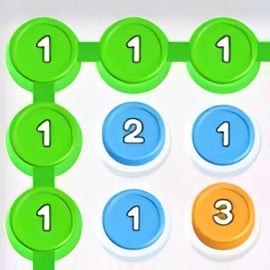
Linklink is a relaxing yet brain-twisting connect the dots puzzle you can play directly in your browser. Each level presents a grid filled with pairs of colored dots. Your job is to draw an unbroken path between every matching pair while using all available tiles on the board. It sounds simple, but this color path logic game quickly ramps up into a clever challenge that rewards planning, patience, and pattern recognition.
Because Linklink runs as a free online logic puzzle in your browser, there’s nothing to download or install. You can jump in for a quick session during a break, or treat it as a daily brain training game to keep your mind sharp. It’s family-friendly, has intuitive controls, and scales well from beginners to puzzle veterans.
This guide covers how to play Linklink, strategies for solving puzzles faster, and everything you need to know about controls, difficulty modes, performance, and safe online play.
At its core, Linklink is about creating continuous color paths without breaking any rules. If you’ve played other connect-the-dots or pipe-drawing puzzle titles, you’ll feel right at home. Still, Linklink adds its own twist by demanding that you fill the entire board to successfully complete a level.
Here’s how a typical Linklink puzzle works from start to finish:
This clean, minimal rule set is what makes Linklink such an effective browser puzzle game: you learn it in seconds, but the combinations of layouts and color placements provide a long-lasting challenge.
Each move in Linklink is extremely simple, which is why it works so well as a quick mental warm-up:
The flow is quick and satisfying, making Linklink ideal when you want a short, focused puzzle session without any complicated menus or systems.
Linklink has a straightforward objective, but the way you achieve it can be surprisingly deep. Every level is essentially a compact logic puzzle: the layout of the grid and the placement of each colored dot create a unique problem to solve.
Your central goal in Linklink is always the same:
If even one color is not connected, or one tile remains empty, the level is incomplete. This combination of pairing and full-coverage is what makes Linklink stand apart from many other connect the dots puzzle games that only require making simple connections.
While Linklink doesn’t rely on heavy achievement systems, many players naturally create extra challenges for themselves:
Because the puzzles are deterministic logic problems, Linklink also works as a gentle introduction to problem-solving for kids and casual players, while still offering enough difficulty for serious fans of free online logic puzzles.
Linklink is designed as a browser puzzle game, so you can access it through modern web browsers on desktop and laptop computers. There’s no need for extra plug-ins or a heavy download – the game loads quickly and runs inside the page.
To get the best experience:
Because it’s browser-based, Linklink fits perfectly into a workday or study schedule. You can open a tab, complete a few quick puzzles for mental refreshment, and then return to your tasks. This flexibility is a big reason people treat it as a daily brain training game rather than just another casual distraction.
Linklink is a family-friendly logic title focused entirely on color matching and path planning. There’s no violent content, no chat system, and no user-generated material to worry about, which makes it appropriate for kids, teens, and adults.
From a content and gameplay standpoint, here’s what makes Linklink safe:
As with any browser game, parents should still encourage kids to play on reputable sites that respect privacy and use secure connections (HTTPS). Within those normal online safety guidelines, Linklink is a clean choice for anyone who enjoys free online logic puzzles.
Mastering Linklink is all about combining local decisions (how you connect one pair) with global awareness (how that connection affects the rest of the grid). The following approach will help you reliably complete even tricky levels.
Scan the board for color pairs that are close together or share a nearly direct route. Connecting these first gives you quick wins and starts to define the structure of the grid.
Edges and corners in a color path logic game are naturally constrained: fewer directions to move means fewer valid solutions. Use them to your advantage:
A common beginner mistake is drawing a path that blocks off a section of the board so that no color can reasonably fill it. Before finalizing a line, ask:
If the answer is yes, adjust your route so that all regions remain usable.
Linklink rewards logic, but sometimes you’ll need to test a hypothesis. When you’re unsure about two possible routes for a color:
This structured experimentation makes you faster over time and turns trial and error into a learning tool rather than random guessing.
If you’re treating Linklink as a daily brain training game, you’ll naturally want to improve your speed and consistency. These practical tips will help you complete each connect the dots puzzle more efficiently.
Instead of immediately connecting the closest pairs, look for color pairs that are farthest apart or clearly must snake through the center of the grid. Solving the longest paths first:
Mentally divide the grid into regions:
This perspective makes it easier to see when a path is invading another color’s natural territory and causing trouble.
With repeated play, you’ll start noticing recurring configurations:
Spotting these patterns lets you make fast, confident moves instead of re-evaluating every single tile from scratch.
Some versions of Linklink include a hint system. Hints are great for learning, but overreliance can slow your growth. Treat hints as a teaching tool:
This way, each hint becomes an investment in faster solves later on.
Many players adopt Linklink as a light but effective daily brain training game because it exercises multiple cognitive skills in a low-pressure environment.
Every puzzle requires you to mentally simulate where paths can and can’t go. Over time, this strengthens:
Because each level can be solved in a few minutes, Linklink fits perfectly into a daily routine:
Unlike competitive games, Linklink doesn’t punish you for taking your time. There are no opponents, no timers forcing you to rush, and no consequences for experimentation. This creates an ideal environment for steady mental training without stress.
One of the best parts of Linklink is how simple it is to control. Whether you’re playing with a mouse, trackpad, or keyboard, you can navigate and connect colors with minimal effort.
Some browser setups for Linklink also include basic keyboard control for accessibility or personal preference:
Even if you mainly use a mouse, it’s helpful to know these options exist, especially if you’re playing on a laptop where precision dragging is harder.
To get the most out of this browser puzzle game, it’s worth mastering a few control habits and shortcuts that keep your movement smooth and precise.
Instead of dragging long, sweeping lines across the board in a single motion, consider:
This reduces mis-clicks, especially on higher-density grids.
Most versions of Linklink support a quick undo or back action:
Because you’re solving a connect the dots puzzle, backtracking is part of the logic process, not a failure. Use undo liberally when you see that a path has boxed you in.
On tricky levels where borders are tight, combining mouse and keyboard can help:
This hybrid approach offers both speed and precision, especially on laptops or small displays.
Linklink stays engaging over time because it offers a wide variety of boards that escalate in complexity. This progression makes it a satisfying choice if you’re looking for free online logic puzzles you can revisit day after day.
Early levels usually feature:
As you advance, you’ll encounter:
Even once you’ve solved a level, there are reasons to come back:
This combination of varied layouts and personal goals gives Linklink strong replay value compared to many one-and-done puzzle experiences.
Because Linklink is an HTML5-style browser puzzle game, it usually runs smoothly even on older hardware. Still, if you run into slowdowns or visual glitches, there are a few simple checks you can do.
If problems persist, trying a different browser is often the quickest fix, since Linklink doesn’t require a specific platform or operating system.
Linklink is primarily designed as an online experience delivered through your browser, so in most cases you’ll need an active internet connection to load and play it. The core game logic, assets, and interface are all served from the hosting website.
In general:
For consistent play, especially if you’re using Linklink as a reliable daily brain training game, it’s best to plan on having a stable internet connection. That way you’ll always have access to the full set of puzzles and any updates the developers release.
Whether you’re a fan of minimalistic color puzzles, a logic enthusiast, or just hunting for a clean, focused connect the dots puzzle you can play in your browser, Linklink delivers a satisfying blend of relaxation and mental challenge. With its simple controls, escalating difficulty, and strong replay value, it’s an easy recommendation for anyone who enjoys free online logic puzzles and wants a low-friction way to keep their brain engaged every day.
A: Linklink is a browser-based puzzle game where you connect matching colored dots with lines to fill the entire grid without crossing paths.
A: Yes, Linklink is free to play in your browser. You do not need to download or install anything to start solving puzzles.
A: Select a colored dot, drag or use the arrow keys to draw a line to its matching dot, and fill every cell on the board. Lines cannot overlap or cross other paths.
A: Yes, Linklink is a family-friendly logic game with no violent content, making it suitable for kids and adults who enjoy brain teasers.
A: In most versions you can use the mouse to click and drag, but some platforms also support keyboard controls like arrow keys to move and Enter to select.