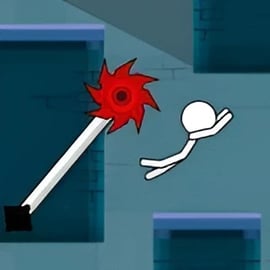
Parkour Stick is a fast-paced stickman parkour game that drops you into a minimalist world of platforms, gaps, and deadly traps. You control a nimble stickman who sprints, jumps, and wall-climbs through tight levels that demand quick reactions and precise timing. Every stage feels like a quick puzzle mixed with a high-speed stickman jumping adventure, perfect for short sessions or long skill-grinding marathons.
Built as an online parkour platformer, Parkour Stick runs directly in your browser with no download, letting you jump into the action in seconds. The goal is simple: get from start to finish as efficiently as possible while dodging spikes, making risky jumps, and mastering momentum. Under that simple surface, though, there’s plenty of depth for players who love parkour obstacle challenges and fast, replayable runs.
If you enjoy arcade-style action, tight platforming, and the thrill of nailing a difficult sequence in one smooth run, Parkour Stick is a refreshing free running browser game that’s easy to learn and satisfying to master.
Parkour Stick uses responsive, lightweight controls so you can focus on flow and timing. The exact inputs can vary slightly by site, but these are the most common setups for PC and mobile play.
Most browser versions of Parkour Stick support either the arrow keys or the WASD layout:
Some versions also support wall jumps or wall slides. In those cases, simply push toward the wall while in the air and tap jump again to kick off. The tighter your timing, the more distance and height you’ll gain, which is crucial in an online parkour platformer.
When you run Parkour Stick in a mobile browser, movement is usually mapped to simple on-screen buttons:
For best performance, rotate your device to landscape mode and keep at least three fingers ready (two for movement, one for jump). This makes Parkour Stick feel much closer to a traditional controller even though you’re using touch.
Parkour Stick focuses on lean, replayable content instead of bloated menus. The core experience is a sequence of crafted levels packed with parkour obstacle challenges, but many browser versions add extra twists.
In the standard mode, you complete one level after another, each slightly harder than the last. Early stages introduce basics like short jumps and simple gaps. Later ones mix in:
Even if there isn’t a separate “time attack” menu, Parkour Stick naturally encourages speedrunning. Levels are short and reset is instant, letting you push for cleaner and cleaner runs. Many players treat it like a personal free running browser game challenge, aiming to cross stages:
Some builds include coins, stars, or hidden pickups that sit in awkward, risky spots. Snagging these forces you to experiment with new routes and advanced jumps. Think of them as bonus objectives layered onto your usual stickman jumping adventure, especially if you already know the safe path to the goal.
Success in Parkour Stick comes down to how well you control your jumps. Simple taps get you through early levels, but to cruise through advanced parkour obstacle challenges, you need to understand height, distance, and timing.
Many versions of Parkour Stick use variable jump height based on how long you hold the button:
Practice each type on a safe level. Being able to “feel” the right duration makes every online parkour platformer section much easier.
If your version of Parkour Stick includes a second jump or flip, it’s your lifeline:
This gives your stickman far more control in the air, turning risky falls into stylish saves.
Many stickman parkour game variants feature walls you can bounce off or slide down:
Once you’re comfortable, focus on flow: keeping your momentum while smoothly chaining jumps and flips. Aim to complete whole levels in one uninterrupted movement, turning Parkour Stick into a rhythmic, almost musical experience.
New to parkour platformers? Parkour Stick is welcoming to beginners, but later stages can be brutal. These tips will help you survive spikes, gaps, and awkward moving platforms.
On your first attempt at a stage, don’t sprint blindly. Instead:
This slows your initial run, but you’ll win back time when you replay with better knowledge.
Instead of seeing one long gauntlet, treat each hazard like a mini-puzzle:
Once you can clear each “chunk” reliably, string them together into a single clean run. This approach makes even punishing parkour obstacle challenges feel manageable.
Instant restarts are your best friend in a free running browser game like this. Each time you fail, ask:
A few intentional practice runs on a single obstacle can save you dozens of rage resets later.
Parkour Stick keeps things simple and tight, focusing on responsive platforming instead of heavy story or complex menus. Here are the core features you can expect when you load this online parkour platformer in your browser:
Parkour Stick is lightweight, but browser performance can still impact how responsive your jumps feel. For a game that relies on tight timing, smooth frame rates matter.
If you love the feel of Parkour Stick, there’s a whole world of similar free running browser game experiences that build on the same idea: fast runs, tight jumps, and creative levels.
Beyond stickman titles, you’ll find plenty of online parkour platformer games featuring robots, ninjas, or cartoon heroes. If you enjoy Parkour Stick’s structure—short, intense platforming levels—you’ll feel right at home in other arcade platformers that focus on responsive controls and challenging jumps.
Parkour Stick is designed as a casual, family-friendly stickman parkour game that’s safe for most ages.
As long as you access it through a reliable platform and keep basic web safety in mind, Parkour Stick is a safe, clean way to enjoy fast-paced stickman jumping adventure action directly in your browser.
A: Parkour Stick is a free online stickman platformer where you run, jump, and flip across challenging obstacle courses right in your browser.
A: Use the arrow keys or WASD on keyboard, or on-screen buttons on mobile, to move, jump, and avoid obstacles while reaching the end of each level.
A: Yes, Parkour Stick is completely free to play in your browser with no download required.
A: Yes, Parkour Stick is family-friendly. It focuses on jumping, timing, and obstacle courses without graphic violence or inappropriate content.
A: No account is needed. Just open the game in your browser and start playing instantly.