Introduction to Matches Craft Idle Game
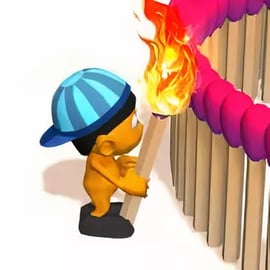
Matches Craft Idle Game is a relaxing yet addictive matchstick crafting game where you build detailed 3D sculptures out of tiny wooden matches, then watch them burn in a super satisfying blaze. It mixes the best parts of an idle clicker building game, a creative 3D sculpture maker, and a soothing satisfying burn simulator you can enjoy right in your browser.
You start with simple shapes and a small crew of workers. Match by match, you place sticks to form chairs, animals, landmarks, and other intricate objects. Each matchstick you add earns you in-game currency, which you can reinvest into faster workers, upgrades, and new levels. When your structure is complete, you ignite it and enjoy the fireworks before moving on to your next crafting project.
Because it’s an incremental tapping game at heart, Matches Craft Idle Game lets you progress even when you’re just casually clicking or letting the workers handle the job. It’s perfect for short breaks, idle play in the background, or long, satisfying build-and-burn sessions.
Matches Craft Idle Game Control Guide
The controls in Matches Craft Idle Game are intentionally simple, making it easy for anyone to jump in within seconds. Whether you’re on desktop, laptop, or mobile, you’ll only need a few basic inputs to master the game.
Desktop & Laptop Controls
- Left Mouse Button – Place matchsticks, tap objects to speed up crafting, confirm upgrades, and interact with menus.
- Right / Left Arrow Keys – Rotate the camera around your matchstick sculpture to admire it from different angles.
- Scroll / Mouse Drag (if supported) – In some versions, you can drag or scroll to adjust the view or zoom.
Mobile & Tablet Controls
- Tap – Place matchsticks, upgrade workers, start burning, and speed up the build with rapid tapping.
- Swipe or Drag – Rotate the camera around your structure to check your 3D sculpture from all sides.
There are no complex key combos or hidden commands. The whole experience is focused on quick interactions: tap to build, tap to speed up, and tap to earn. That simplicity is what makes this idle clicker building game so easy to play casually while doing other things.
Key Features
Matches Craft Idle Game packs a surprising amount of depth into a simple concept. Here are the core features that make it stand out among incremental tapping games and simulation titles:
- 3D Matchstick Sculptures – Build fully 3D objects and structures match by match, watching your design grow from a bare frame into a complete sculpture.
- Satisfying Burn Simulator – When an object is finished, set it ablaze and enjoy a mesmerizing burn animation as each matchstick catches fire.
- Idle Crafting & Workers – Hire workers that keep placing matches for you, even when you’re not tapping nonstop, turning it into a true idle clicker building experience.
- Tap Tap Speed Boost – Use rapid tapping to dramatically speed up the crafting process whenever you want a quick burst of progress.
- Multiple Levels & Objects – Progress through a series of increasingly complex sculptures and levels, each with unique shapes and layouts.
- Night Mode – Switch to a darker, more immersive theme where your burning matchstick creations glow beautifully against the night backdrop.
- Incremental Upgrades – Invest earned currency into worker speed, number of workers, and other improvements over time.
- Casual & Family-Friendly – No gore or graphic content; just relaxing building, burning, and upgrading.
Together, these features make Matches Craft Idle Game a great choice if you like calming simulation experiences that still deliver the rewarding loop of an incremental tapping game.
How to Build Matchstick Sculptures Step by Step
Building detailed matchstick sculptures is the heart of Matches Craft Idle Game. Here’s a clear step-by-step breakdown to help you get the best results from your first builds:
1. Start a New Object
Each level presents you with a new structure to create. It may start as an outline, a wireframe, or a partially built model made of matches.
- Look for highlighted areas or outlines that show where the next matchstick should go.
- Click or tap on these zones to place a matchstick and earn currency.
2. Place Every Matchstick
As you tap, each matchstick is added to the sculpture in a specific programmed order. This isn’t free-form building; you’re assembling a carefully designed 3D sculpture maker pattern:
- Follow the on-screen prompts that guide you toward the next placement.
- Rotate the camera to ensure you don’t miss hidden sides or inner structures.
- Keep an eye on your progress percentage; once it hits 100%, the build is ready to ignite.
3. Use Tap Tap to Speed Things Up
While workers slowly add matches automatically, you can massively boost your build speed:
- Tap repeatedly on the build area to trigger the Tap Tap mechanic.
- Each rapid tap speeds up match placement, helping you finish sculptures much faster.
4. Complete and Burn the Sculpture
Once all matchsticks are placed, a prompt usually appears to ignite your creation.
- Tap the Burn or Play button to start the burn animation.
- Watch as flames move through your matchstick crafting game creation, consuming each match and showering your screen with sparks.
- When the burn finishes, you typically unlock the next level or next object.
5. Reinvent and Repeat
With each new level, the shape, complexity, and build time change. Some objects are tall and thin, others wide and intricate. The gameplay loop stays simple: build, burn, upgrade, then move on to the next sculpture.
Idle Crafting Tips: Earn More by Placing Every Matchstick
Because this is an idle clicker building game, your income depends on how smartly you place matchsticks and invest upgrades. Use these tips to grow your earnings faster:
Focus on Matchstick Income Early
- Upgrade any option that increases income per matchstick first, so every placement is more valuable.
- Even small boosts add up quickly when you’re placing hundreds or thousands of matches.
Balance Tap Speed with Worker Speed
- If you like actively playing, invest in Tap Tap or tap-based speed multipliers.
- If you prefer a more relaxed style, prioritize worker speed and worker count instead.
- Finding the right balance turns Matches Craft Idle Game into a smooth incremental tapping game where progress never feels stalled.
Don’t Leave Spaces Unbuilt
Most levels pay you based on complete builds. If any area is missing, you may not unlock full rewards:
- Rotate the camera to scan lower and upper sections for empty outlines.
- Make sure progress indicators are fully filled before moving on.
Use Burns as Milestones
- Each time you burn a finished sculpture, treat it as a checkpoint.
- After the burn, go back and invest your profits into better workers and faster building before starting the next level.
Burning Creations: Why Watching Them Blaze Feels So Satisfying
The second half of Matches Craft Idle Game is the satisfying burn simulator effect. You spend time carefully constructing these fragile matchstick objects, then you deliberately destroy them in a controlled, beautiful fire show.
The Visual & Audio Feedback
- Flames gradually travel through your 3D sculpture, following the pattern of the matches.
- Glowing embers, sparks, and changing lighting make each burn visually mesmerizing.
- Soft crackling sound effects (where supported) make the experience even more relaxing.
Why It Works So Well
- Completion Reward: You’ve spent time building, so the burn feels like a satisfying payoff.
- Low-Stress Destruction: There’s no penalty for burning; it’s part of the intended loop.
- Visual Reset: Watching everything turn to ash creates a clean slate for the next project.
This balance between creation and destruction is what gives the game such strong appeal. You get the calm focus of a 3D sculpture maker and the visual thrill of a burn simulator in one neat package.
Unlock Night Mode, New Levels, and Faster Workers
Progression is key in any good idle game, and Matches Craft Idle Game gives you several ways to feel stronger and faster over time.
New Levels & Sculptures
- Each completed object usually unlocks the next level, with a fresh sculpture to build.
- Later levels often include more complex shapes that take longer to complete but reward you with higher earnings.
Night Mode for a Different Vibe
- Night Mode switches the lighting to a darker scene with glowing highlights.
- Burning matchsticks look especially dramatic in this mode, amplifying the satisfying burn simulator feel.
- It’s purely cosmetic in most versions, but it changes the mood of your crafting sessions.
Faster Workers & Productivity Upgrades
- Spend your earnings to hire more workers that place matchsticks automatically.
- Upgrade worker speed so they build structures more quickly, even without your tapping.
- Combine these with per-match income upgrades to scale your progress exponentially.
Over time, these upgrades transform Matches Craft Idle Game from a slow starter into a fast-paced incremental tapping game where huge sculptures come together in a fraction of the time.
Beginner’s Guide: Tap Tap Mechanics and Offline Idle Progress
If you’re just starting out, understanding the Tap Tap system and idle progress is crucial for getting the most from this matchstick crafting game.
Mastering Tap Tap
- When to Tap: Tap rapidly when you want to rush through the last part of a build or when you’re trying to finish a level before taking a break.
- Upgrade Support: Look for upgrades tied to tap power or click efficiency if you enjoy active play.
- Comfort: Don’t overdo it; treat Tap Tap as a short burst mechanic instead of holding down your screen for minutes at a time.
Understanding Idle Progress
Matches Craft Idle Game is primarily designed as an idle crafting experience:
- Once you’ve hired enough workers, they’ll keep adding matchsticks for you.
- Even if you aren’t tapping constantly, the sculpture continues to grow, though at a slower rate.
- Check back periodically to trigger burns and reinvest your earnings into new upgrades.
Depending on the platform or version you’re playing, some offline progress may be limited. It’s best to consider it a “low-attention” game rather than a fully offline simulator, using it as a calm background activity.
Play Matches Craft Idle Game on Phones & Tablets
Matches Craft Idle Game isn’t just for desktop browsers. It’s also well-suited to mobile and tablet play, which makes it ideal for quick sessions whenever you have a spare moment.
Mobile Browser Play
- If your favorite gaming site offers a browser version, you can open it directly in your phone or tablet browser.
- The tap-based controls translate perfectly to touch screens, and the simple UI keeps everything readable on smaller displays.
Touch-Friendly Idle Experience
- Tap Tap mechanics are naturally more satisfying on touchscreen devices.
- Swiping to rotate the camera around your matchstick sculpture feels intuitive and responsive.
Because gameplay relies mainly on tapping and swiping, the experience is nearly identical between PC, phone, and tablet, making it a great pick if you like playing incremental tapping games across multiple devices.
Is Matches Craft Idle Game Safe to Play Online?
Matches Craft Idle Game is generally considered a family-friendly, safe title for most ages, especially compared to more intense simulation or action games.
Content & Theme
- No graphic violence, gore, or realistic destruction—only stylized matchstick burning.
- Focus is on creativity, simple simulation, and watching satisfying visuals.
- Reading requirements are minimal, making it accessible to younger players with basic supervision.
Online Safety Considerations
- Always play via trusted gaming platforms or official app stores.
- Some versions may show ads; parents may want to supervise younger kids or use device-level restrictions.
- There’s no competitive chat or multiplayer, which significantly reduces online risk.
As long as you stick to reputable sites and standard device safety practices, Matches Craft Idle Game is a safe and relaxing way to enjoy a matchstick crafting game with a soothing burn simulator twist.