Introduction to Sprunki Retrowave
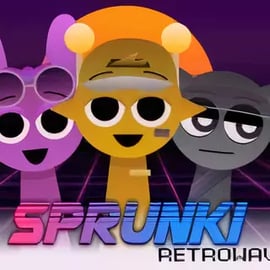
Sprunki Retrowave is a browser-based retrowave music game that lets you build tracks by dropping quirky animated characters onto the screen and letting them jam together. Instead of mixing on a complex studio timeline, you play in a neon-drenched playground where every character is a sound: retro drum loops, shimmering synth pads, chopped vocals, bass riffs, and glitchy effects.
This mod takes the familiar Sprunki-style formula and wraps it in a full-on retro arcade music creator vibe. Think 80s arcades, VHS fuzz, and vaporwave aesthetics fused with a simple, toy-like interface. It plays directly in your browser, so you can experiment with a neon synth sound mixer without installing any software or owning real music gear.
Whether you just want to stack loops and see what happens, or you're trying to sculpt a legit vaporwave style rhythm track, Sprunki Retrowave gives you a playful sandbox. The mod focuses on accessibility: no music theory, no complicated menus, and no way to "fail"—only different flavors of cool, nostalgic sound collages.
Sprunki Retrowave Control Guide
The core of this browser beat making game is its drag-and-drop interface. You don't need hotkeys or long tutorials—just your mouse or touchpad:
- Mouse / Touchpad
- Left-click and drag a character onto the stage to make it start playing its loop.
- Move characters around to adjust your layout and visually group sounds.
- Click again (or drag off the stage) to mute or remove a sound.
- Stage Interaction
- Combine characters on screen to build layered beats and textures.
- Experiment with different combinations to discover hidden grooves and surprising harmonies.
- Basic Interface Elements
- Character bar / roster: your library of sound characters—scroll or click to browse them.
- Play area / stage: the main neon grid where your characters perform.
- Reset / clear (if available): quickly wipes the stage so you can start a new idea from scratch.
Most versions of Sprunki Retrowave don't require keyboard input. It's designed to feel like picking toys out of a box and dropping them on a glowing table that turns everything into music.
Sprunki Retrowave Features
As a retrowave music game, Sprunki Retrowave blends audio and visuals into one cohesive, arcade-style experience. Instead of long checklists of studio tools, it focuses on instantly fun features that reward experimentation.
- Drag-and-Drop Composition
- Create full tracks simply by dragging characters onto the stage.
- No tempo adjustment or note editing needed—everything auto-syncs so your mix always stays on beat.
- Retro Synth and Arcade Sound Library
- Layer retro arcade music creator loops: punchy kicks, snares, and claps.
- Add neon synth sound mixer elements like lush pads, arpeggios, and dreamy leads.
- Use basslines and glitch FX for depth, drops, and weird textures.
- Vaporwave Style Rhythm Game Aesthetic
- Soft neon gradients, glowing grids, and vaporwave color palettes.
- Subtle scanlines, distortion, and 'broken monitor' effects that echo old-school CRTs.
- Character-Based Sound Design
- Each character represents a sound type or loop pattern.
- Visual design cues hint at what they do (for example: robotic characters for drums, floaty characters for pads).
- Casual-Friendly, No-Fail Gameplay
- No score, no strict objectives, and no game-over screens.
- Perfect for quick creative breaks or testing ideas before moving to a full DAW.
All of this runs directly in your browser, turning Sprunki Retrowave into a lightweight music toy that still manages to feel like a complete retro arcade music creator experience.
Dive into Neon Beats: What Makes This Retrowave Mod Unique?
Among all the music toys and loop-based games online, Sprunki Retrowave stands out for how tightly it fuses theme, sound, and interaction. It's not just a random synth sandbox; it's designed as a coherent vaporwave style rhythm game that leans heavily into retro-futuristic nostalgia.
- Unified Retrowave Identity
- Every element—the fonts, colors, animations, and loops—leans into that 80s neon-city-at-night mood.
- The whole experience feels like spinning tracks inside an arcade cabinet, not a studio.
- Character Personality
- Characters don't just sit there and play sounds—they bob, glitch, and react, giving your track a sense of life.
- This makes arranging feel more like staging a performance than managing a technical mixer.
- Instant-On Creativity
- No logins or long loading processes on most sites—load the page, drop a few characters, and you're already in a groove.
- This immediacy is part of what makes it such a compelling browser beat making game.
- Balanced Between Casual and Creative
- Kids and non-musicians can just throw sounds together and enjoy the chaotic mix.
- More serious players can methodically test combinations, building evolving patterns and textures.
The result is a playful mod that doesn't pretend to replace music software, yet still captures the essence of creating tracks in a much more approachable, visual way.
How to Create Retro Synth Tracks with Drag-and-Drop Characters
Sprunki Retrowave turns arranging music into a visual puzzle: which characters do you combine, and in what order, to get the vibe you want? Here's a simple way to approach your first retro synth track.
1. Start with a Drum Foundation
Every good track in a retrowave music game begins with a solid beat:
- Drag in 1–2 drum characters that give you kicks and snares.
- Listen for a steady, looping rhythm that feels like a walking tempo—not too fast, not too slow.
- Add a hi-hat or percussive loop if you want extra movement.
2. Add a Bassline
Once you've got your pulse, bring in low-end energy:
- Drop a bass character onto the stage and listen to how it locks with your drums.
- If it feels too busy, remove a percussion character so the mix stays clear.
- Keep a single main bass layer at first for a clean groove.
3. Color the Track with Synths and Pads
This is where the neon synth sound mixer side shines:
- Add a pad or chord character to create a dreamy background.
- Use a lead or arpeggiated synth to give your track a memorable hook.
- Try balancing 1–2 melodic elements so the mix doesn't get muddy.
4. Sprinkle FX and Glitches
To fully lean into the retro arcade music creator vibe:
- Add a character that provides sweeps, whooshes, or glitch hits.
- Don't spam too many of these—treat them like spices, not the main dish.
- Try muting and unmuting them to create "drops" or transitions.
5. Refine by Subtracting
Often, the best tracks come from what you remove:
- Silence characters that clash or make the groove feel crowded.
- Keep checking that you can clearly hear drums, bass, and at least one main melody.
- Once it feels balanced, just let it loop and enjoy your custom vaporwave vibe.
Key Features: Glitchy Visuals, Vaporwave Vibes, and Retro Sound Loops
Sprunki Retrowave isn't just about sound; it's a cohesive vaporwave style rhythm game with a strong visual identity. The presentation helps your ears "see" what’s happening in the track.
- Glitchy Neon Visuals
- Characters flicker, distort, or trail pixels when they trigger sounds.
- The stage often uses grid lines, scanlines, and neon outlines.
- These cues help you track which layers are active without staring at labels.
- Retro Sound Palette
- Punchy drum machines echo classic arcade cabinets and 80s drum boxes.
- Synths lean toward warm, hazy tones perfect for chillwave and vaporwave loops.
- Subtle detune and chorus effects create that nostalgic "old tape" feel.
- Seamless Looping
- All loops are designed to repeat cleanly, so your groove never falls off the grid.
- This makes Sprunki Retrowave feel like a self-playing browser beat making game once you set it up.
- Arcade-Like Feedback
- Layer more characters, and the stage feels more "alive" with animation.
- The interplay of light, color, and motion keeps your track visually engaging even over long loops.
Together, these touches make Sprunki Retrowave function almost like an interactive music video that you direct in real time.
Tips for Beginners: Making Cool Tracks Without Music Experience
You don't need to know chords, scales, or production jargon to enjoy this retrowave music game. Use these simple guidelines to make your mixes sound intentional instead of random.
- Limit Yourself at First
- Start with 3–5 characters only: 1 drum, 1 bass, 1–2 synths, 1 FX.
- Too many layers can blur the groove and make it tiring to listen to.
- Listen for Roles
- Drums = rhythm, Bass = weight, Synths = melody / atmosphere, FX = decoration.
- If two characters are fighting for the same role, try muting one.
- Use Contrast
- Pair a simple, steady beat with a more complex synth pattern.
- Combine a deep bass with a bright, airy pad for balance.
- Try "Scenes"
- Build a calm version of your track with fewer characters.
- Then add a few more layers for a busier "chorus" feel.
- Switch between these by muting and unmuting characters.
- Trust Your Ear
- If something feels harsh, crowded, or tiring, remove a layer.
- If you find yourself nodding along, you're doing it right—there are no wrong answers.
The main goal is fun, not perfection. Sprunki Retrowave is a playground, not a test, so feel free to break your own "rules" any time your ears like the result.
Performance & Troubleshooting
Because Sprunki Retrowave runs directly in your browser, performance depends on your device, browser version, and how many characters you've loaded at once. Here are simple steps to keep the game running smoothly.
- Recommended Setup
- Use a modern browser such as Chrome, Edge, Firefox, or a recent version of Safari.
- Close heavy background tabs (especially video streams or other games) while playing.
- If Audio Starts to Stutter
- Remove a few characters from the stage to lighten CPU load.
- Pause any streaming music or video running in other tabs.
- Refresh the page to clear temporary hiccups.
- If the Game Doesn't Load
- Check your internet connection and reload the page.
- Disable aggressive ad blockers for that site if the game frame is being blocked.
- Try another browser if nothing appears in the play window.
- Latency or Input Lag
- On lower-end PCs, use fewer characters at once.
- Close desktop apps that use a lot of CPU or GPU power.
Most issues can be fixed with a refresh, a different browser, or by trimming down how many animations and loops you're running at the same time.
Browser Performance: Can Your PC Run This Retrowave Music Mixer?
Sprunki Retrowave is designed as a lightweight browser beat making game, which means most everyday computers can handle it without trouble.
- Typical System Requirements
- A basic dual-core processor or better (common on most laptops and desktops from the last several years).
- 4 GB of RAM or more for comfortable multitasking.
- A stable internet connection for loading the game assets.
- Best Devices for Smooth Play
- Modern Windows or macOS laptops and desktops.
- Chromebooks with up-to-date Chrome OS.
- What Affects Performance Most?
- The number of animated characters placed on the stage.
- The number of open tabs and apps in the background.
- Whether your browser is updated to the latest version.
In practice, if your PC can comfortably watch HD video in a browser, it's usually capable of running this neon synth sound mixer at a steady pace—especially if you manage your tabs and keep only the essentials open while you play.
Is Sprunki Retrowave Safe to Play Online?
Sprunki Retrowave is generally considered a family-friendly music sandbox with no graphic violence or inappropriate themes. Most of the content focuses on colorful characters, retro visuals, and electronic beats.
- Content & Themes
- No explicit language, gore, or adult themes in the core gameplay.
- Visuals center on neon art, abstract shapes, and stylized characters.
- Online Safety Considerations
- Play on reputable browser gaming platforms that you trust.
- Parents may want to supervise younger kids when navigating to and from the game page, as some sites display general ads or links to other games.
- Privacy
- Many platforms let you play without creating an account, reducing data sharing.
- Always review the host site’s privacy policy and settings if you decide to register.
As with any online game, the safest experience comes from sticking to trustworthy portals, avoiding suspicious pop-ups or third-party downloads, and keeping your browser and security software up to date.