Introduction to Makeup Fruits
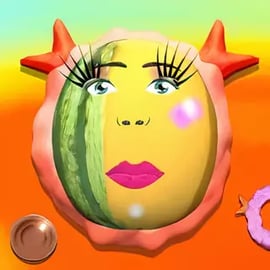
Makeup Fruits is a playful online makeup game where your clients aren’t people – they’re colorful, juicy fruits. Instead of classic models, you’ll be giving a fabulous makeover to watermelons, oranges, kiwis and more, turning each one into a tiny beauty icon. It’s a lighthearted fruit makeover game that mixes creativity, humor and simple salon gameplay in a kid-friendly way.
This free browser makeover game is perfect if you enjoy online makeup games, funny dress up games and makeover salon experiences without having to install anything. You can experiment with lipstick shades, eyelashes, stickers, cute accessories and then snap a fruit selfie to show off your masterpiece. Every session feels like a mini photoshoot at a makeup salon for kids, only with fruit instead of fashion models.
Whether you’re a younger player trying makeover games for the first time, or an older player who just wants a relaxing break, Makeup Fruits offers easy controls and quick sessions that you can play directly in your browser. Just click, style and share.
Makeup Fruits Controls
The controls in Makeup Fruits are intentionally simple, so kids and casual players can jump in without reading long manuals. Everything in this online makeup game is built around point-and-click actions.
- Mouse / Touchpad: Use your mouse to move the cursor over fruits, tools and buttons.
- Left Click: Select fruits, choose cosmetics, apply makeup and confirm actions.
- Click & Hold (when needed): For some tools like powder or lipstick, hold down the mouse button and move slightly to "brush" the color on.
On touch devices, the inputs feel just like any other free browser makeover game:
- Tap: Works like a left click – choose fruits, makeup tools, stickers and accessories.
- Tap & Drag: When shaping or spreading certain cosmetics, drag your finger gently over the fruit’s surface.
There are no complicated keyboard shortcuts or timed combos. This simplicity is part of what makes Makeup Fruits a great makeup salon for kids and a relaxing option among funny dress up games.
Makeup Fruits Features
Makeup Fruits focuses on creativity and humor, giving you just enough tools to design unique styles without overwhelming you. Here are the key features that make this fruit makeover game stand out:
- Playful fruit characters: Choose from a variety of fruits – such as watermelons, citrus slices and more – each acting as a quirky canvas for your makeup ideas.
- Wide range of cosmetics: Experiment with powder, lipstick, eyelashes and additional beauty items that you’d find in many online makeup games.
- Stickers and accessories: Decorate your fruit with hearts, stars, funny mustaches, glasses, crowns and other silly add-ons.
- Selfie snapshots: When your design is finished, take a "selfie" of your fruit makeover and admire the full look as if you’re running your own photo studio.
- Gem-based progression: Earn in-game gems from playing and use them to unlock new cosmetics, stickers and accessories.
- Browser-based gameplay: No downloads, no extra accounts – launch the session directly and enjoy a quick free browser makeover game any time.
- Kid-friendly visuals: Bright colors, simple shapes and cheerful animations make it suitable for young players.
Together, these features create a compact but charming salon experience that feels like a mix between a dress up game and a digital art toy.
Performance & Troubleshooting
Makeup Fruits is an HTML5 game designed to run smoothly in a modern browser, but if you encounter problems, a few quick checks usually help.
Basic performance tips
- Use an up-to-date browser: Chrome, Edge, Firefox or Safari in a current version will usually give the best performance.
- Close unnecessary tabs: Too many open tabs or heavy streaming can slow down this and other online makeup games.
- Check your connection: A stable internet connection reduces loading delays when you first open the game.
Common issues & quick fixes
- Game not loading: Refresh the page, disable aggressive ad-blockers for the site or try another browser.
- Laggy or choppy animations: Close other apps using a lot of CPU (video calls, multiple streams) and restart the browser.
- Touch controls not responding: On mobile or tablet, reload the page and make sure you’re in fullscreen if the platform supports it.
Because Makeup Fruits is lighter than many 3D funny dress up games, it usually runs well even on older devices once the page has fully loaded.
Can I Play Makeup Fruits Offline?
Makeup Fruits is designed as an online browser-based makeover game. You need an active internet connection to load the game assets and, on many platforms, to show in-game ads or save basic progress like unlocked items.
In practical terms:
- You cannot play the full experience offline in your browser.
- If you lose your connection mid-session, some actions might stop working or the page may ask you to reload.
- To enjoy this fruit makeover game reliably, stay connected to Wi‑Fi or mobile data.
If you’re specifically looking for an offline makeup salon for kids, a downloadable app version from an official app store might be an alternative, but the browser version itself expects you to be online.
How to Give Your Favorite Fruits a Fabulous Makeover
Turning an ordinary fruit into a glamorous star is the heart of Makeup Fruits. Here’s a simple walkthrough of a typical makeover session in this free browser makeover game:
- Pick your fruit model
Start by choosing which fruit you want to style. Each fruit has a slightly different shape and vibe, so a watermelon might feel bold while a citrus slice can look cute and bright. - Begin with the base makeup
Just like real online makeup games, you’ll first apply basic cosmetics: - Use powder to smooth out the "skin" of the fruit.
- Add blush-like color if available to warm up the look.
- Add lips and eyes
This is where your fruit starts looking alive and expressive. - Pick a lipstick shade that matches your theme – bold reds, soft pinks or playful colors.
- Choose eyelashes and eye shapes to give your fruit a personality: shy, fierce or silly.
- Decorate with stickers and accessories
Once the face is done, layer on fun extras: - Stickers like hearts, stars or sparkles.
- Accessories like glasses, bows or small crowns.
- Finalize the look and take a selfie
When you’re happy with your design, capture a fruit "selfie" inside the game. This snapshot lets you appreciate the entire style, just like a finished outfit in other funny dress up games.
You can repeat the process with different fruits and styles, experimenting with everything from soft pastel looks to wild, neon party themes.
Game Features: Makeup Tools, Stickers and Fruit Selfies
Makeup Fruits gives you a compact but satisfying toolbox that feels familiar if you enjoy other online makeup games.
Makeup tools
- Powder: Smooths and colors the fruit’s surface, acting as a base layer.
- Lipstick: Adds bright, cartoon lips to your fruit; different shades change the overall mood.
- Eyelashes and eyeliner: Create expressive eyes, from dramatic glam lashes to simple, cute looks.
Stickers & accessories
- Fun stickers: Hearts, stars, cute patterns and shapes that you can place around the fruit’s face.
- Wearable accessories: Items like glasses, crowns or quirky decorations make each fruit feel like a stylized character.
Fruit selfies & rewards
- Selfie feature: After finishing your design, you can snap an in-game photo of your fruit icon.
- Gem rewards: By playing and creating more looks, you earn gems that unlock extra cosmetics, giving your salon more variety over time.
All of these pieces come together to create a fun, low-pressure makeover salon for kids and anyone who enjoys quick, creative sessions.
Tips to Unlock More Accessories and Cosmetics
Progression in Makeup Fruits revolves around collecting gems and opening up new items. If you want to grow your collection of stickers and makeup tools faster in this fruit makeover game, use these tips:
- Play multiple short sessions: Instead of one super-long run, come back for several quick makeovers. Many free browser makeover games reward frequent play.
- Experiment with different fruits: Don’t always stick to the same fruit – exploring different options can sometimes expose new items or combinations.
- Try varied styles: Switch between cute, glamorous and goofy looks. Some platforms highlight or reward diverse creation styles.
- Finish your designs: Make sure you complete the makeover and take the selfie so the session properly counts toward your in-game rewards.
- Check for in-game prompts: Some versions of Makeup Fruits may show hints about unlocking extra cosmetics or how many gems you need for the next item.
Over time, you’ll build a much larger virtual makeup kit, turning a simple makeup salon for kids into a more customizable styling studio.
Why Makeup Fruits Is a Fun Makeover Game for All Ages
Although Makeup Fruits clearly appeals to children, especially fans of online makeup games and funny dress up games, it has a broad charm that can entertain older players too.
- Simple enough for kids: Straightforward controls and bright visuals make it easy for younger players to enjoy without getting frustrated.
- Creative outlet: Players who like art, fashion or design can use the game as a digital sketchbook, trying out color combinations and styles.
- Quick, low-stress sessions: Each makeover is short, making the game ideal for short breaks or casual play between tasks.
- Humorous concept: Putting lipstick and eyelashes on a watermelon is inherently silly, which gives Makeup Fruits a lighthearted, meme-like vibe that older players can appreciate.
- No complex failure states: There’s no strict "lose" condition – every fruit makeover is valid, which encourages experimentation rather than perfectionism.
Because it combines creative play, quick rewards and a goofy theme, Makeup Fruits fits comfortably among the most approachable free browser makeover games available.
Controls and Gameplay: How to Play Makeup Fruits Online
Putting everything together, here’s how a typical play session works when you launch Makeup Fruits in your browser:
- Open the game page
Load the game on your preferred site. After a short loading screen, you’ll see the main menu or fruit selection screen. - Choose your fruit
Click or tap the fruit you want to style. This becomes your model in the makeup salon. - Select a makeup tool
At the bottom or side of the screen, you’ll find icons for powder, lipstick, eyelashes and other options common in online makeup games. - Apply makeup and decorations
Use clicks or taps to place each cosmetic on your fruit. You can usually change your mind and try different items until you’re satisfied. - Add stickers and accessories
Open the sticker or accessory menus and decorate your fruit with cute or hilarious elements. - Take a selfie and earn gems
When you’re done, snap the in-game selfie. This often completes the makeover sequence and can grant you gems toward unlocking more content. - Start another makeover
Return to the selection screen and try a new fruit, or re-style the same one with a different theme.
That’s all you need to know to get started. In just a few clicks, Makeup Fruits turns from a simple fruit makeover game into your personal, bite-sized makeup salon for kids and playful adults alike.
FAQ
What is Makeup Fruits about?
A: Makeup Fruits is a casual makeover game where you apply makeup, accessories and stickers to different fruits, then snap a selfie of your creation.
Is Makeup Fruits free to play?
A: Yes, Makeup Fruits is free to play in your browser. Some versions may show ads, but you do not have to pay to enjoy the game.
How do I play Makeup Fruits?
A: Use your mouse or touch to pick a fruit, then tap on powders, lipsticks, eyelashes and stickers to apply them. When you are happy, take a selfie of your fruit.
Is Makeup Fruits suitable for kids?
A: Yes, Makeup Fruits is family-friendly and focuses on creative play. There is no violence, and the gameplay is about decorating cute fruits with makeup.
Can I play Makeup Fruits on mobile devices?
A: Yes, Makeup Fruits is built with HTML5 and works on most modern smartphones and tablets, as well as on desktop browsers.