Overview of Perfect Landing
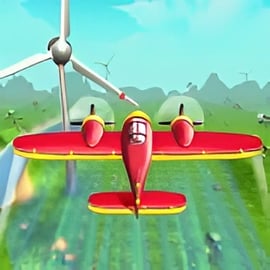
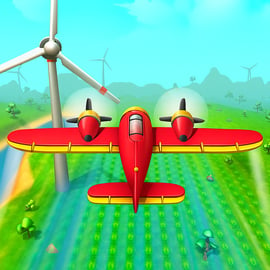
Perfect Landing is a fast-paced plane pilot game that mixes arcade-style action with light flight simulation. You take control of a small aircraft, weave through obstacles in an endless sky, and try to survive long enough to pull off a smooth landing. It’s simple to learn, but staying airborne without crashing is where the real airplane landing challenge begins.
If you enjoy airplane flying games and want a quick, skill-based flight simulator online, Perfect Landing is a great pick. The goal is straightforward: fly as far as you can, collect coins, avoid crashing, and upgrade your plane to reach an even higher distance next run. There are no complicated cockpit panels—just responsive controls, clever obstacle patterns, and that addictive “one more run” feel common to great endless flying arcade games.
This makes Perfect Landing ideal for players who like casual yet challenging plane pilot games. You can jump in for a short session, practice your reactions, and compete against your own high score, all directly in your browser without downloads.
Perfect Landing Control Guide
Perfect Landing keeps its controls streamlined so you can focus on reflexes and timing instead of complex systems. While the exact bindings can vary slightly by platform, the standard browser version uses very intuitive inputs.
Here’s a typical control setup you’ll encounter when you load this flight simulator online in your browser:
- Left/Right Arrow Keys – Bank the plane left or right to dodge incoming obstacles and line up your landing path.
- Up Arrow / W – Slightly increase altitude or pitch up to clear tall obstacles.
- Down Arrow / S – Gently lower your nose or lose altitude; useful when preparing for a landing approach.
- Spacebar – In some versions, triggers a burst of speed or activates a special power-up when available.
- Mouse Click / Tap – On touch devices or mouse-control mode, a tap or click can change direction or adjust altitude based on how the game is configured.
The key to mastering these controls is smooth, small adjustments. Sudden, large movements make it easy to slam into an obstacle or overcorrect your approach when trying to land. Because this is more of an endless flying arcade experience than a hardcore sim, the game rewards timing and rhythm rather than following strict aviation rules.
Perfect Landing Features
Perfect Landing focuses on a tight, replayable loop that will feel familiar if you enjoy quick, skill-based airplane flying games. Instead of long missions, you get short, intense runs that challenge your reflexes and decision-making.
- Endless Flight Gameplay
Challenge yourself to fly as far as possible. Each run spawns new obstacle patterns, so you can’t just memorize a route. - Simple, Accessible Controls
With only a few keys or taps, anyone can pick up this plane pilot game in seconds, including younger players. - Upgrade System
Use in-game earnings to upgrade your aircraft’s stats—like speed, handling, and durability—so you can push your distance record higher. - Gradually Increasing Difficulty
Obstacles start sparse and slow, then ramp up in density and speed, mimicking the feel of more advanced airplane flying games without overwhelming new players right away. - Arcade-Style Scoring
Your score is usually tied to distance flown, plus any bonus gained from coins, special pickups, or particularly smooth landings. - Visual Feedback on Landings
Perfect Landing emphasizes the touchdown moment, rewarding soft, controlled landings with better scores and a sense of satisfaction.
Taken together, these features make Perfect Landing a fun hybrid between a casual flight simulator online and a traditional arcade high-score chaser.
Where to Play Perfect Landing
Perfect Landing is designed primarily as a browser-based plane pilot game, which means you can usually play it instantly without installing anything heavy on your device. It commonly appears on browser gaming portals that feature Simulation, Arcade, and Flying categories.
To play:
- Open your preferred desktop or mobile browser (Chrome, Edge, Firefox, Safari, etc.).
- Navigate to a reputable online game site that hosts Perfect Landing.
- Wait a moment for the game to load in the embedded window.
- Check the control instructions displayed on the loading or start screen.
- Press the start/play button to begin your first flight.
Because it runs in the browser, you can switch devices easily and enjoy the same endless flying arcade experience at school, at home, or on the go—as long as you’ve got a stable internet connection and a modern browser.
Is Perfect Landing Safe to Play Online?
Perfect Landing is a family-friendly airplane flying game with simple graphics and non-violent gameplay. There’s no graphic damage, no mature storylines, and no realistic crash depictions. When your plane hits an obstacle, the round simply ends and you restart.
Key safety points:
- Content: The focus is on flying, dodging, and landing. There’s no blood, horror, or inappropriate language.
- Multiplayer / Chat: The standard browser version is typically single-player only, with no public chat or direct interaction with strangers, which is safer for kids.
- Ads: Some portals may show ads before or after rounds. Parents may want to supervise younger children and consider ad-blocking or kid-safe modes if they’re concerned about third-party advertising content.
- Purchases: Browser versions are usually free-to-play without real-money purchases, but always read the page around the game to confirm whether any microtransactions or external links are promoted.
As long as you’re playing on a trusted gaming site, Perfect Landing is generally safe and suitable for most ages who enjoy light flight simulator online experiences.
Master the Skies: How to Control Your Plane Like a Pro
To truly excel in Perfect Landing, you’ll need to move beyond simply “not crashing” and learn to fly with confidence. This isn’t a hardcore cockpit sim, but it still rewards precision like the best airplane flying games.
Use these control habits to feel more like a veteran pilot:
- Think Ahead, Not Just React
Instead of waiting until an obstacle is right in front of you, watch the horizon. Start your maneuver early with a light tap on the direction keys or quick touch movement. Early corrections are smoother and safer. - Use Gentle, Repeated Inputs
Avoid slamming and holding keys for too long, which can send you veering off course. Tap lightly and frequently to “nudge” the plane where you want it to go. - Stay Near the Center
When it’s safe, keep your aircraft roughly centered. That way, you have room to dodge left or right if sudden hazards appear. - Practice Altitude Control
Perfect Landing often combines horizontal obstacles (like towers) with vertical gaps. Learn how much a single press of the up/down keys changes your height so you can weave through tight patterns. - Memorize Common Patterns
Even though this is an endless flying arcade title, many obstacle types repeat in similar formations. The more you play, the better you’ll recognize them—and know the safest route on sight.
With time, your movements will feel instinctive, and you’ll start chasing the kind of distances that separate casual players from true Perfect Landing experts.
Endless Flight Mode: Dodge Obstacles and Beat Your High Score
Endless flight is the heart of Perfect Landing. Unlike mission-based plane pilot games with strict objectives, this mode gives you one main goal: go farther than you did last time.
Here’s what to expect in endless mode:
- Progressive Speed
The longer you survive, the faster the world scrolls. This adds a natural difficulty curve as your brain and fingers race to keep up. - Randomized Obstacles
The game continuously generates new hazards and gaps, ensuring each run feels fresh. The randomness keeps you from relying solely on memorization. - Coin and Power-Up Placement
Coins and boosts are often placed in risky lines or near obstacles, forcing you to weigh reward against danger. Skilled players balance aggressive drafting with survival. - High Score Tracking
Your best distance is usually recorded locally each session. Chasing this number—especially after a near-perfect run—creates the addictive loop that defines a great endless flying arcade experience.
To push your high score higher, combine smart flying with strategic risk: grab coins and power-ups when it’s reasonably safe, but never at the cost of a guaranteed crash.
Plane Upgrades and Power-Ups: Boost Your Flying Distance
Perfect Landing includes a basic upgrade and power-up system that helps you turn average flights into record-breaking journeys. While it’s not as deep as full-scale simulation titles, it offers enough progression to keep every flight feeling meaningful.
Common Plane Upgrades
- Speed
Lets you cover more distance in less time. This can boost your score but also makes obstacle dodging more demanding, so upgrade gradually. - Handling / Agility
Improves how quickly your plane responds to input. Great for weaving through tight gaps or recovering from late reactions. - Durability
Some versions of Perfect Landing may give you a small tolerance for minor bumps. Higher durability can occasionally save a run that would otherwise end instantly. - Power-Up Duration
Extends the length of time certain boosts remain active, giving you more value from each pickup.
Typical Power-Ups in Endless Flying Arcade Games
Exact items vary, but you can expect power-ups similar to these:
- Shield – Lets you survive a single collision without ending the run.
- Magnet – Pulls nearby coins toward your plane so you can earn currency without risky maneuvers.
- Speed Boost – Temporarily increases flight speed, which is good for covering distance quickly if you can handle the pressure.
- Slow Motion / Time Dilation – Briefly slows down the action to help you navigate particularly dense obstacle clusters.
The best long-term strategy is to focus on handling and survivability first. Once you’re comfortable dodging at higher speeds, you can invest in speed and extended power-up duration to accelerate your scoring potential.
Tips to Avoid Crashes and Make a Perfect Landing Every Time
Avoiding crashes is half the challenge; the other half is nailing that smooth final landing. As in many airplane flying games, your last few seconds of control decide whether your run ends with style or a nose-first failure.
Crash-Prevention Tips
- Never Tunnel-Vision on Coins
Coins and pickups are tempting, but if grabbing one pulls you into a narrow or unpredictable gap, skip it. Distance matters more than a single missed reward. - Give Obstacles Extra Space
Whenever possible, fly with a safety margin. Don’t hug towers or edges too closely; slight lag or a delayed twitch can be fatal. - Calm Down After Near-Misses
Barely surviving a close call is exciting, but don’t let adrenaline cause another mistake. Take a steady breath and reset your rhythm within a second or two. - Use Vertical Space Wisely
When obstacles stack horizontally, change altitude instead of blindly dodging sideways into unseen threats.
Landing Like a Pro
- Stabilize Early
When you see the runway or landing zone approaching, stop making wild maneuvers. Level your plane and line up with the center. - Gradually Reduce Altitude
Tap the down key or control gently. Large drops can cause last-second overcorrections. - Aim for a Flat Attitude
Try to touch down with your nose slightly up or level, not pointing straight down. Many plane pilot games reward this with higher landing scores. - Watch for Final Obstacles
Some levels place a last barrier or height change before the runway. Keep scanning the screen until your wheels are fully down.
Over time, you’ll learn how long the approach usually lasts and how early you need to start lining up. Once you’ve mastered that rhythm, you’ll start stringing together truly “perfect” landings.
Flight Simulator Controls: Keyboard, Mouse, and Mobile Guide
One of the best parts of Perfect Landing is its flexibility. Whether you’re playing on a computer or mobile device, you can enjoy the same endless flying arcade experience with only small control differences.
Keyboard Controls (Desktop & Laptop)
- Arrow Keys / WASD – Steer left, right, up, and down; this is the most common setup and gives you precise, tactile control.
- Spacebar / Enter – Usually start the game or trigger a special action, depending on the specific build you’re playing.
Keyboard is ideal if you enjoy the feel of traditional airplane flying games and want predictable, consistent movements.
Mouse Controls
- Move Mouse – Some versions let you steer by moving the cursor, with the plane responding to your horizontal or vertical position.
- Left Click – Often used to confirm menus or activate power-ups.
Mouse controls can feel more “analog” and responsive, especially if you like subtle, continuous adjustment in your flight line.
Mobile & Tablet Controls
- Tap Controls – Tap left or right to bank the plane, or tap/hold to climb or descend, depending on the game’s configuration.
- Tilt Controls (on some platforms) – Tilt your device left/right like a yoke to steer. This can feel very immersive, mimicking the motions of a real pilot.
Because Perfect Landing is lighter than full simulators, it plays well on mobile browsers. This makes it a perfect on-the-go flight simulator online for quick sessions.
Whichever input method you choose, give yourself a few runs to adapt. Once the controls feel natural, you’ll find it much easier to rack up high scores and truly live up to the name: Perfect Landing.
FAQ
What is Perfect Landing?
A: Perfect Landing is a casual flight simulator where you pilot a plane, dodge obstacles, upgrade your aircraft, and try to fly as far as possible without crashing.
Is Perfect Landing free to play?
A: Yes. Perfect Landing is free to play in your browser, and you can start flying immediately without paying or creating an account.
How do I control the plane in Perfect Landing?
A: On desktop, you typically use the arrow keys or WASD to steer and adjust altitude. On mobile, you use on-screen buttons or tilting controls, depending on the platform.
Is Perfect Landing suitable for kids?
A: Yes. Perfect Landing is family-friendly, with simple controls and non-violent gameplay focused on flying, avoiding obstacles, and improving your high score.
Can I play Perfect Landing on my phone or tablet?
A: Yes. Perfect Landing is available on mobile devices through supported browsers and app stores, so you can enjoy the game on phones and tablets as well as PC.