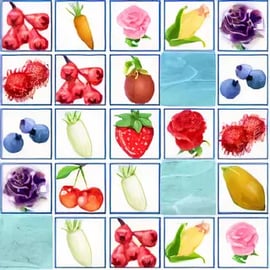
Fruit Connect is a colorful, family-friendly fruit matching puzzle you can play right in your browser. It blends the satisfying logic of a mahjong connect game with cute fruit tiles, simple controls, and a relaxing soundtrack. Your goal is to match pairs of fruit by drawing a path between identical tiles, clearing the board before the timer runs out.
If you enjoy browser matching games where every move matters, Fruit Connect is a great pick. It looks casual on the surface, but as the board fills with different fruits and flowers, finding valid connections becomes a surprisingly strategic challenge. You’ll need a sharp eye to spot which tiles can be linked and a bit of speed to finish each level in time.
Because it’s a web-based title, you can connect tiles online instantly without downloads, sign-ups, or payments. Just load the page, hit play, and start pairing strawberries, grapes, oranges, and other fruity tiles in quick succession.
One of the reasons Fruit Connect is so accessible is its very simple control scheme. Whether you’re on desktop, laptop, or mobile, you only need basic pointing and tapping to play.
You don’t need the keyboard at all for basic gameplay. Everything from starting levels to using hints (if available) is handled through the on-screen icons and mouse clicks.
The touch interface is highly intuitive, essentially mirroring the desktop experience but with finger taps instead of mouse clicks.
Fruit Connect might look simple, but it’s packed with features that keep it engaging for both beginners and puzzle veterans.
These features combine to make Fruit Connect an ideal pick-up-and-play mahjong connect game that still rewards careful planning and pattern recognition.
Fruit Connect runs in most modern browsers, but if you hit performance issues, there are a few easy fixes.
If a particular site’s embed of Fruit Connect won’t run, you can often fix the problem simply by trying another trusted gaming portal that hosts the same puzzle.
Fruit Connect is generally considered safe and family-friendly. The core gameplay involves nothing more than matching pairs of fruit on a colorful board, with no violence or inappropriate content. It’s suitable for kids, teens, and adults who enjoy light brain-training puzzles.
When playing any web game, though, you’ll want to keep a few safety basics in mind:
As long as you’re playing on a trusted site and keep normal web-safety habits, Fruit Connect is a secure and wholesome puzzle experience.
Fruit Connect follows the classic logic of a mahjong connect game. Every tile on the grid contains a symbol—here, colorful fruits and sometimes flowers. The aim is to clear the entire grid by connecting matching tiles under specific path rules.
Mastering these rules is the key to clearing the board fast. The more fluent you become in “seeing” valid paths, the faster you’ll finish each level and the higher your score will climb.
To get consistently good times and scores in this fruit matching puzzle, you’ll want more than just random clicking. Here are practical strategies to make your matches smarter and faster.
Edges and corners are often easier to connect because they have more open path options. Clearing the outermost tiles first can open up the interior and create longer, unobstructed paths between remaining fruits.
Some tiles effectively “lock” others by blocking potential routes. When you notice a piece sitting in the middle of multiple possible paths, try to remove it early. Freeing a central bottleneck can reveal several new matches at once.
Instead of darting your eyes around the entire grid, pick a structured scanning pattern:
This helps you quickly spot pairs and avoid missing obvious matches while you chase harder ones.
Start to recognize the shapes and colors of each fruit category at a glance. For example, train yourself to instantly notice where all the strawberries or oranges are. Grouping your search by one fruit type at a time can speed up paths in this connect tiles online challenge.
If your version of Fruit Connect includes hints, resist using them too early. A single hint can break a difficult board, but if you rely on them every time you pause, you’ll never develop your own path-finding instincts.
Across most versions of Fruit Connect, you’ll progress through a sequence of levels that increase in complexity. Early stages ease you in, while later ones pile on the difficulty.
Some builds of Fruit Connect track your score or award stars based on how quickly you complete each stage, giving you an incentive to replay levels for better times.
Most Fruit Connect boards are governed by a ticking timer:
This time pressure transforms a calm fruit matching puzzle into a light-paced race, forcing you to balance accuracy with speed.
These challenges keep Fruit Connect fresh as you advance, pushing you to refine your strategy and path-reading skills.
Fruit Connect is flexible and runs on a wide range of devices. Still, different players may prefer different setups depending on comfort and accuracy needs.
For many players, a desktop or laptop offers the best overall experience for this style of browser matching games:
Touch devices are great if you prefer a more casual, on-the-go approach:
For smaller phones, consider slightly zooming in so you can tap tiles accurately without mis-selections.
If you enjoy Fruit Connect’s style of connecting tiles under path constraints, there are several related titles worth trying after you’ve mastered this one.
All of these games share the same core concept: match pairs of fruit, animals, or symbols by drawing valid paths between tiles. If you like the mental workout that Fruit Connect delivers, exploring these other options will give you even more ways to test your pattern recognition and planning skills in the browser.
A: Fruit Connect is an online puzzle game where you match identical fruit tiles by drawing a path between them with no more than two right-angle turns.
A: Click or tap a fruit tile, then select a matching tile. If a path can connect them using up to two 90-degree bends without crossing other tiles, they disappear from the board.
A: Yes, Fruit Connect is free to play in your browser. You do not need to pay or install any additional software to enjoy the game.
A: Yes, Fruit Connect is family-friendly. It features colorful fruit graphics and simple rules that help kids practice concentration and logical thinking.
A: No account is required to start playing Fruit Connect. Just open the game in your browser and begin matching fruit tiles right away.