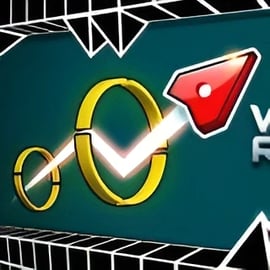
Wave Road 3D is a fast, neon-lit geometry dash style game where you guide a glowing arrow through a twisting tunnel packed with spinning gears, spikes, lasers, and hoops. Every tap changes your altitude, and every mistake sends you crashing into the walls. It plays like a mix between an endless tunnel runner and a classic rhythm reflex challenge, with smooth 3D visuals and precise one-button controls.
This browser-based arcade title is designed to test your timing, focus, and reaction speed. You can play solo in Classic and Endless modes, or turn it into a two player browser game where you both dodge traps on the same keyboard or device. Along the way you’ll pick up gems, unlock new arrow skins, and customize the trail you leave behind, making each run feel unique.
Whether you’re a fan of tight skill games or just want a quick reflex skill game online to warm up your fingers, Wave Road 3D hits the sweet spot: easy to learn, hard to master, and instantly replayable.
The goal in Wave Road 3D is simple: steer your arrow through the neon obstacle course without crashing. You’ll fly through an enclosed tunnel, moving up and down to avoid the ceiling, floor, and a huge variety of rotating traps and moving hazards.
Here’s how a typical run works:
The deeper you go into the tunnel, the faster the pace and the denser the trap layouts become. It’s a pure endless tunnel runner feel, but with the tight, tap-based altitude control normally seen in geometry-inspired arcade titles.
Wave Road 3D keeps its rules and systems straightforward so you can focus fully on your reflexes. Below are the core mechanics you’ll use every run.
The heart of Wave Road 3D is its one-button control scheme. Whether you’re on desktop or mobile, your input only affects vertical movement:
This simple input makes it easy for anyone to jump in, but mastering the timing—especially at high speeds—takes serious practice.
Wave Road 3D uses instant-fail collisions, much like other geometry wave and dash titles:
While survival is your main goal, there’s more going on in each neon obstacle course:
This blend of survival, collecting, and accuracy makes every route through the tunnel a small puzzle about risk and reward.
Wave Road 3D offers several game modes that keep the experience fresh whether you’re playing solo or with a friend. These modes echo the structure of other geometry dash style games but with a unique neon tunnel twist.
Classic Mode is a structured campaign of handcrafted levels:
Classic Mode is ideal for players who enjoy pattern recognition and gradually ramping difficulty instead of purely random challenges.
Endless Mode turns Wave Road 3D into a true endless tunnel runner:
If you’re looking for a pure reflex skill game online, Endless Mode delivers tightly tuned, high-adrenaline runs.
Wave Road 3D also supports a competitive two player browser game mode on the same device:
It’s a quick way to turn a solo skill challenge into a party-friendly showdown right in your browser.
To help you choose the right mode for your mood, here’s a closer comparison of the three primary ways to play this neon obstacle course.
Classic Mode emphasizes learning fixed patterns and mastering them:
Endless Mode focuses on long-term concentration and stamina:
2 Player Mode turns Wave Road 3D into a skill-based race:
Whichever mode you pick, the gameplay loop stays tight and responsive, delivering the same arcade rush found in the best geometry-inspired dash titles.
To climb the leaderboards and conquer harder tunnels, you’ll want to train your reactions and get comfortable with the game’s physics. These tips will help you get better, faster.
The arrow doesn’t stop instantly when you release the key. It has a slight glide both upward and downward. Spend a few runs in easier levels watching how quickly it rises and falls so you can anticipate its path rather than chasing it.
Instead of staring at your arrow, let your eyes track upcoming gears, spikes, and hoops. Your brain will naturally adjust your taps as you see openings appear. This is a classic trick used by top players in most geometry dash style games.
Holding the key too long makes large, jerky movements that are hard to correct. Try:
Classic levels are perfect training grounds because the patterns never change. Once you’ve memorized a layout, you can work on flying it flawlessly, which builds the reflex memory you’ll need for the faster speeds in Endless Mode.
When you’re still learning the tunnels, prioritize survival. Skip dangerous gem clusters until you’re confident with the base path. Later, you can reroute your line to grab extras without risking a crash every few seconds.
Because it’s a high-intensity reflex skill game online, your concentration can drop fast. Play in short bursts, take breaks, and come back fresh. You’ll usually notice better reaction times after a quick reset.
Wave Road 3D is built to be as accessible as possible, with consistent one-button controls across platforms. That makes it easy to jump between PC and mobile without relearning the game.
On desktop or laptop, you can use any of the following inputs for Player 1:
In 2 Player mode, Player 2 usually gets:
On touch devices, the control scheme is even simpler:
Because the input is so minimal, the game runs smoothly as a tap-based endless tunnel runner on smaller screens without cluttered UI or virtual buttons.
To summarize, here’s a quick reference of the main control options available in most browser versions of Wave Road 3D:
Regardless of platform, the single-input design keeps the experience focused on timing and reflexes instead of complex button combinations, which is a core appeal of this kind of geometry-inspired arcade action.
Beyond simply surviving the neon obstacle course, Wave Road 3D gives you reasons to keep replaying and experimenting with your style.
Gems appear throughout the tunnel, often placed in risky spots that demand precise flying. While they’re optional, collecting them is how you unlock cosmetic upgrades:
As you bank more gems, you can unlock new arrow models and colors:
Skins don’t change gameplay but make your runs feel more personal and visually satisfying as you fly through the neon tunnel.
Some versions of the game also include trail customization:
This visual progression gives you a constant sense of reward, especially in Endless Mode where you’ll be seeing your customized arrow for long stretches of time.
Wave Road 3D is a browser-based arcade, skill, and action game that runs directly in modern web browsers with no download required. That makes it easy to hop in for quick runs at home, at school (where allowed), or on the go.
The game is typically hosted on multiple gaming portals that specialize in reflex skill game online experiences and browser-ready two player browser games. Just make sure you’re playing from reputable gaming sites that keep everything family-friendly and secure.
Wave Road 3D is designed as a family-friendly arcade title focused entirely on skill-based flying and obstacle dodging.
As with any browser game, safety depends partly on where you choose to play:
Played from reputable platforms, Wave Road 3D is a safe, engaging way to enjoy a neon-filled, geometry-inspired reflex challenge directly in your browser.
A: Wave Road 3D is a fast-paced arcade skill game where you guide an arrow through a neon tunnel, dodging traps, flying through hoops, and collecting gems to score points.
A: On desktop, press W, Space, Left Click, or the Up Arrow to fly up and release to go down. On mobile, tap and hold to rise and release to descend while avoiding obstacles.
A: Yes, Wave Road 3D is completely free to play in your browser. You do not need to download anything to start playing.
A: Yes, Wave Road 3D includes a 2 player mode where two players share the keyboard, each controlling their own arrow to see who survives the tunnel longer.
A: Yes, Wave Road 3D is built with HTML5 and works on most modern mobile browsers. You can play it on smartphones and tablets using touch controls.