Introduction to Tower Battle
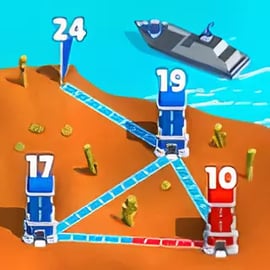
Tower Battle is a fast-paced tower war strategy game where you draw paths, connect the towers, and flood enemy bases with your troops in real time. Instead of traditional static tower defense, you’re constantly reacting, redirecting your army, and racing to conquer every tower on the map before your opponent does.
This casual tower defense online experience blends quick decision-making with simple controls. You start with a small base, send units along drawn lines, and try to outnumber enemy forces when they clash. As you progress, you unlock tanks, special units, portals, and powerful commanders that turn each level into a tactical puzzle.
Whether you’re into light, pick-up-and-play strategy or you love optimizing every route and unit, Tower Battle feels like a compact army base conquest game that you can enjoy in short sessions or longer marathons.
Basic Rules & Mechanics
The core idea in Tower Battle is simple: connect towers, send more troops than your enemy, and take control of the battlefield. Here’s how the basic systems work:
Towers and Ownership
- Player towers: Your starting bases, usually highlighted by your color. They generate troops over time.
- Neutral towers: Unclaimed structures with a small defending garrison. Capture them early to boost your troop income.
- Enemy towers: Controlled by AI or rival forces. You must overpower them to win the map.
Each tower has two vital stats: the number of units inside and its defense strength. When enemy units arrive, they reduce that number; if it reaches zero, the tower switches ownership.
Drawing Lines and Moving Troops
Unlike many strategy games, here you don’t place buildings on a grid. You draw lines between towers to create paths:
- Tap and drag from one tower to another to connect the towers.
- Your troops start marching automatically along that path.
- You can redirect or remove paths to change where your army flows.
The longer a path, the more travel time and the more exposed your troops are. Choosing short, safe lines is a core part of high-level strategy.
Unit Generation and Flow
- Towers generate troops continuously as long as you own them.
- When a tower is linked to another, a portion of new units will automatically march along that path.
- Stronger towers or upgraded bases generate units faster or hold more defenders.
Your job is to balance offense and defense: don’t empty a tower completely, or a quick enemy push can steal it back easily.
Special Units and Commanders
As you advance, you unlock different troop types that give the real time tower battle extra depth:
- Runners – Fast but fragile, perfect for racing to neutral towers.
- Engineers – Great at holding ground or improving tower defenses.
- Bombers – Deal massive damage when they hit a heavily defended tower.
- Mercenaries – Costly but powerful, ideal for clutch pushes.
- Commanders – Special heroes that enhance nearby troops or trigger strong abilities.
Combining these units wisely is what elevates Tower Battle from a simple clicker to a full-fledged tower war strategy game.
Tower Battle Features
Tower Battle packs a surprising amount of variety for a casual tower defense online title. Some of the key features include:
- Draw-to-attack gameplay – Intuitive path drawing to send troops across the map.
- Symmetrical warfare levels – Many maps give each side comparable positions, making strategy the decisive factor.
- Progressive difficulty – Early missions ease you in, while later levels demand quick reactions and smart planning.
- Multiple troop types – Runners, tanks, engineers, bombers, mercenaries, and more to customize your battle plan.
- Special powers and abilities – Call in strikes, buffs, and debuffs to turn the tide of battle.
- Portals and advanced paths – Teleport and duplicate troops to outmaneuver enemy defenses.
- Short, replayable matches – Perfect for quick sessions while still rewarding long-term mastery.
Together, these elements create a game that plays like a mix of tower war strategy game, army base conquest game, and accessible puzzle, all inside a browser-friendly experience.
Performance & Troubleshooting
Because Tower Battle is a casual, visually light real time tower battle, it generally runs smoothly on modern browsers and devices. If you encounter issues, try the following:
Improving Performance
- Close background tabs and apps that may be using CPU, RAM, or bandwidth.
- Lower system load by pausing downloads or streaming services while you play.
- Update your browser to the latest version for better graphics and script performance.
- Disable heavy extensions (ad blockers, script injectors, VPN add-ons) temporarily if the game stutters.
Fixing Loading or Connection Problems
- Refresh the page if the game gets stuck on a loading screen.
- Clear browser cache and reload, which often fixes assets that failed to download correctly.
- Switch networks or restart your router if latency or disconnects persist.
- Try another browser (Chrome, Firefox, Edge, or Safari) if one gives repeated errors.
Input or Control Issues
- If drawing lines is unresponsive, adjust touch sensitivity on mobile or clean your touchscreen.
- On desktop, ensure your mouse or trackpad is working properly and isn’t suffering from low battery or hardware faults.
- Disable gesture or overlay apps that might intercept swipe or drag inputs.
In most cases, these quick checks are enough to get you back into the action and keep your tower war strategy game sessions running smoothly.
Is Tower Battle Safe to Play Online?
Tower Battle is built as a family-friendly, casual tower defense online experience. There’s stylized combat, but no graphic violence, adult themes, or inappropriate content.
Content and Age Suitability
- Violence: Non-realistic, cartoon-style battles between tiny units and towers.
- Language: No explicit language in standard gameplay.
- Complexity: Strategy-focused, but with simple enough controls for younger players who enjoy tactics.
Parents or guardians can feel comfortable with Tower Battle as a light army base conquest game that emphasizes planning and problem-solving over reflexes or mature themes.
Online Safety Basics
- Stick to official, reputable gaming portals when playing in a browser.
- Avoid sharing personal information (real name, address, phone) in any associated chats or communities.
- Use strong, unique passwords for platform accounts if cloud saves or profiles are used.
Played from a trusted browser platform, Tower Battle is a safe, casual way to enjoy real-time strategy without worrying about inappropriate content.
How to Connect Towers and Control the Battlefield
Mastering how you connect the towers is the single biggest step toward winning consistently in Tower Battle. Every line you draw shapes the flow of your army.
Priority 1: Early Expansion
- On the countdown, immediately draw lines to the nearest neutral towers.
- Use your quickest units (like runners) for these early grabs.
- Once a neutral tower is nearly captured, cut the line so you don’t oversend troops and weaken your main base.
The goal is to control more towers faster than the enemy, without leaving your starting point exposed.
Creating Safe Supply Lines
- Avoid long, direct paths that cross enemy routes, where your units will collide mid-way.
- Instead, chain towers: base → midpoint → frontline. This turns every captured tower into both a shield and a spawn point.
- Keep at least one backup route to any critical frontline tower, so if a path gets cut off, reinforcements still arrive.
Offense vs. Defense Connections
- Frontline towers: connect them aggressively forward to enemy towers and backward to your safer bases.
- Rear towers: set them as support hubs, feeding surplus troops to where they’re needed most.
- When under pressure, temporarily cut offensive lines so all new units stay inside towers to rebuild your defense.
Think of the map like a living network: you’re constantly rerouting troop “traffic” to maintain pressure without collapsing your defenses.
Best Troop Combinations for Fast Tower Conquests
To dominate a real time tower battle, you need smart unit mixes, not just raw numbers. Here are effective combinations that fit different phases of a match.
Early Game Rush: Speed & Numbers
- Runners + Basic Infantry
- Use runners to quickly tag neutral towers.
- Send basic infantry behind them to reinforce and defend newly captured points.
This combo explodes your presence on the map and is ideal for fast casual matches.
Mid-Game Push: Breaking Tough Towers
- Tanks + Bombers
- Tanks soak damage from heavily defended towers.
- Bombers deal high burst damage once they make contact.
- Add Engineers behind them to quickly stabilize captured towers and upgrade their defenses.
Use this trio for key objectives: major choke points or high-yield towers.
Late Game Domination: Control & Sustain
- Mixed Army + Commander Aura
- Main line of tanks and infantry.
- Support from mercenaries for lethal pushes.
- Commander boosting attack speed or durability along the main route.
Here, your focus is on maintaining momentum. Once you gain a significant advantage, keep feeding your strongest path and don’t let the enemy rebuild.
Beginner Tips and Tricks to Win More Tower Battles
If you’re just starting out, these fundamentals will quickly boost your win rate in this tower war strategy game.
Tip 1: Don’t Overextend
New players often send all their units from a tower, leaving it almost empty. Instead:
- Send just enough to win a fight or capture a neutral tower.
- Keep a reserve garrison in every important base, especially near the front.
Tip 2: Watch Unit Numbers Before Attacking
- Hover or glance at the number displayed on towers.
- Attack when you have at least 30–50% more units than the defender, unless you’re relying on bombers or special abilities.
Tip 3: Use Multiple Lines for Big Pushes
When you want to take a key tower quickly:
- Connect several of your towers to that same target at once.
- This overwhelms it far faster than a single trickle of units and leaves less time for the enemy to react.
Tip 4: Adjust Mid-Battle
Because this is a real time tower battle, the situation can flip quickly. Get used to:
- Cutting off losing attacks the moment you realize they’ll fail.
- Redirecting fresh troops toward more vulnerable enemy towers instead.
Advanced Tower Strategies: Portals, Paths, and Defense
Once you’re comfortable with basics, Tower Battle opens up deeper tactical layers involving portals, complex paths, and defensive structures.
Playing with Portals
- Teleportation: Some maps feature portals that instantly move your troops across the map.
- Duplication: Certain portals multiply the number of troops entering, effectively giving you a free numbers boost.
Advanced players use portals to:
- Bypass heavily fortified frontlines and strike rear towers.
- Turn small streams of units into massive surprise waves via duplication.
Optimizing Path Layout
- Avoid creating too many overlapping lines; it gets harder to manage quickly.
- Favor triangles (A-B-C) over simple lines (A-B) so every tower has at least two support options.
- Reroute long, inefficient paths once you’ve secured closer staging towers.
Layered Defense
- Use inner towers as banks that store surplus troops to bail out the frontline.
- If a forward tower is about to fall, cut its outgoing lines so you don’t keep feeding troops into a lost position.
- Immediately after recapturing a tower, pause attacks for a few seconds to let it restock defenders.
These advanced techniques turn your network of towers into a resilient web that’s hard to crack, even against strong opponents.
Unlocking New Units and Upgrades in Tower Battle
Progression is what keeps this army base conquest game exciting over the long term. New units and upgrades steadily deepen the strategy.
How Unlocks Typically Work
- Complete levels or campaigns to earn currency or upgrade points.
- Reach certain milestones or chapters to unlock new troop types.
- Use resources to level up units, improving stats like health, speed, and damage.
Which Upgrades to Prioritize
- Core generators: Upgrades that increase troop production speed in towers pay off every second of every match.
- Mainline troops: Focus on upgrading the units you use in almost every attack (often basic infantry and tanks).
- Key specials: Pick one or two special units (like bombers or mercenaries) and invest enough to make them reliable finishers.
Adapting Your Playstyle with New Units
Whenever you unlock a new troop in this casual tower defense online game:
- Test it in easier levels first to learn its strengths and weaknesses.
- Adjust your usual routes and connections to exploit its advantages (for example, placing faster units on longer paths).
- Gradually swap out weaker units from your lineup as you find more effective combos.
As your army grows stronger and more varied, Tower Battle shifts from simple number-pushing to a deep tower war strategy game, rewarding creativity and flexible thinking every step of the way.